

SharePoint expanded a lot in REST API from the 2013 version onwards. Nowadays modern frameworks like Angular and Knockout are very useful and powerful in web development.
With this, I have come up with a blog which will showcase basic Create, Read, Update and Delete operations in SharePoint lists. I have used Knockout js as a binding agent. Also Knockout validation is used to validate data before submitting. You can customize the files as per the needs of a business.
I personally like to start with UI part so below is the HTML required for our application.
HTML
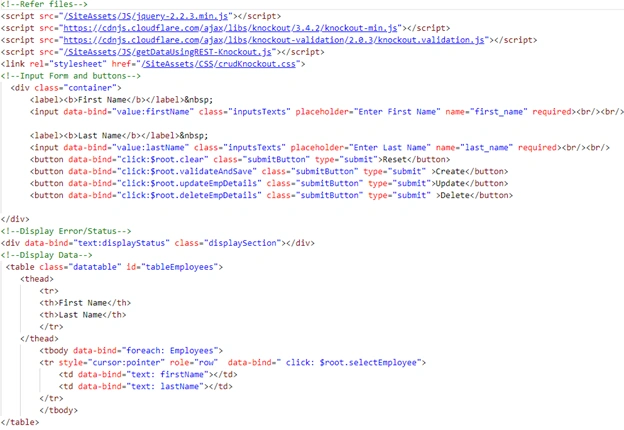
The above code shows standard input fields in HTML for first name and last name.
Below that will be a tabular format to display data from SharePoint lists.
JavaScript
I am using SharePoint REST API to get list data and perform other operations.
- //load view model after documnet gets loaded
- $(document).ready(function() {
- mainFunction();
- });
- var modelInstance = null;
- //Function to activate Knockout
- function mainFunction() {
- modelInstance = new crudViewModel();
- modelInstance.errors = ko.validation.group(modelInstance); //for validation of fields
- ko.applyBindings(modelInstance);
- modelInstance.getEmpDetails();
- }
- //define view Model
- var crudViewModel = function() {
- var self = this;
- var listName = "EmpDetails";
- self.Id = ko.observable();
- self.firstName = ko.observable().extend({
- required: "Please enter First name"
- });
- self.lastName = ko.observable().extend({
- required: "Please enter Last name"
- });
- self.Employees = ko.observableArray();
- self.displayStatus = ko.observable();
- //Function to Read all Employees details
- self.getEmpDetails = function() {
- $.ajax({
- url: _spPageContextInfo.siteAbsoluteUrl + "/_api/web/lists/getbytitle('" + listName + "')/items",
- type: "GET",
- headers: {
- "Accept": "application/json;odata=verbose"
- },
- success: function(data) {
- self.Employees(data.d.results); //add employee details to observable
- },
- error: function(data) {
- self.displayStatus("Error in processing request " + data.status);
- }
- });
- };
- //function to validate data such as blank values are not alllowed in input fields
- self.validateAndSave = function() {
- if (modelInstance.errors().length === 0) {
- self.addEmployee();
- } else {
- alert("please check your details");
- modelInstance.errors.showAllMessages();
- self.displayStatus("Please fill all required details");
- }
- };
- //Function to add new employee details in list
- self.addEmployee = function() {
- var itemType = "SP.Data.EmpDetailsListItem";
- var emp = {
- "__metadata": {
- "type": itemType
- },
- "firstName": self.firstName,
- "lastName": self.lastName
- };
- $.ajax({
- url: _spPageContextInfo.siteAbsoluteUrl + "/_api/web/lists/getbytitle('" + listName + "')/items",
- type: "POST",
- contentType: "application/json;odata=verbose",
- data: ko.toJSON(emp),
- headers: {
- "Accept": "application/json;odata=verbose",
- "X-RequestDigest": $("#__REQUESTDIGEST").val()
- },
- success: function(data) {
- alert("New Employee Created Successfully");
- self.getEmpDetails(); //call to display again
- },
- error: function(data) {
- self.displayStatus("Error in processing request " + data.status);
- }
- });
- self.clear();
- };
- //Function to get Specific Employee details using its ID
- function getEmpById(callback) {
- var url = _spPageContextInfo.siteAbsoluteUrl + "/_api/web/lists/getbytitle('" + listName + "')/items(" + self.Id() + ")";
- $.ajax({
- url: url,
- type: "GET",
- headers: {
- "Accept": "application/json;odata=verbose"
- },
- success: function(data) {
- callback(data);
- },
- error: function(data) {
- self.displayStatus("Error in processing request");
- }
- });
- };
- //Function to Update Category
- self.updateEmpDetails = function() {
- getEmpById(function(data) {
- var itemType = "SP.Data.EmpDetailsListItem";
- var emp = {
- "__metadata": {
- "type": itemType
- },
- "firstName": self.firstName,
- "lastName": self.lastName
- };
- $.ajax({
- url: data.d.__metadata.uri,
- type: "POST",
- contentType: "application/json;odata=verbose",
- data: ko.toJSON(emp),
- headers: {
- "Accept": "application/json;odata=verbose",
- "X-RequestDigest": $("#__REQUESTDIGEST").val(),
- "X-HTTP-Method": "MERGE",
- "If-Match": data.d.__metadata.etag
- },
- success: function(data) {
- alert("Employee details updated successfully");
- self.getEmpDetails(); //call to display again
- self.clear();
- },
- error: function(data) {
- self.displayStatus("Error in processing request " + data.status + " " + data.statusCode);
- }
- });
- });
- };
- //Function to Delete Employee details
- self.deleteEmpDetails = function(emp) {
- getEmpById(function(data) {
- var itemType = "SP.Data.EmpDetailsListItem";
- var emp = {
- "__metadata": {
- "type": itemType
- },
- "firstName": self.firstName,
- "lastName": self.lastName
- };
- $.ajax({
- url: data.d.__metadata.uri,
- type: "POST",
- contentType: "application/json;odata=verbose",
- data: ko.toJSON(emp),
- headers: {
- "Accept": "application/json;odata=verbose",
- "X-RequestDigest": $("#__REQUESTDIGEST").val(),
- "X-HTTP-Method": "DELETE",
- "If-Match": data.d.__metadata.etag
- },
- success: function(data) {
- alert("Employee details deleted successfully");
- self.getEmpDetails(); //call to display again
- self.clear();
- },
- error: function(data) {
- self.displayStatus("Error in processing request " + data.status + " " + data.statusCode);
- }
- });
- });
- };
- //Function to Select Employee used for Update and Delete
- self.selectEmployee = function(emp) {
- self.Id(emp.Id);
- self.firstName(emp.firstName);
- self.lastName(emp.lastName);
- };
- //Function to clear all fields
- self.clear = function() {
- self.displayStatus("");
- self.Id(0);
- self.firstName("");
- self.lastName("");
- };
- }; //End of view model
Finally add content editor web part on any page and refer to the html file from SharePoint.
End result will be as follows,
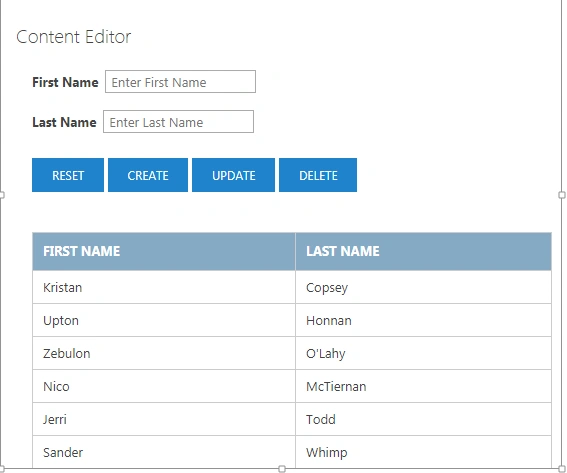
Add First Name and last name. Click on Create. Alert will be displayed that “New employee created.”
To update and delete, first click on the table row. It will select an employee and then click on update/delete which will perform an action in the list and will be displayed in UI as well.
Piyush AgarwalPosted Mar 7, 2018, 10:54 AM
Great article ..... This is the first article which has combination of Knockout and Rest...