

I have written the code for reading a text file from a local machine. It reads all the text from the file and counts total word count and each unique word frequency/occurrence in the file.
The code first uses ReadAllText(inFileName) to copy the file’s text into a string. Next, the code uses regular expressions to replace non-letter and non-number characters with spaces. It uses the pattern [^a-zA-Z0-9].
The code first uses ReadAllText(inFileName) to copy the file’s text into a string. Next, the code uses regular expressions to replace non-letter and non-number characters with spaces. It uses the pattern [^a-zA-Z0-9].
The ^ meafns “not the following characters.
The a-zA-Z0-9 part means any lowercase or uppercase letter or a digit.
The a-zA-Z0-9 part means any lowercase or uppercase letter or a digit.
The code uses the Regex object’s Replace method to replace the characters that match the pattern with a space character.
The code then uses Split to break the text into an array of words, removing any duplicates.
The code uses LINQ to select all of the words from the array and sort them. It uses the Distinct method to remove duplicates.
CODE
- using System;
- using System.IO;
- using System.Text.RegularExpressions;
- using System.Linq;
- class WordCounter {
- static void Main() {
- string inFileName = "C:\\Files\\MyFile.txt";
- StreamReader sr = new StreamReader(inFileName);
- string text = System.IO.File.ReadAllText(@ "C:\Files\MyFile.txt");
- Regex reg_exp = new Regex("[^a-zA-Z0-9]");
- text = reg_exp.Replace(text, " ");
- string[] words = text.Split(new char[] {
- ' '
- }, StringSplitOptions.RemoveEmptyEntries);
- var word_query = (from string word in words orderby word select word).Distinct();
- string[] result = word_query.ToArray();
- int counter = 0;
- string delim = " ,.";
- string[] fields = null;
- string line = null;
- while (!sr.EndOfStream) {
- line = sr.ReadLine(); //each time you read a line you should split it into the words
- line.Trim();
- fields = line.Split(delim.ToCharArray(), StringSplitOptions.RemoveEmptyEntries);
- counter += fields.Length; //and just add how many of them there is
- foreach(string word in result) {
- CountStringOccurrences(text, word);
- }
- }
- sr.Close();
- Console.WriteLine("The total word count is {0}", counter);
- Console.ReadLine();
- }
- //Count the frequency of each unique word.
- public static void CountStringOccurrences(string text, string word) {
- int count = 0;
- int i = 0;
- while ((i = text.IndexOf(word, i)) != -1) {
- i += word.Length;
- count++;
- }
- Console.WriteLine("{0} {1}", count, word);
- }
- }
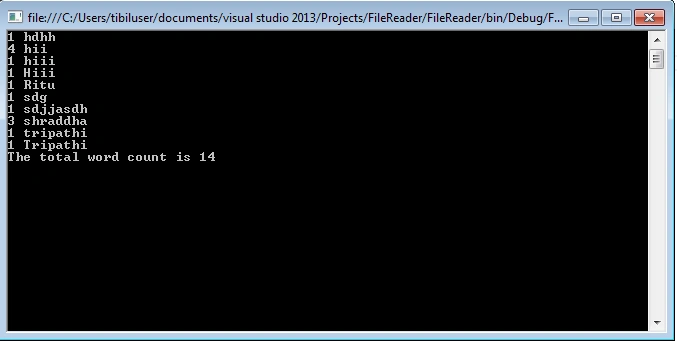
The following output will display in the console.
Leo MaxwellPosted Aug 19, 2020, 9:25 PM
This is wrong. if your code replaces non letter non number with spaces then "aren't" will become "aren" and "t" which means it'll be two words althought it is in fact one word
Lalit kjkjPosted Aug 30, 2019, 2:21 AM
Using System;using System.Collections.Generic; using System.IO; using System.Linq; namespace ProgrammeEg { public class Details { public int Id { get; set; } public string Name { get; set; } } class Program { public static void processData(IEnumerable<string> lines) { List<Details> good = new List<Details>(); List<Details> bad = new List<Details>(); foreach (string line in lines) { Details detail = new Details(); string[] list = line.Split(','); if (list.Count() > 1) { detail.Name = list[0].Trim(); detail.Id = Convert.ToInt32(list[1]); for (int i = 0; i < bad.Count; i++) { if (bad[i].Name.Contains(detail.Name)) good.RemoveAt(i); } good.Add(detail); } else { detail.Name = list[0].Trim(); for (int i = 0; i < good.Count; i++) { if (good[i].Name.Contains(detail.Name)) good.RemoveAt(i); } bad.Add(detail); } } Console.WriteLine("--Good--"); foreach (var item in good) { Console.WriteLine(item.Name); } Console.WriteLine(); Console.WriteLine("---Bad---"); foreach (var item in bad) { Console.WriteLine(item.Name); } } static void Main(string[] args) { try { //processData(File.ReadAllLines("file.txt")); processData(File.ReadAllLines(@"C:\file.txt")); Console.ReadLine(); } catch (IOException ex) { Console.WriteLine(ex.Message); } } } }
Lalit kjkjPosted Aug 30, 2019, 1:55 AM
Console.WriteLine("--Good--"); foreach (var item in good) { Console.WriteLine(item.Name); }
Lalit kjkjPosted Aug 30, 2019, 1:54 AM
This is nice one and code for the same is as Amankumar
Sudhanshu SharmaPosted Mar 29, 2019, 2:17 AM
What's the point of including the statement:StreamReader sr = new StreamReader(inFileName);
Sagar Pandurang KapPosted Feb 14, 2018, 12:44 AM
Very nice post.Keep shring...