
SIGN UP MEMBER LOGIN:    
ARTICLE

Create a Master-Details Screen in a LightSwitch Application 2011

Posted by Vineet Kumar Saini Articles | VS LightSwitch 2011 November 12, 2011
Using this article one can easily create a Master-Details (One-to-Many) Screen in a LightSwitch Application.
Reader Level:

Create a Master-Details (One-to-Many) Screen in a LightSwitch Application step by step :

First of all we create tables like Customer, OrderDetail, OrderHeader, Product and then we add screens like search screen, details screen.

Step 1: Click the customer detail screen->click Add OrderHeader likes below image.

image1.gif

Step 2. Now Add OrederHeader.

image2.gif

Step 3. Now select List.

image3.gif

Step 4. Go to OrderHeader summary property->select OrderDate.

image4.gif

Step 5. Now go to OrderDetail summary property->select price.

image5.gif

Step 6. Run application->Open any customer->click + sign in OrderHeader->Fill data->ok->save.

image6.gif

Step 7. Design screen->go to OrdrHeader property->check show as link->save.

image7.gif

Step 8. Add screen->detail screen->select screen data (OrderHeader)->ok.

image8.gif

Step 9. Now select customer summary->check show as a link  likes below image.

image9.gif

Step 10. Run application->open any customer->click datetime.

image10.gif

Step 11. Click + sign->fill data->ok->save.
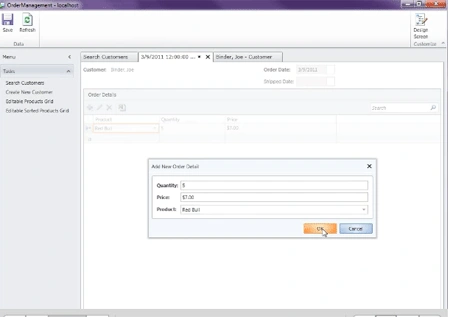
image11.gif

Step 12. Design screen->add selected item->save.

image12.gif

Step 13. Now you can add or delete data at run time and you can see product details.

image13.gif

Login to add your contents and source code to this article
share this article :
post comment
 
Become a Sponsor
PREMIUM SPONSORS
  • Finally – a virtual platform that delivers next-generation Windows Server 2008 Hyper-V virtualization technology from a managed hosting partner you can truly depend on. Visit www.maximumasp.com/max for a FREE 30 day trial. Hurry offer ends soon. Climb aboard the MaxV platform and take advantage of High Availability, Intelligent Monitoring, Recurrent Backups, and Scalability – with no hassle or hidden fees. As a managed hosting partner focused solely on Microsoft technologies since 2000, MaximumASP is uniquely qualified to provide the superior support that our business is built on. Unparalleled expertise with Microsoft technologies lead to working directly with Microsoft as first to offer IIS 7 and SQL 2008 betas in a hosted environment; partnering in the Go Live Program for Hyper-V; and product co-launches built on WS 2008 with Hyper-V technology.
    The leading .NET charting control now features PDF, Flash and Silverlight export, visualization of large datasets and more. Deliver true charting functionality to your BI, Scorecard, Presentation or Scientific apps. Download evaluation now.
6 Months Free & No Setup Fees ASP.NET Hosting!
Become a Sponsor