

Introduction
Let's dive into the world of Backbone.js.
Before moving into the basics of Backbone.js just have a look at the official definition of Backbone.js:
“Backbone.js gives structure to web applications by providing models with key-value binding and custom events, collections with a rich API of enumerable functions, views with declarative event handling and connects it all to your existing API over a RESTful JSON interface.”
Backbone.js is basically a light-weight JavaScript library that provides flexibility in web development. It adds an amount of functionality and structure to client-side code. It enforces the communication with the server using the RESTful API. Backbone.js is not a framework.
These libraries are used to create Single-Page Applications (SPAs).
In Backbone data is represented as Models that can be manipulated in various ways (including created, deleted, validated and saved to the server). It keeps front-end code modular and organized.
The attribute of a Model is changed after UI action, the Model triggers a changed event. Accordingly all the views will also be notified of the change. Simply put, when the model changes the views simply update themselves.
All the prototypes of Backbone.js are instantiated with the "new" keyword. There is an initialize() function that is called at the time of the instantiating of the prototypes of Backbone (Views, Models, Collections and Routers).
Backbone Structure: Backbone provides the various tools to introduce structure into client-side applications.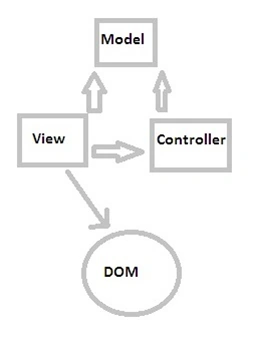
Modules of Backbone.JS
These are the following modules:
- Views
- Events
- Models
- Collections
- Routers
Let us taste the basics of these modules.
Views
If you have a basic knowledge of MVC, Views are just like "Controllers" in MVC. If you are unfamiliar with MVC frameworks then no worries. Here we will try to explain in a simple way.
A view's render() method can be bound to a model's change() event, enabling the view to instantly reflect model changes without requiring a full page refresh.
Backbone's Views
Takes user events (clicks, pressed keys, and so on) and perform accordingly.
Render HTML views and templates.
Interact with models that contain the data of the application.
- Creating a View
The View can be created by extending an existing view class of backbone. Here it is:
The "el" property: It references the DOM object created in the brower. Every Backbone.js view has an "el" property.- var demoView = Backbone.View.extend({ });
Every Backbone.js view has an “el” property, if we don't define the el property then Backbone.js constructs an empty div element as an "el" property.- <div id="search_container"></div>
- <script type="text/javascript">
- SearchView = Backbone.View.extend({
- initialize: function(){
- alert("function instantiated.");
- }
- });
- var search_view = new SearchView({ el: $("#search_container")
- });
Events
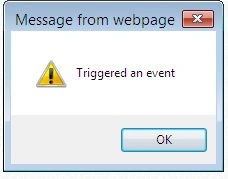
Events are a module that can be mixed in to any object. Events provide the object the ability to bind and trigger custom named events. Events are not declared before they are bound. They may take arguments. For example:
- var object = {};
- _.extend(object, Backbone.Events);
- object.on("alert", function (msg) {
- alert("Triggered " + msg); });
- object.trigger("alert", "an event");
Model
Models are the heart of every application.
They contain the interactive data and the logic surrounding it, such as data validation, default values, data initialization, conversions and so on.
- Creating Backbone Model
We need to extend the model class to create a backbone model. Here is how it is:
- var student = Backbone.Model.extend({
- });
- How to instantiate a Model
A Model can be instantiated using the "new" keyword.
- var student = new student();
- To Delete Model
There is a destroy function in backbone.js to delete a model. This function can be used as follows:
If the size of the method is slightly heavier then it takes time to delete the model. In this case we are not quite sure about the response, whether the method is called successfully or not.- Student.destroy();
- book.destroy({
- success: function () {
- alert("The model has been destroyed successfully");
- }
- });
- How to set the attributes in the model
There are two ways to set attributes in the Model.
- By ing a JavaScript object in the constructor.
- Student = Backbone.Model.extend({
- initialize: function () {
- alert("ing attributes");
- }
- });
- var student = new Student({ name: "Adam", sub: "science" });
- Using the model.set() method:
- Student = Backbone.Model.extend({
- initialize: function () {
- alert("By using SetMethod");
- }
- });
- var person = new Person();
- person.set({ name: "Adam", sub: "science" });
- By ing a JavaScript object in the constructor.
- Getting Attributes in a model
To access model properties there is the model.get() method.
- Student = Backbone.Model.extend({
- initialize: function () {
- alert("Getting model attributes");
- }
- });
- var student = new Student({ name: "Rama", age: 20, sub: 'Maths' });
- var age = student.get("age");
- var name = student.get("name");
- var sub = student.get("sub");
Collections
Backbone collections are simply an ordered set of models such that it can be used in situations such as:
Model: Student, Collection: School
Model: Animal, Collection: Zoo
- Creating a Backbone Collection
Creating a backbone collection is similar to the backbone model. It is simply created by extending a Backbone.Collection as follows:
- var StudentCollection = Backbone.Collection.extend({ });
- Instantiating Collections
Collections are also instantiated using the "new" keyword. We can create empty collections as well as Model objects to it.
We can get and set Models in the collection, listen for events when an element in the collection changes and fetch the Model's data from the server.- var collection1 = new StudentCollection(); //empty collection
- //ing Model as objects
- var book1 = new Book({ ID: 1, StudentName: "John" });
- var book2 = new Book({ ID: 2, StudentName: "Adam" });
- var collection2 = new StudentCollection([John, Adam]);
Router
Backbone routers are used for routing application URLs when using hash tags(#). It also enables us to use browser navigation with Single-Page Applications.
Actually routes facilitate the possibility of having deep copied URLs and history provides the possibility of using the browser navigation. A Router interprets anything after "#" tag in the URL.
Creating a backbone Router
Similar to various modules of backbone are JavaScript modules created by extending the Router class of backbone.
- var routers = Backbone.Router.extend({
- routes: {
- },help: function() {
- ... },
- search: function(query, page)
- { ... } });
Backbone.History: It handles hashchange events in our application. This will automatically handle routes that have been defined and trigger callbacks when they've been accessed.
The Backbone.history.start() method will simply tell Backbone that it's okay to begin monitoring all hashchange events.
Note
During page load, after your application has finished creating all of its routers, be sure to call Backbone.history.start(), or Backbone.history.start({pushState: true}) to route the initial URL.
Backbone.js code sample
Here I am trying to present a simple code sample in which I will be using nearly all the modules of Backbone.js like View, Collection, Model and Events.
In this example I am using the 3 JavaScript Libraries Backbone.js, jQuery, Underscore.js.
We need to create a HTML file for front view and add JavaScript code to it.
- <!DOCTYPE html >
- <html>
- <head>
- <title>Backbone.js By Shridhar</title>
- <script type="text/javascript"
- src="https://ajax.googleapis.com/ajax/libs/jquery/1.5.2/jquery.min.js"></script>
- <script type="text/javascript"
- src="http://ajax.cdnjs.com/ajax/libs/underscore.js/1.1.4/underscore-min.js"></script>
- <script type="text/javascript"
- src="http://ajax.cdnjs.com/ajax/libs/backbone.js/0.3.3/backbone-min.js"></script>
- <script type="text/javascript"
- src="sampleTask.js"></script>
- </head>
- <body>
- <input type="text" id="txtinput" placeholder="Add items" />
- <button id="input">Click to Add</button>
- <ul id="itemslist"></ul>
- <script type="text/javascript">
- $(function() {
- ItemList = Backbone.Collection.extend({ // creating collection
- initialize: function() {
- }
- });
- ItemView = Backbone.View.extend({ // creating view
- tagname: 'li',
- events: {
- 'click #input': 'getitems'
- },
- initialize: function() {
- var thisView = this;
- this.itemlist = new ItemList;
- _.bindAll(this, 'render');
- this.itemlist.bind("add", function(model) {
- thisView.render(model);
- })
- },
- getTask: function() {
- var task_name = $('#txtinput').val();
- this.itemlist.add({ name: task_name });
- },
- render: function(model) {
- $("#itemslist").append("<li>" +
- model.get("name") + "</li>");
- console.log('rendered')
- }
- });
- var view = new ItemView({ el: 'body' });
- });
- </script>
- </body>
- </html>
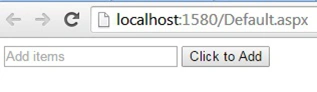
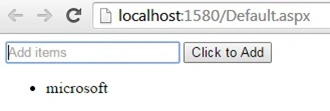
Add some items:
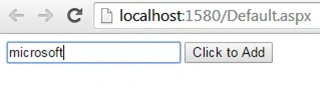
Items will appear in the list after the Click event, in other words after clicking “Click to Add”.
How the preceding code works
In the preceding code, we are trying to add the value in the collection in the HTML list element. Initially we created a collection by extending Backbone. For the collection, similarly we create a view that takes user events (clicks, pressed keys and so on) and performs accordingly. After a "click" event occurs, the getitems method will be called that will get the values from the input type we use. After getting the items from the input types, items will be added to the Itemlist. The collection.render() method is responsible for displaying that collection in the HTML element, for that purpose we had to use a list element.
Model in Backbone.JS : Part 2 >>
Gowtham RajamanickamPosted Mar 12, 2015, 2:38 AM
Good one...
Humayun Kabir MamunPosted Jan 16, 2015, 6:39 AM
Nice...
Shridhar SharmaPosted Jan 13, 2015, 11:15 PM
thanks you ! Praveen Kumar
Praveen KumarPosted Jan 13, 2015, 10:26 AM
It's fabulous ! Shridhar Sharma
Manish Kumar ChoudharyPosted Dec 29, 2014, 11:15 PM
Nice one..
Jitendra KumarPosted Dec 29, 2014, 10:33 AM
Good work..
Rahul Kumar SaxenaPosted Dec 29, 2014, 8:57 AM
Very informative.....
Rizwan AliPosted Dec 29, 2014, 5:28 AM
nice work
Guest UserPosted Dec 29, 2014, 2:20 AM
good one. I use AngularJS which is MVC framework too.
K P Singh ChundawatPosted Dec 29, 2014, 1:11 AM
Great article for Beginners ...Keep it up Shridhar Sharma sir...
Gaurav KumarPosted Dec 26, 2014, 12:54 AM
Very Nice Article keep it up..
Atul RawatPosted Dec 24, 2014, 10:47 AM
good explanation in simple words.
Abhishek AroraPosted Dec 24, 2014, 8:23 AM
Nice work..
Vithal WadjePosted Dec 24, 2014, 12:21 AM
Good start ,keep it up
Sachin KaliaPosted Dec 24, 2014, 12:11 AM
Gud work Shri..Keep the spirit UP :)
Dinesh BeniwalPosted Dec 24, 2014, 12:06 AM
Good start Shridhar, appreciate your hard work.
Praveen KumarPosted Dec 23, 2014, 11:29 PM
It's too good!
Shridhar SharmaPosted Dec 23, 2014, 11:05 PM
Thanks to all for appreciation.
Rizwan AliPosted Dec 23, 2014, 10:41 PM
good one..
Nimit JoshiPosted Dec 23, 2014, 10:36 PM
Very Nice...
Jitendra KumarPosted Dec 23, 2014, 9:51 PM
Good one..