

Background
Sometimes there is a need to insert, update, and delete records in a GridView using a single Stored Procedure instead of creating separate Stored Procedures for each operation.
Suppose I have one .aspx web page in which I need to insert, view, update, and delete records. To do that, instead of creating four Stored Procedures to perform these tasks I will create a single Stored Procedure to satisfy my requirements and I will access it in code behind depending on the action performed by the end user on a button click.
I have written this article, especially focusing on newcomers and anyone who wants to insert, update, and delete records in a GridView using a Single Stored Procedure, so let us start with a basic introduction.
First, create the table named employee as.
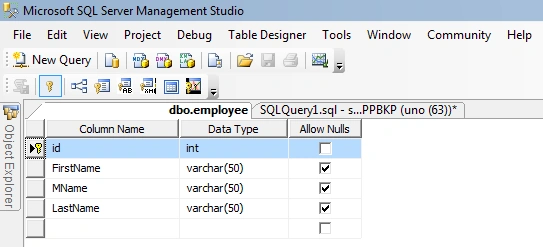
I have set the primary key on the ID column and I have set the Identity specification to Yes.
Now we have a table to perform these operations for. Now let us start to create the Stored Procedure.
The Stored Procedure is created using the keyword "Create Procedure" followed by the procedure name. Let us create the Stored Procedure named "EmpEntry" as in the following.
CREATE PROCEDURE EmpEntry
(
  -- Variable declarations
  @Action VARCHAR(10), -- To perform operation such as Insert, Update, Delete, Select
  @id INT = NULL, -- ID to perform specific task
  @Fname VARCHAR(50) = NULL, -- For FirstName
  @MName VARCHAR(50) = NULL, -- For MName
  @Lname VARCHAR(50) = NULL -- For LastName
)
AS
BEGIN
  SET NOCOUNT ON;

  IF @Action = 'Insert' -- Used to insert records
  BEGIN
    INSERT INTO employee (FirstName, MName, LastName) VALUES (@Fname, @MName, @Lname)
  END
  ELSE IF @Action = 'Select' -- Used to Select records
  BEGIN
    SELECT * FROM employee
  END
  ELSE IF @Action = 'Update' -- Used to update records
  BEGIN
    UPDATE employee SET FirstName = @Fname, MName = @MName, LastName = @Lname WHERE id = @id
  END
  ELSE IF @Action = 'delete' -- Used to delete records
  BEGIN
    DELETE FROM employee WHERE id = @id
  END
END
The comments in the Stored Procedure above clearly explain which block is used for which purpose, so I have briefly explained it again. I have used the @Action variable and assigned the string to them and according to the parameter ed to the Stored Procedure, the specific block will be executed because I have kept these blocks or conditions in nested if else if conditional statements.
Now create the one sample application "Empsys" as.
- "Start", "All Programs", "Microsoft Visual Studio 2010".
- "File", "New Project", "C#", and "Empty Web Application" (to avoid adding a master page).
- Provide the website a name such as "Empsys" or another as you wish and specify the location.
- Then right-click on Solution Explorer, "Add New Item", and "Default. aspx page".
- Drag and drop one button, three textboxes, one GridView one hidden field to the hidden value to the database, and one label on the <form> section of the Default.aspx page.
Then switch to the design view; the <form> section of the Default aspx page source will look as in the following.
<form id="form1" runat="server">
    <div>
        First Name <asp:TextBox ID="TextBox1" runat="server"></asp:TextBox>
        Middle Name <asp:TextBox ID="TextBox2" runat="server"></asp:TextBox>
        Last Name <asp:TextBox ID="TextBox3" runat="server"></asp:TextBox>
        <asp:Button ID="Button1" runat="server" Text="Save" OnClick="Button1_Click" />
    </div>
    <asp:HiddenField ID="HiddenField1" runat="server" />
    <asp:GridView ID="GridView1" runat="server">
    </asp:GridView>
</form>
Now use the following GridView event properties to perform events such as update, delete, edit cancel, and so on. Let us see what the properties are.
- DataKeyNames: This property I have used for the row index of GridView.
- OnRowEditing: This property is used to handle the event when the user clicks on the edit button
- OnRowCancelingEdit: This property is used to handle the event when the user clicks on the Cancel button that exists after clicking on the edit button
- OnRowDeleting: This property is used to handle the event when the user clicks on the delete button that deletes the row of the GridView
- OnRowUpdating: This property is used to handle the event when the user clicks on the update button that updates the Grid Record.
Now my grid will look as follows.
<asp:GridView ID="GridView1" runat="server" DataKeyNames="id" OnRowEditing="Edit" OnRowCancelingEdit="canceledit" OnRowDeleting="delete" OnRowUpdating="Update">
</asp:GridView>
On the preceding GridView properties I have assigned the method name to be called for particular operations.
Method to Insert Data in Database
Right-click from the design page and view the code and then write the following code in the default. aspx.cs page to save the inserted records in the database.
protected void empsave(object sender, EventArgs e)
{
    connection();
    query = "studentEntryView"; //Stored Procedure name
    SqlCommand com = new SqlCommand(query, con); //creating  SqlCommand  object
    com.CommandType = CommandType.StoredProcedure; //here we declaring command type as stored Procedure

    // adding parameters to  SqlCommand below
    com.Parameters.AddWithValue("@Action", HiddenField1.Value).ToString(); //for ing hidden value to preform insert operation
    com.Parameters.AddWithValue("@FName", TextBox1.Text.ToString());      //first Name
    com.Parameters.AddWithValue("@Mname ", TextBox2.Text.ToString());    //middle Name
    com.Parameters.AddWithValue("@LName ", TextBox3.Text.ToString());    //Last Name
    com.ExecuteNonQuery();   //executing the sqlcommand
    Label1.Visible = true;
    Label1.Text = "Records are Submitted Successfully";
}
Now create the method to view the records in the GridView.
public void viewdata()
{
    connection();
    query = "studentEntryView";
    SqlCommand com = new SqlCommand(query, con);
    com.CommandType = CommandType.StoredProcedure;
    com.Parameters.AddWithValue("@Action", HiddenField2.Value).ToString();
    DataSet ds = new DataSet();
    SqlDataAdapter da = new SqlDataAdapter(com);
    da.Fill(ds);
    GridView1.DataSource = ds;
    GridView1.DataBind();
}
The following is the method for the "OnRowEditing" Event.
protected void edit(object sender, GridViewEditEventArgs e)
{
    GridView1.EditIndex = e.NewEditIndex;
    gedata();
}
The following is the method for the "OnRowCancelingEdit" Event.
protected void canceledit(object sender, GridViewCancelEditEventArgs e)
{
    GridView1.EditIndex = -1;
    gedata();
}
The following is the method for the "OnRowDeleting" Event.
protected void delete(object sender, GridViewDeleteEventArgs e)
{
    connection();
    int id = int.Parse(GridView1.DataKeys[e.RowIndex].Value.ToString());
    HiddenField1.Value = "Delete";
    query = "EmpEntry";
    com = new SqlCommand(query, con);
    com.CommandType = CommandType.StoredProcedure;
    com.Parameters.AddWithValue("@Action", HiddenField1.Value).ToString();
    com.Parameters.AddWithValue("id", SqlDbType.Int).Value = id;
    com.ExecuteNonQuery();
    con.Close();
    gedata();
}
The following is the method for the "OnRowUpdating" Event.
protected void update(object sender, GridViewUpdateEventArgs e)
{
    connection();
    int id = int.Parse(GridView1.DataKeys[e.RowIndex].Value.ToString());
    HiddenField1.Value = "update";
    query = "EmpEntry";
    com = new SqlCommand(query, con);
    com.CommandType = CommandType.StoredProcedure;
    com.Parameters.AddWithValue("@Action", HiddenField1.Value).ToString();
    com.Parameters.AddWithValue("@FName", ((TextBox)GridView1.Rows[e.RowIndex].Cells[3].Controls[0]).Text.ToString());
    com.Parameters.AddWithValue("@MName", ((TextBox)GridView1.Rows[e.RowIndex].Cells[4].Controls[0]).Text.ToString());
    com.Parameters.AddWithValue("@LName", ((TextBox)GridView1.Rows[e.RowIndex].Cells[5].Controls[0]).Text.ToString());
    com.Parameters.AddWithValue("@id", SqlDbType.Int).Value = id;
    com.ExecuteNonQuery();
    con.Close();
    GridView1.EditIndex = -1;
    gedata();
}
A brief introduction to the code
In the sample code above I have used the two string queries for giving the Stored Procedure name and the constr for storing the connection from the web. config file and another thing is that I have used a hidden field by which I am ing the action values that are required to our Stored Procedure.
Now our application is ready to use, press F5 or other as you know, then enter some values to TextBox and press the "Save" button.
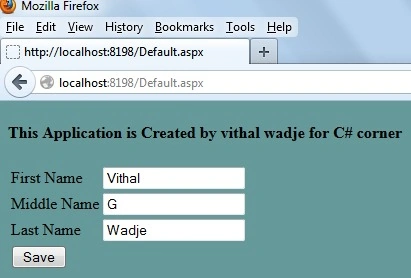
Now after clicking on the "Save" button, the hidden field value takes the value "Insert" and es it to the Stored Procedure as the action and because of this, the Stored Procedure will execute a particular type of block.
Now at page load, I have called the method, so after that the grid will fill as in.
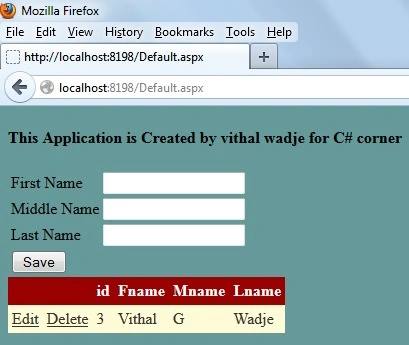
Now click on the Edit button that calls the edit method as shown in the following grid.
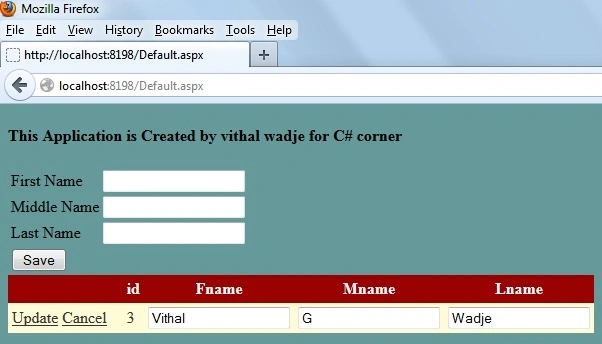
If you click on the "Cancel" button then the edit cancel method will be called and the edit mode will be canceled. Now enter some values into the grid TextBox and click on an update button that calls the update method and then the records in the GridView will be updated.
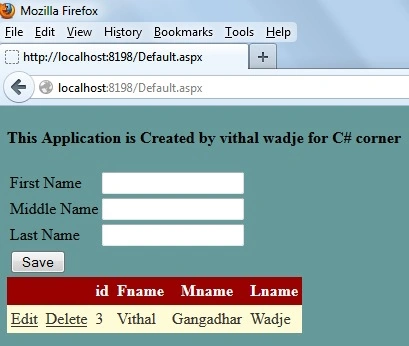
Now click on the delete button that calls the delete method and deletes the records from the GridView
Note
- For detailed code please download the zip file attached above.
- Don't forget to update the Web. config file for your server location.
Summary
From all the examples above we see how to reduce the code required to perform these tasks. In the next article, I will explain how to Implement a 2-tier architecture which makes my code much simpler and reusable, I hope this article is useful for all students and beginners. If you have any suggestions related to this article then please contact me.
Emi WhoPosted May 20, 2021, 5:52 PM
Hi Friends, this works perfectly, but what should I do when trying to bulk update (update multiple rows in a gridview) using a button outside the gridview?
Anand ThoratPosted Jun 2, 2018, 2:27 AM
Not Tested... Incompltete Code...
MEENAKSHI KEDWALPosted Aug 26, 2017, 7:08 PM
Hi sir... i couldn't found the definition of method getdata() in above code?
Pradnya DabholkarPosted Jan 27, 2017, 8:10 AM
What is gedata(); in above code ?
Arvind ChourasiyaPosted Jan 23, 2016, 3:44 PM
means for all actions asking for all parameters than only executing..How to do like this example (passing required params)in 3 tier architecture like above example..thank you
Arvind ChourasiyaPosted Jan 23, 2016, 3:41 PM
if I'm using 3 tier architecture so for that(stored procedure) it is asking all parameters for individual actions..suppose I want to delete record so I have pass fname="",lname="",mname="" and id=1;
Vithal WadjePosted Sep 30, 2015, 10:17 AM
Thanks
RAHUL DEOLEPosted Sep 30, 2015, 12:33 AM
very good & useful article
Vithal WadjePosted Jul 19, 2014, 1:52 PM
thanks MK,you can find 3 layer related articles not 3tier related
MkPosted Jul 15, 2014, 3:33 AM
Its really good;)...Do u hve ny other related article similar to this but using 3 tier architecture
Vithal WadjePosted Jun 23, 2014, 2:49 PM
thanks
raviPosted Jun 21, 2014, 2:44 AM
Very helpful.Thank you..........
Vithal WadjePosted Mar 27, 2014, 2:49 PM
thanks sir
Said AbdullahPosted Mar 26, 2014, 12:19 PM
Amazing , Thank you :)))
prasanna rajPosted Dec 16, 2013, 9:14 AM
public void getdata() { connection(); query = "DMLgrid_SP"; SqlCommand com = new SqlCommand(query, con); com.CommandType = CommandType.StoredProcedure; com.Parameters.AddWithValue("@Action", HiddenField1.Value).ToString(); DataSet ds = new DataSet(); SqlDataAdapter da = new SqlDataAdapter(com); //da.Fill(ds, "DMLgrid_TB"); da.Fill(ds); GridView1.DataSource = ds; GridView1.DataBind(); con.Close(); }
prasanna rajPosted Dec 16, 2013, 9:14 AM
finally i got the error "The IListSource does not contain any data sources.", in that particular code....
prasanna rajPosted Dec 16, 2013, 1:24 AM
hello sir, nice tutorial , but i have error like this "Procedure or function 'DMLgrid_SP' expects parameter '@id', which was not supplied." how can i clear this please help me.....
emmanuel constantPosted Nov 20, 2013, 5:01 PM
The is very good. Question, how would you provide filtering functionality?
Vithal WadjePosted May 24, 2013, 10:08 AM
yes jagan sir,you can use any logic,thanks
Jagan MohanPosted May 22, 2013, 6:59 AM
Hi Vital nice article.Instead of multiple If-Else statements can we try this with CASE Expression?
Vithal WadjePosted Apr 8, 2013, 3:21 AM
thanks Anurag sir
Anurag SarkarPosted Apr 8, 2013, 2:00 AM
Nice One.