

Windows 10 Settings
In Windows 10 the user must explicitly give permission to access the user information data. The first time it runs the application, Windows 10 privacy settings automatically prompt the message box, to confirm whether the application can read the user information or not.
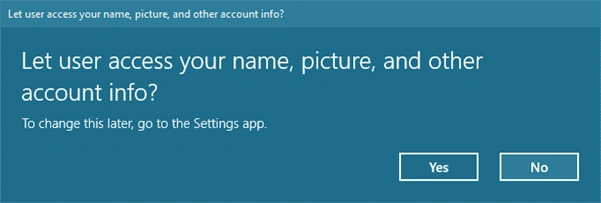
Later at some point of time, ifthe user doesn't like the application accessing information, then he or she can disable it (go to settings -> Privacy -> Account -> select the application and disable,
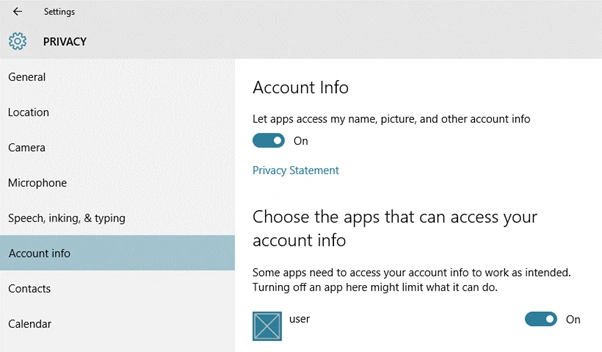
Application Setting
Later at some point of time, ifthe user doesn't like the application accessing information, then he or she can disable it (go to settings -> Privacy -> Account -> select the application and disable,
Application Setting
Application must enable the User Account information in the Package.appxmanifest file, otherwise the application can’t access the user information.
Let us see a simple example of how to read user name and display account information.
Define the User Modal class,
- public class UniversalUserInfo: INotifyPropertyChanged
- {
- private string _userName;
- public string UserName
- {
- get
- {
- return _userName;
- }
- set
- {
- _userName = value;
- OnPropertyChanged(nameof(UserName));
- }
- }
- private BitmapImage _imgStream;
- publi BitmapImageImgStream
- {
- get
- {
- return _imgStream;
- }
- set
- {
- _imgStream = value;
- OnPropertyChanged(nameof(ImgStream));
- }
- }
- private string _userType;
- public string UserType
- {
- get
- {
- return _userType;
- }
- set
- {
- _userType = value;
- OnPropertyChanged(nameof(UserType));
- }
- }
- private string _authenticationStatus;
- public string AuthenticationStatus
- {
- get
- {
- return _authenticationStatus;
- }
- set
- {
- _authenticationStatus = value;
- OnPropertyChanged(nameof(AuthenticationStatus));
- }
- }
- public eventPropertyChangedEventHandlerPropertyChanged;
- protected virtual voidOnPropertyChanged(string propertyName = null)
- {
- PropertyChanged ? .Invoke(this, new PropertyChangedEventArgs(propertyName));
- }
- }
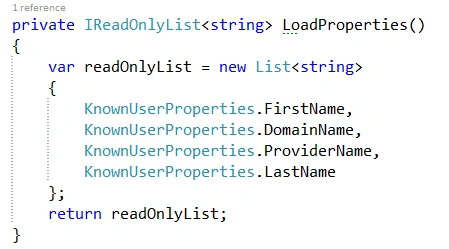
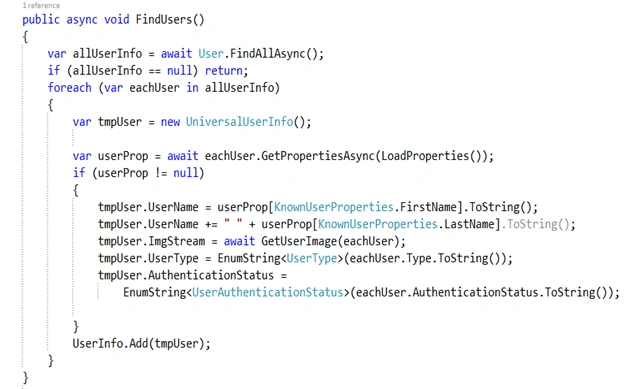
User.FindAllAsync(); this function used to get all the user information and read each user's properties, such as name or picture name. Use the KnowUserProperties to get all user properties.
There are wo ways we can pass this KnowUserProperties -- single parameter passes or multiple properties
User.GetPropertyAsync() – returns single properties value
Ex: User.GetPropertyAsync(KnownUserProperties.AccountName);
User.GetPropertiesAsync passes the collection of properties and returns the collection of properties value
Ex:
- User.GetPropertiesAsync(newList < string > ()
- {
- KnownUserProperties.DisplayName,
- KnownUserProperties.DisplayName
- });
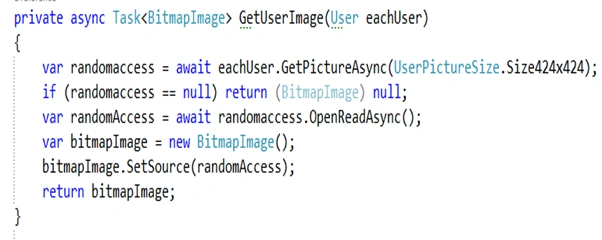
Read the picture information, call the GetPictureAsync function, and pass the size (Note: read the picture information it’s not under the KnownUserProperties).
User.GetPictureAsync(UserPictureSize.Size424x424);
And function return the IRandomAccessStreamReference to display to the GUI, and convert to the Bitmap image,
User AuthenticationStatus and UserType information are Enum types, the below function uses to convert the Enum to String,

Find Users () function to read the complete information and assign the UniversalUserInfo class,
Here's the output:

Find the complete source code.
Vinoth RajendranPosted Apr 26, 2016, 12:42 AM
please post the sample source code in Forum section , will check and answers
shagufta syedPosted Apr 22, 2016, 3:56 AM
This returns null for me. Do u know why? I have added the user account info capability to app manifest too.
Luiey AckermanPosted Apr 10, 2016, 11:03 PM
Deadly wanted finding something like this. Thanks for sharing
Asfend YarPosted Feb 29, 2016, 3:02 AM
nice
Santhakumar MunuswamyPosted Jan 17, 2016, 2:16 PM
Thanks for nice share
Shubham KumarPosted Jan 16, 2016, 12:54 PM
nice explain
Nanddeep NachanPosted Jan 16, 2016, 5:50 AM
Nice share