

Introduction
We will continue the second part of the jQuery Datepicker Dateformat. Before reading this article you must read my previous article JQuery Datepicker - Part 1 because I have explained some important part in my previous article. In this article I will teach you the remaining part of jQuery Datepicker Format! Let's start.
JQuery Reference
We will continue the second part of the jQuery Datepicker Dateformat. Before reading this article you must read my previous article JQuery Datepicker - Part 1 because I have explained some important part in my previous article. In this article I will teach you the remaining part of jQuery Datepicker Format! Let's start.
JQuery Reference
You must use the following jquery reference in your HTML Code, otherwise it will not work.
- <head>
- <link rel="stylesheet" href="//code.jquery.com/ui/1.11.4/themes/smoothness/jquery-ui.css">
- <script src="//code.jquery.com/jquery-1.10.2.js"></script>
- <script src="//code.jquery.com/ui/1.11.4/jquery-ui.js"></script>
- </head>
Display Month & Year Menus In JQuery Datepicker
HTML
HTML
- Date : <input id="Datepicker" type="text" />
The following code will show the Month & Year Menus In Jquery Datepicker. The "yearRange" will specify the range of the year you want.
- $(function () {
- $('#Datepicker').datepicker({
- dateFormat: 'dd/mm/yy',
- changeMonth: true,
- changeYear: true,
- yearRange: '1950:2100'
- });
- })
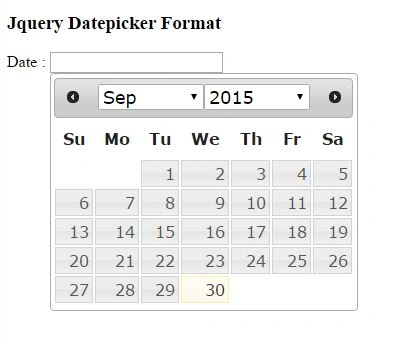
JS Fiddle Demo 1: http://jsfiddle.net/rajeeshmenoth/1juozmdn/.
Disable Weekends In JQuery Datepicker
Disable Weekends In JQuery Datepicker
HTML
- Date : <input id="Datepicker" type="text" />
The following code will disable all weekends in the JQuery Datepicker."noWeekends" will disable the weekends.
- $(function () {
- $('#Datepicker').datepicker({
- beforeShowDay: $.datepicker.noWeekends
- });
- })
Output
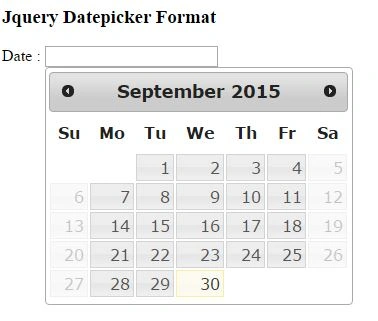
JS Fiddle Demo 2 :
Display Multiple Month In JQuery Datepicker
HTML
- Date : <input id="Datepicker" type="text" />
The following code will display the multiple month in jQuery Datepicker. The "numberOfMonths" will show the next months.
- $(function () {
- $('#Datepicker').datepicker({
- numberOfMonths:2
- });
- })
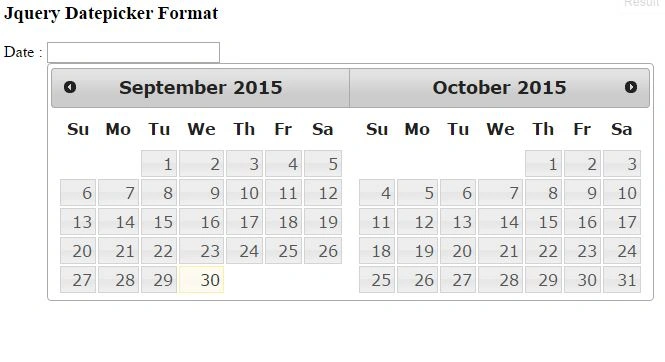
JS Fiddle Demo 3 : http://jsfiddle.net/rajeeshmenoth/tvc64dtg/
Reference
Summary
We learned various date format in jQuery Datepicker. I hope this article is useful for beginners.
Delpin Susai RajPosted Aug 28, 2016, 7:05 AM
Nice
Rajeesh MenothPosted Oct 5, 2015, 2:03 AM
Thank You Abhay Shanker
Abhay ShankerPosted Oct 2, 2015, 4:15 AM
Nice Share..
Karthikeyan KPosted Oct 2, 2015, 2:22 AM
Good one sir...
Santhakumar MunuswamyPosted Oct 1, 2015, 4:00 PM
Good One
Pankaj Kumar ChoudharyPosted Oct 1, 2015, 5:45 AM
Nice Explain Sir........
Rajeesh MenothPosted Oct 1, 2015, 5:33 AM
Thanks Ankit Bansal
Ankit BansalPosted Oct 1, 2015, 5:08 AM
nice..thanks for sharing..
Nilesh JadavPosted Oct 1, 2015, 4:24 AM
Great Rajeesh Menoth