

Introduction
In this article we will return a collection using a View in backbone.js. Backbone is used for client-side coding, it is a lightweight JavaScript library. The backbone.js provides the model and collection that uses the lightweight data for creating the views.
In backbone.js models are used for connecting the data to the web application. It also contains the connection among data. Models are used for representing the concept of the object including its attribute.
A View acts as a user interface but in backbone.js it not only works as a View but also as a controller for connecting the model to the data interaction. So the backbone is called a Model View (MV) framework.
Sets of models are called collections, we create the collection by extending the "Backbone.collection". When we create a collection then we can pass the property specification for the models that are used by the collection as well as an instance property.
Let's create the application:
- First we create a web application as in the following:
- Start Visual Studio 2013.
- From the Start window select "New Project".
- Select "Installed" -> "Template" -> "Visual Studio" -> "Web" -> "Visual Studio 2012" and select "Web Application".
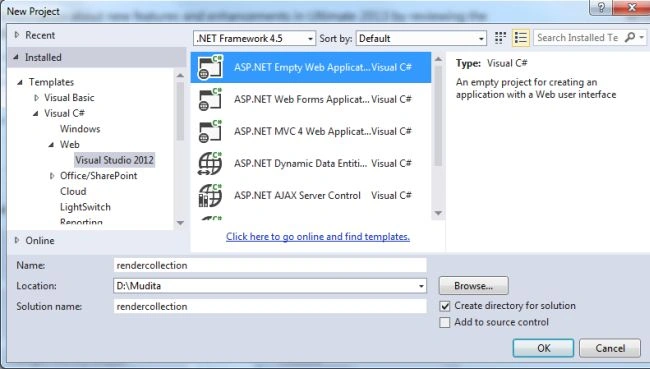
- Click the "OK" button.
- Now we need to add a HTML Page to the project:
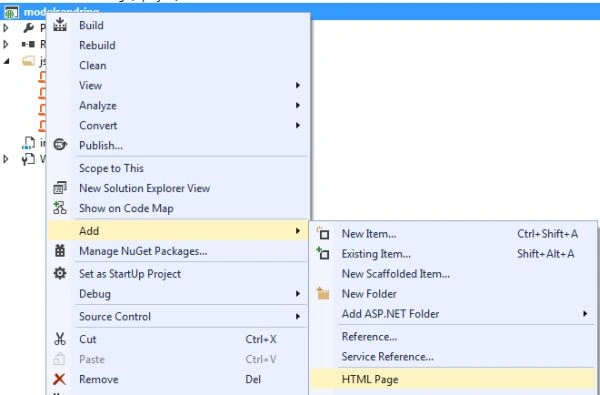
- In the "Solution Explorer".
- Right-click on the project and select "Add" -> "HTML Page".
- Change the Name of the HTML page.
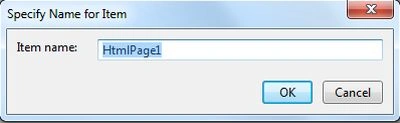
- Click on the "Add" button.
Add the following code to the HTML page:
<!DOCTYPE html>
<html xmlns="http://www.w3.org/1999/xhtml">
<head>
<title></title>
<script src="js/jquery-1.8.2.min.js"></script>
<script src="js/underscore-min.js"></script>
<script src="js/backbone-min.js"></script>
<script src="js/model.js"></script>
</head>
<body>
<script type="text/javascript">
var UsView = Backbone.View.extend({
el: 'body',
render: function () {
var viewHtml = '<table border="2">';
viewHtml += "<tr><td>UserId</td><td>UserName</td><td>DeptName</td><td>Designation</td> <td>Salary</td></tr>";
_.each(this.collection.models, function (m, i, l) {
var usRecHtml = '<tr><td>' + m.get('UserId') + '</td><td>' + m.get('UserName') + '</td><td>' + m.get('DeptName') + '</td><td>' + m.get('Designation') + '</td><td>' + m.get('Salary') + '</td></tr>';
viewHtml += usRecHtml;
});
viewHtml += '</table>'
$(this.el).html(viewHtml);
}
});
var eView = new UsView({
collection: Users
});
eView.render();
</script>
</body>
</html>
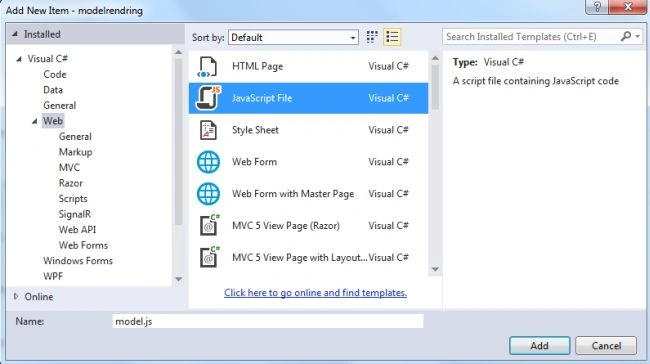
- Add a js file to the project as "model.js".
- In the Solution Explorer.
- Right-click on the project then select "Add" -> "New Item" -> "JavaScript".
Add the following code:
var User = Backbone.Model.extend({
defaults: {
UserId: 0,
UserName: "",
DeptName: "",
Designation: "",
Salary: 0.0
}
});
var UsersCollection = Backbone.Collection.extend({
model: User
});
var Users = new UsersCollection();
Users.add(new User({
'UserId': 01, 'UserName': "Smith",
'DeptName': "Dept1", 'Designation': "Senior Tester", 'Salary': 50000
}));
Users.add(new User({
'UserId': 02, 'UserName': "Jhon",
'DeptName': "Dept2", 'Designation': "Developer", 'Salary': 40000
}));
Users.add(new User({
'UserId': 03, 'UserName': "tanya",
'DeptName': "Dept1", 'Designation': "Testing TL", 'Salary': 60000
}));
Users.add(new User({
'UserId': 04, 'UserName': "vikram",
'DeptName': "Dept3", 'Designation': "Sales manager", 'Salary': 30000
}));
Users.add(new User({
'UserId': 05, 'UserName': "Rupal",
'DeptName': "Dept4", 'Designation': "HR Executive", 'Salary': 55000
}));
Users.add(new User({
'UserId': 06, 'UserName': "Bacchan",
'DeptName': "Dept4", 'Designation': ".Net Developer", 'Salary':60000
}));
- The following three js files need to be added here:
- backbone-min.js
- underscore-min.js
- jquery-1.8.2.min.js
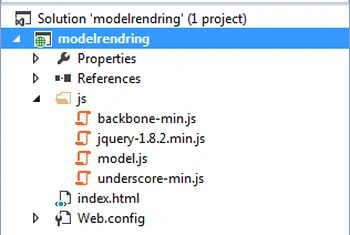
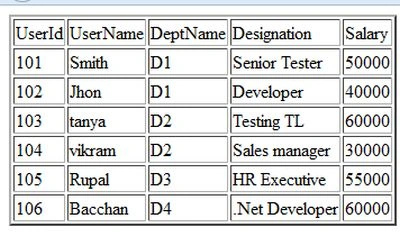
- Now execute the application:
Join the conversation! Your thoughts help the community grow.