

Introduction
In Java, we can format strings depending on our needs and get the required output. The printf command is very useful in Java. The printf command takes text as a string and formats it depending on the instructions given to it.
String Formatting
- "%s" Format a string with the required number of characters.
- "%10s" Format a string with the specified number of characters and also right justify.
- "%-10s" Format a string with the specified number of characters and also left justify.
For formatting numbers, we use the "d" character and for floating-point numbers we use the "f" character.
Example
- package demo;
- public class Demo {
- public static void main(String args[]) {
- String n = "NAME";
- System.out.printf("%10s %n", n);
- }
- }
Output
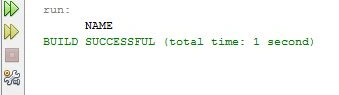
Example
- package demo;
- public class Demo {
- public static void main(String args[]) {
- String n = "NAME";
- String l = "LOCATION";
- System.out.printf("%-10s %10s %n", n, l);
- }
- }
Output
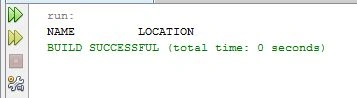
Integer Formatting
- "%d" Format a string with the required numbers.
- "%5d" Format a string with the required number of integers and also pad with spaces to the left side if integers are not adequate.
- "%05d" Format a string with the required number of integers and also pad with zeroes to the left if integers are not adequate.
Example
- package demo;
- public class Demo {
- public static void main(String args[]) {
- String r = "ROLL NO";
- int i = 12345;
- System.out.printf("%s %15d %n", r, i);
- }
- }
Output
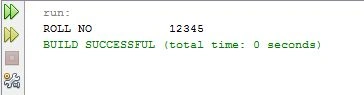
Example
- package demo;
- public class Demo {
- public static void main(String args[]) {
- int r = 54321;
- int i = 12345;
- System.out.printf("%015d %15d %n", r, i);
- }
- }
Output
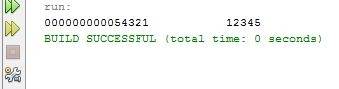
Floating Point Number Formatting
- "%f" Format a string with the required numbers. It will always give six decimal places.
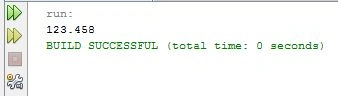
- "%.3f" Format a string with the required numbers. It gives three decimal places.
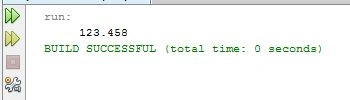
- "%12.3f" Format a string with the required numbers. The string occupies twelve characters. If numbers are not adequate then spaces are used on the left side of the numbers.
Example
- package demo;
- public class Demo {
- public static void main(String args[]) {
- System.out.printf("%.3f %n", 123.45789);
- }
- }
Output
Example
- package demo;
- public class Demo {
- public static void main(String args[]) {
- System.out.printf("%12.3f %n", 123.45789);
- }
- }
Output
Summary
This article explains string formatting in Java and the use of the printf command in Java.
Join the conversation! Your thoughts help the community grow.