
Introduction : The Extensible
Application Markup Language (XAML) is a
new declarative language is used in Windows Framework and Windows
Presentation Foundation.
XAML is used for initializing structured values
and objects. The XAML define UI element, Data Binding, Event. The use of workflow markup with code-beside logic files is similar to how ASP.NET separates presentation files from logic files.
Step 1 : Open Visual Studio.
- Select File->New-> Project.
- Select Sequential Workflow Console Application.
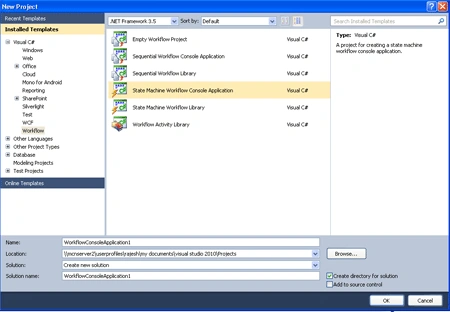
Step 2 : Go to Solution Explorer and right-click.
- Select Workflow1.cs file.
- Delete Workflow1.cs file form project for display the XAML.
Step 3 : Go to Solution Explorer and right-click.
- Add-> New Item->Workflow.
- Select Sequential Workflow Code Separation.
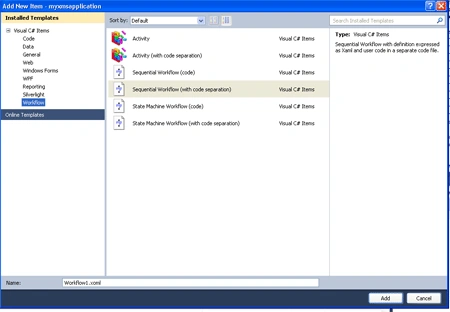
Step 4 : Go to Solution Explorer and see Workflow.xoml file create.
- Click Workflow.xoml file and open with.
- XML editor option open.
- The look like following code.
Code :
<SequentialWorkflowActivity
x:Class="myxmsapplication.Workflow2"
x:Name="Workflow2"
xmlns:x="http://schemas.microsoft.com/winfx/2006/xaml"
xmlns="http://schemas.microsoft.com/winfx/2006/xaml/workflow">
</SequentialWorkflowActivity>
Step 5 : Go to Toolbox
option.
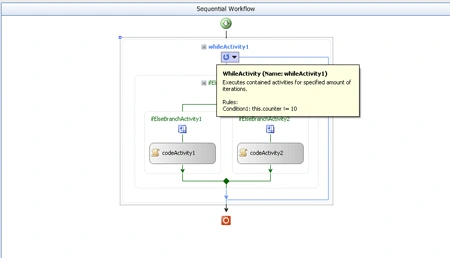
- Drag While activity from Toolbox.
- Go to Workflow.xoml option following code will be add.
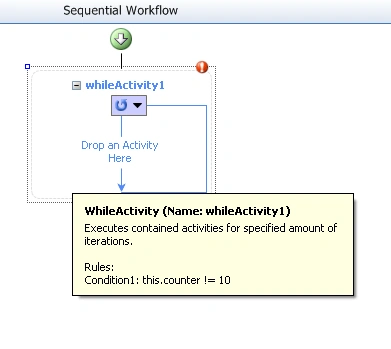
Code :
<SequentialWorkflowActivity
x:Class="myxmsapplication.Workflow2"
x:Name="Workflow2"
xmlns:x="http://schemas.microsoft.com/winfx/2006/xaml"
xmlns="http://schemas.microsoft.com/winfx/2006/xaml/workflow">
<WhileActivity
x:Name="whileActivity1">
<WhileActivity.Condition>
<RuleConditionReference
ConditionName="Condition1"
/>
</WhileActivity.Condition>
</WhileActivity>
</SequentialWorkflowActivity>
Step 6 : Go to
Workflow.xoml.cs file and add following code.
Code :
public
partial class
Workflow2 :
SequentialWorkflowActivity
{
public Int32
counter;
}
Step 7 : Go to Workflow.xoml
design option.
- Right-click-> Properties option.
- Define Condition, Condition Name.
Condition :
this.counter != 10
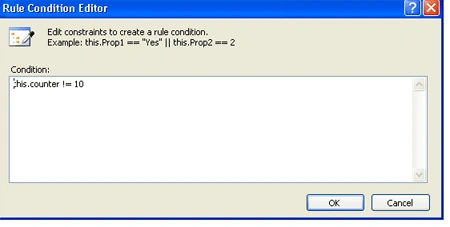
Step 8 : Go to Design option and drag activty from Toolbox.
- Drag If-Else, Code activity.
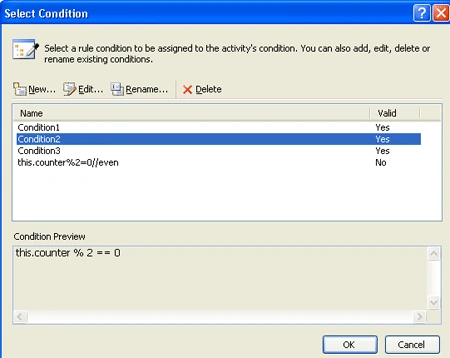
- Define the condition.
Condition :
this.counter % 2 == 0
this.counter % 2 != 0
Step 9 : Now we double-click in CodeActivty1, CodeActivity2.
- Write the below code.
Code :
private
void codeActivity1_ExecuteCode(object
sender, EventArgs e)
{
Console.WriteLine("Hello!
" + Convert.ToString(counter) +"
is an even number!");
counter++;
}
private void
codeActivity2_ExecuteCode(object sender,
EventArgs e)
{
Console.WriteLine("Hello!
" + Convert.ToString(counter) +"
is an odd number!");
counter++;
}
Step 10 : We open
Workflow.xoml option add following code.
Code :
<SequentialWorkflowActivity
x:Class="myxmsapplication.Workflow2"
x:Name="Workflow2"
xmlns:x="http://schemas.microsoft.com/winfx/2006/xaml"
xmlns="http://schemas.microsoft.com/winfx/2006/xaml/workflow">|
<WhileActivity
x:Name="whileActivity1">
<WhileActivity.Condition>
<RuleConditionReference
ConditionName="Condition1"
/>
</WhileActivity.Condition>
<IfElseActivity
x:Name="ifElseActivity1">
<IfElseBranchActivity
x:Name="ifElseBranchActivity1">
<IfElseBranchActivity.Condition>
<RuleConditionReference
ConditionName="Condition2"
/>
</IfElseBranchActivity.Condition>
<CodeActivity
x:Name="codeActivity1"
ExecuteCode="codeActivity1_ExecuteCode"
/>
</IfElseBranchActivity>
<IfElseBranchActivity
x:Name="ifElseBranchActivity2">
<IfElseBranchActivity.Condition>
<RuleConditionReference
ConditionName="Condition3"
/>
</IfElseBranchActivity.Condition>
<CodeActivity
x:Name="codeActivity2"
ExecuteCode="codeActivity2_ExecuteCode"
/>
</IfElseBranchActivity>
</IfElseActivity>
</WhileActivity>
</SequentialWorkflowActivity>
Step 11 : Now we Program.cs file add following code.
Code :
|
using
System;
using
System.Collections.Generic;
using
System.Linq;
using
System.Text;
using
System.Threading;
using
System.Workflow.Runtime;
using
System.Workflow.Runtime.Hosting;
using
System.Workflow.Activities;
namespace
myxmsapplication
{
class Program
{
static void
Main(string[] args)
{
using (WorkflowRuntime
workflowRuntime = new
WorkflowRuntime())
{
AutoResetEvent waitHandle =
new AutoResetEvent(false);
workflowRuntime.WorkflowCompleted +=
delegate(object sender,
WorkflowCompletedEventArgs e) {
waitHandle.Set(); };
workflowRuntime.WorkflowTerminated +=
delegate(object sender,
WorkflowTerminatedEventArgs e)
{
Console.WriteLine(e.Exception.Message);
waitHandle.Set();
};
WorkflowInstance instance =
workflowRuntime.CreateWorkflow(typeof(myxmsapplication.Workflow1));
instance.Start();
waitHandle.WaitOne();
Console.ReadKey();
}
}
}
}
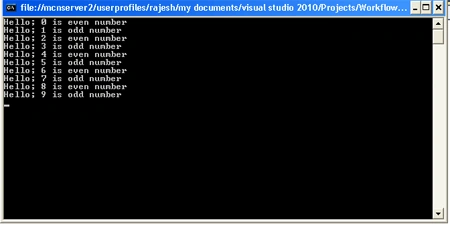
Step 12 : Press F5 and run
the application.
Join the conversation! Your thoughts help the community grow.