

Interpreter Pattern
In this article, I would like to demonstrate the usage of the Interpreter pattern. This is not a widely used pattern but reveals a good way of programming. It describes the creation of a language along with an interpreter for the language. The language can be used to represent states, actions, loops, etc. depending on the programming requirement. Here we use the pattern to resolve a persistence problem.
Challenge
You are working on a Drawing application that allows creating lines and circles on a canvas. The classes Line and Circle do the job for you. You need to communicate the drawing with multiple users who have their own copy of the application. The current persistence of drawing using serialization of the above classes is creating large-sized files and does not allow sending the message over a chat window.
How to provide a better solution for persistence with a smaller size and easier communication?
Definition
"Given a language, define a representation for its grammar along with an interpreter that uses the representation to interpret sentences in the language"
Implementation
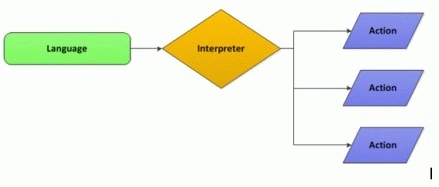
We can use the Interpreter pattern to approach the problem. We need to construct a language to include the commands and an interpreter to execute the actions.
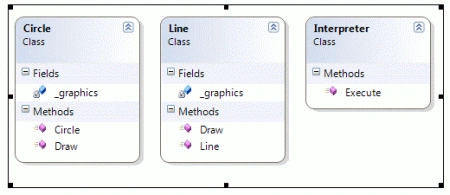
The following are the classes involved in our drawing application.
- A Line Class
- A Circle Class
- An Interpreter Class
The Line and Circle classes provide the drawing functionality. The Interpreter class takes care of converting the commands to the invocation of appropriate line or circle classes.
The Language
The language part could be constituted by a series of sentences. The sentence could be as follows.
| line,10,10,10,10 | Line command stating x, y, width, height |
| circle,10,10,50 | Circle command stating x, y, radius |
Please note that the arguments are separated using commas (,).
The sentence could be separated using semicolons (;) as shown below.
line,60,60,50,0;line,110,110,50,0;
Executing the Application
We can enter the series of commands separated by a semicolon (;). The commands are entered in the application.
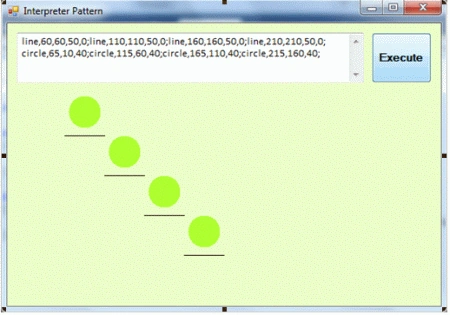
Clicking Execute, you can see the above drawings of lines and circles.
The body of the Interpreter Execute() method is given below.
public void Execute(string commands, Graphics graphics) {
    graphics.Clear(Color.FromA# edfdc8);
    int i = 0;
    foreach(string rawCommand in commands.Split(';')) {
        string command = rawCommand.Replace(Environment.NewLine, string.Empty).Trim();
        if (command.StartsWith("line")) {
            i = 0;
            int x = 0, y = 0, width = 0, height = 0;
            foreach(string argument in command.Split(',')) {
                if (i == 1)
                    x = int.Parse(argument);
                else if (i == 2)
                    y = int.Parse(argument);
                else if (i == 3)
                    width = int.Parse(argument);
                else if (i == 4)
                    height = int.Parse(argument);
                i++;
            }
            new Line(graphics).Draw(x, y, width, height);
        } else if (command.StartsWith("circle")) {
            i = 0;
            int x = 0, y = 0, radius = 0;
            foreach(string argument in command.Split(',')) {
                if (i == 1)
                    x = int.Parse(argument);
                else if (i == 2)
                    y = int.Parse(argument);
                else if (i == 3)
                    radius = int.Parse(argument);
                i++;
            }
            new Circle(graphics).Draw(x, y, radius);
        }
    }
}
Following is the class diagram.
This concludes our application using the Interpreter Pattern. Now the actions could be converted to a language for later interpretation.
Comparison of Command Pattern and Interpreter Pattern
You can find some similarities between the Command and Interpreter patterns. The command pattern talks about converting the actions into commands for logging or undo purposes. Here the commands are objects but for the Interpreter pattern, the commands are sentences.
- Command Pattern: The Command pattern can be used for persisting objects by serializing the command list and results in large-sized files compared with the Interpreter pattern.
- Interpreter Pattern: The Interpreter pattern provides an easier approach in the runtime but comes at the cost of developing an interpreter.
Applications of Interpreter Pattern
You are creating your own Photoshop application. The objects drawn on the layer can be converted to a series of commands. Later the entire drawing could be represented using the command file which will be small in size compared to the entire canvas serialized. You will get the advantage of sending the file to another person where he/she can:
- Regenerate the Drawing
- View all the Draw Actions
- Modify the Draw Action Items
- Undo the last draw actions
References http://www.dofactory.com/Patterns/PatternInterpreter.aspx#_self1
Summary
In this article, we have seen the Interpreter pattern with a small application using it. The above application shows only a simple usage for learning purposes but in real-world scenarios, the language may include loops, conditions, etc. The attachment contains the source code of the application we have discussed.
Jean PaulPosted Apr 25, 2013, 8:24 AM
Thank You Pritam!
pritam chaudharyPosted Apr 25, 2013, 6:14 AM
good
Arjun PanwarPosted Jan 30, 2012, 11:58 AM
Thanks Mr.Jean for this article
Abhi KumarPosted Jan 19, 2012, 11:24 PM
Nice article, Jean.Thanks for sharing.
Sonakshi SinghPosted Jan 19, 2012, 11:06 PM
such a useful article it is Jean...
Daisy KrausePosted Jan 19, 2012, 11:05 PM
You have written your article very nicely. Thanks for sharing it.