

Depending on the Feature Scope, we need to activate it from different locations.
Feature Activation Matrix
The following is the Feature Scope & Activation locations.
|
Scope |
Location |
|
Site |
"SharePoint Site" > "Site Actions" > "Site Settings" > "Manage Site Features" |
|
Site Collection |
"SharePoint Site" > "Site Actions" > "Site Settings" > "Site Collection Features" |
|
Web Application |
"Central Administration" > "Manage Web Applications" > "Manage Features" |
|
Farm |
"Central Administration" > "Manage Farm Features" |
Feature Scopes
As you know we have 4 types of scope:
- Site (web site)
- Site Collection
- Web Application
- Farm
To view it, open your project in Visual Studio & double-click on the Features item from Solution Explorer.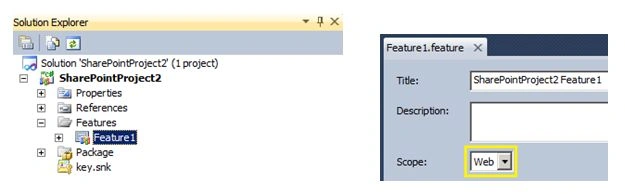
After deploying the solution, you can Activate/Deactivate a feature from the corresponding page.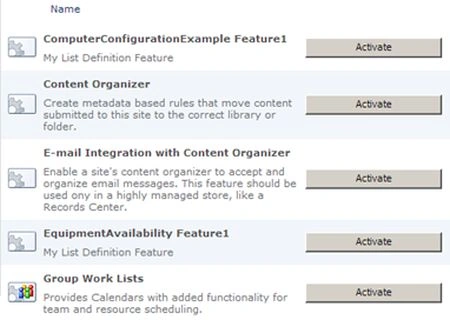
For activating the Site Scoped feature, open the SharePoint site & go to "Site Actions" > "Site Settings" > "Manage Site Features" page.
You can activate or deactivate a corresponding feature.
For activating Site Collection scoped feature, open the SharePoint site collection top-level site & go to "Site Actions" > "Site Settings" > "Site Collection Features" page.
For activating the Farm Scoped feature, open "Central Administraiton" > "Manage Farm Features" page.
For activating the Web Application Scoped feature, open "Central Administraiton" > "Manage Web Applications" page and then select "Web application", "Manage Features" from the Toolbar.
Note: You can also activate features using PowerShell. For more information on Feature Scope & Items, see the References section.
References
http://bit.ly/YMyINQ
Summary
In this article we have explored the Feature Activation locations based on the scope.
Vijay BhaskarPosted Jul 12, 2017, 8:17 AM
Its wonderfull explanation thank you..
Former memberPosted May 26, 2014, 8:41 AM
can i use this in sharepoint foundation 2010, because i am not able to add master page in solution and also not able to see created pages and user controls in features.
Jean PaulPosted Nov 28, 2013, 11:57 AM
You are Welcome Kiran! SP ke aage gold hei.. Continue learning! :)
Kiran Kumar TalikotiPosted Nov 28, 2013, 2:03 AM
Thanks JP.Your articles are helping me a lot..