

This article describes some operations available for Collection Data Sources. In my previous article we saw how easy it is to add a Collection Data Source to our app. A Collection Data Source offers us the following capabilities:
- Adding data row (Insert)
- Editing data row
- Removing data row (Delete)
- Adding Column (Alter)
- Removing Column (Alter)
In the rest of the article we will see how to perform the preceding operations without writing any code.
Adding data row
A Collection Data Source is merely a table. A table consisting of rows and columns. Each column defines an attribute related to our Data Source. Each row in the table defines the value of those attributes. In any table we generally have a fixed number of columns but a large number of rows. In a Collection Data Source we can have a maximum of 40 rows (at least in a beta version). After 40 rows you need to use a new Data Source. Now to add a new Data Source:
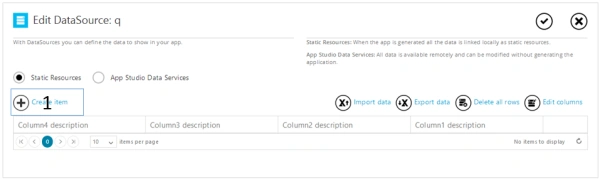
- Open Data Source settings
- Click on create Item
- Fill up your data in all corresponding columns.
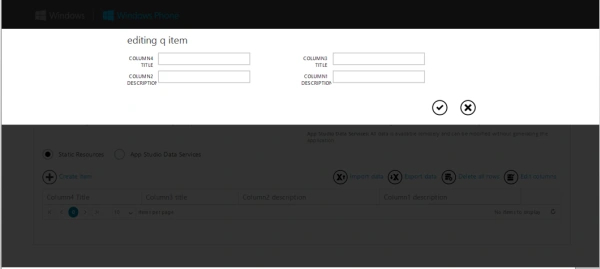
- Click "Save".
Your new row is created. To create more rows, just repeat the preceding steps 2 to 4.
Editing data row
Sometimes it is necessary to edit a row because of some mistake or typo. This is the same as an update operation. To do the data update or to edit data:
- Open the Data Source settings.
- Click on the small pencil icon at the right end of the row.
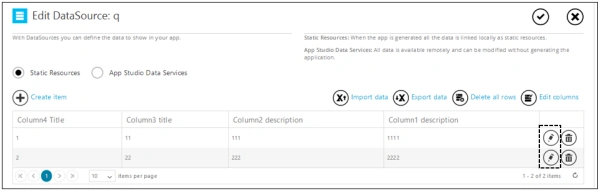
- Edit the data of the column.
- Click "Save".
Deleting the row
To completely remove any row from the table:
- Open the Data Source settings.
- Click on the small dustbin icon at the right end of the row.
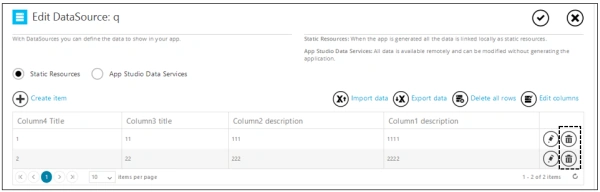
- Done! Now save your settings using "Save changes".
You can also make an entire table vacant in just one click, To remove all the rows:
- Open the Data Source settings.
- Click on the "Delete all rows" icon at the right end of the row.
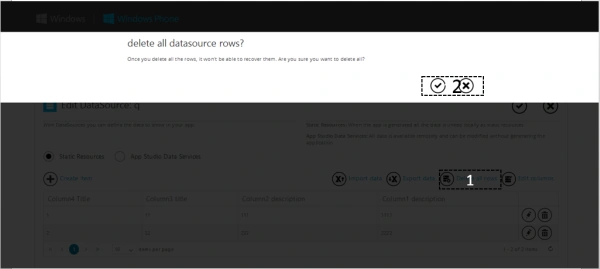
- Click "Checkmark" to confirm the deletion or "Cross" to reject the operation.
- Click "Save changes" to save the Data Source settings.
Adding columns
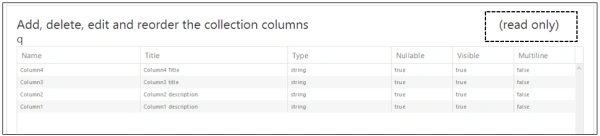
Consider a case in which you have created your Data Source for book management and forgot to add an "author email" column. Later after filling in the database the requirement arises that it is a mandatory field. So now the challenge is on! You can't add the column in your Data Source if it has some established data bindings. Your schema will be shown as read only if it has some established bindings or it has some rows added already. So the pont of the preceding example is, design your Data Source carefully before you start populating it.
To add a column in a newly added Data Source:
- Open Data Source settings.
- Click on the "Edit columns" icon at the right end of the table.
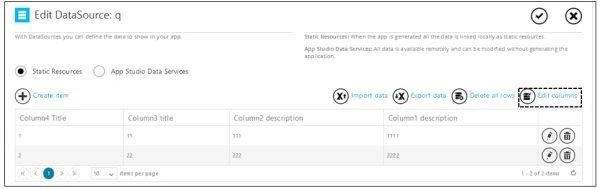
- Click on the "Add new column" at the top left corner of the table to add a new column.
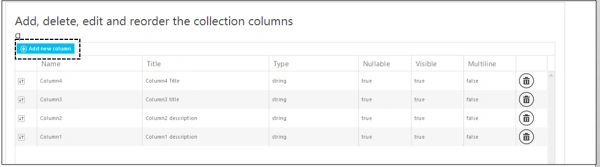
- Fill out the newly added column properties.
- If you see "read only" in the upper right then that implies that some problem exists with your Data Source and you need to re-visit the preceding paragraph.
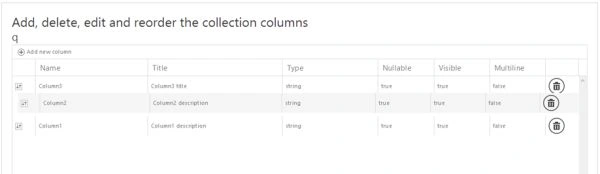
- If you want to rearrange the columns then you can use the "Drag to reorder columns" button on the left of the column's row.
- Click "Save" to save the changes.
Column properties
- Name: Column name that will be shown in the data binding list. No connection with app UI. It is used in data binding for referring to a specific column.
- Title: Refers to the column title of s Data Source table. No connection with the app UI.
- Type: Type of column. Choose the type on the basis of data you want to store in that column. You can choose from string, address, album, song, email, and so on from the drop-down menu.
- Nullable: Set it to true if it can be left without data else set it to false.
- Visible: To set the visibility of a column in a table. Keep it to "true" for general use.
- Multiline: To allow multiline text.
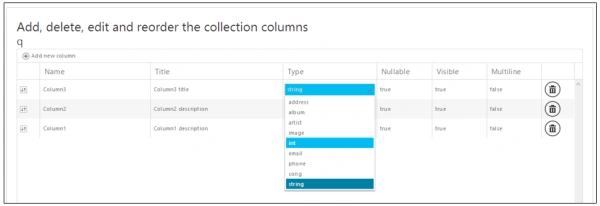
A maximum of 20 columns are possible in one table.
Removing columns
You can also delete columns from a Data Source.
- Open the Data Source settings.
- Click on the "Edit columns" icon at the right end of the table.
- Click on the "dustbin" icon at the right side of the row to delete that column.
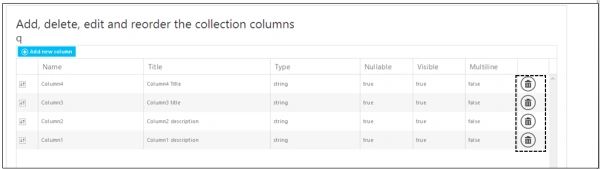
- Click "Save".
Some warnings
- You can't delete a column having data bindings set.
- You can't delete the column if the table contains data.
Summary
In this article we learned about some operations that are available in a Collection Data Source. In my next article we will see how to import data from and export data to a Data Source. Finally, don't forget to comment and share this article. In the case of any doubt feel free to ask in the comment section.
Mahesh ChandPosted Dec 30, 2013, 1:54 PM
Is this Windows Phone app or Windows 8? If it is Windows Phone, may be you move it to Windows Phone category.