

This article shows how to load on-demand data into a Webgrid on a scroll using ASP.Net and jQuery AJAX.
You have certainly visited various Ecommerce sites where you can see the list of products as you scroll the page looking for more products. New products are loaded when scrolliing down. In a similar way I am showing you how to do that with webgrid.
Procedure
- First let's begin with the database.
- Second create the project.
- Third work with the model and also Dapper for simple data retrieving.
- Fourth work with the Controller .
- Fifth work with the View, Ajax and Webgrid.
Database
- I am using the Database ( [AdventureWorksLT2008R2] ) for the demo.
- You can easily download it from the Microsoft website.
AdventureWorks Databases – 2012, 2008R2 and 2008
- Inside that database I am using the table “ [SalesLT].[Customer] ” .
- Along with this article I will provide you a table and SqlScript.
Table
The following is a snapshot of the Customer table.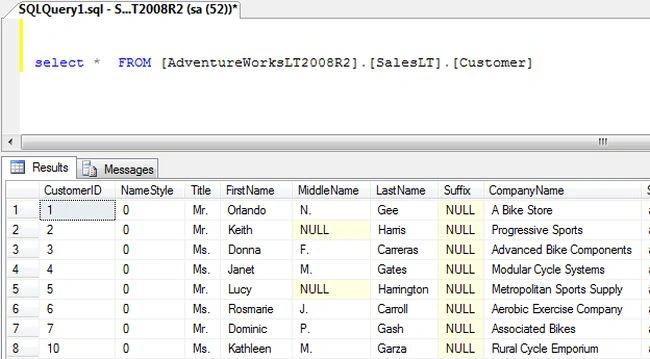
Stored Procedure
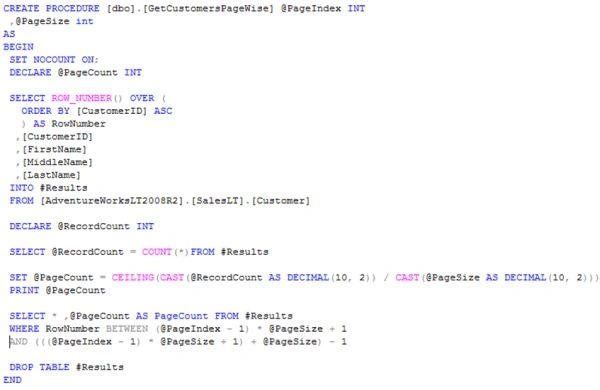
- And the Stored Procedure used for retrieving the data by pages.
- The following is a snapshot of the GetCustomersPagewise Stored Procedure.
- Completed database part.
- After completing the database part we will do the coding part.
Creating Project
- Let's start creating a new ASP.Net MVC 4 application.
- For creating the ASP.Net MVC 4 Application select "File" -> "New" -> "Project...".
- After that a new wizard will popup for New Projects.
- Select the Installed panel; inside that there is a Templates panel.
- Select Visual C# then inside that select Web.
- In the center block you will see all the ASP.NET and MVC Templates. From that just select “ASP.NET MVC 4 Web Application”.
- Specify the project name as “RowonDemandin_Webgrid”.
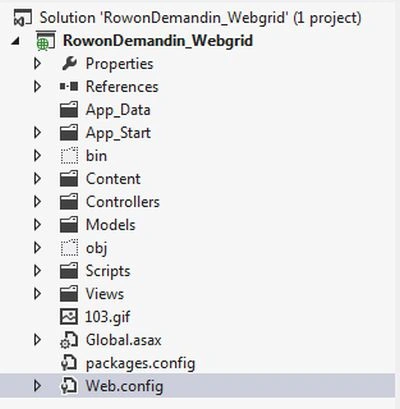
- Now we have successfully created the project.
Model
- Now let's start creating the Model.
- Adding a new Model with the name “MemberDetails”.
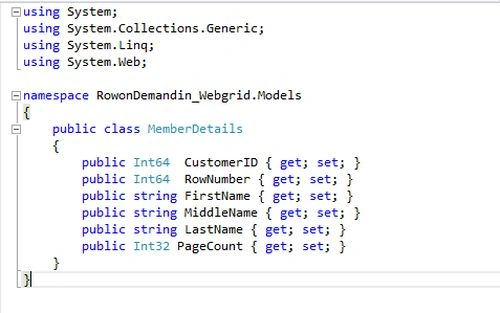
- In this Model I am using only those fields that are required for displaying in the Webgrid.
- The following is a snapshot of the Model “MemberDetails”.
- After completing the adding of the Model I will now add another class with the name “SelectMember“. I will add this class for getting data from the database using Dapper.
- After adding a Model you will see like this View in the project.

- Now in the “SelectMember“ class I will add a sqlConnection String to get data from the database.
- SqlConnection con = new SqlConnection(ConfigurationManager.ConnectionStrings["DBstring"].ToString());
- After adding the sqlconnection now add a method inside this class.
- This IEnumerable method is of type MemberDetails ( IEnumerable<MemberDetails> ) with two input parameters.
- public IEnumerable<MemberDetails> GetallMemberlist(int pageIndex, int pageSize)
- {
- }
- Inside this method I am using dynamic parameters for passing a parameter to a Stored Procedure.
- There are 2 dynamic parameters used.
- var para = new DynamicParameters();
- para.Add("@PageIndex", pageIndex);
- para.Add("@PageSize", pageSize);
- Now, after adding parameters the main Dapper retrieving comes here.
- var employees = con.Query<MemberDetails>("GetCustomersPageWise", para,commandType: CommandType.StoredProcedure);
- This is the way to retrieve List data from a database using Dapper with a Stored Procedure. This Con.Query <MemberDetails> will return an IEnumerable list of type MemberDetails.
- And storing the complete output into the Var employee variable.
- The following is a snapshot of the Model “SelectMember”.
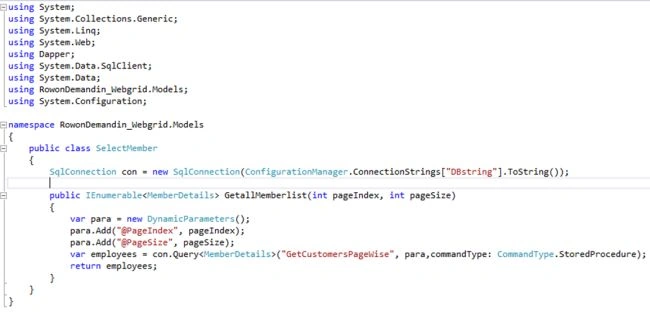
- In the last part of this method I am just returning an employee in which the entire list was stored.
- We have now completed the Model part. Now let's move to the controller part.
Controller part
Let us start this part by adding a new controller with the name “MemberController” then you will see a similar view in your project.
- After adding the controller, you will only find an ActionResult of type Index just returning a view.
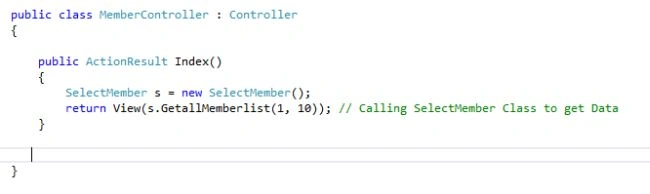
- Now I want to get the list that we created in the class MemberDetails into the Controller. To get that I created an object of “SelectMember” for calling the method inside it and passed 2 Parameters.
- This will be bound when the user hits this MemberController.
- The following is a snapshot of the Controller.
View part
- Now let's add a View to this method.
- Just right-click inside the Controller.
- A popup wizard will appear.
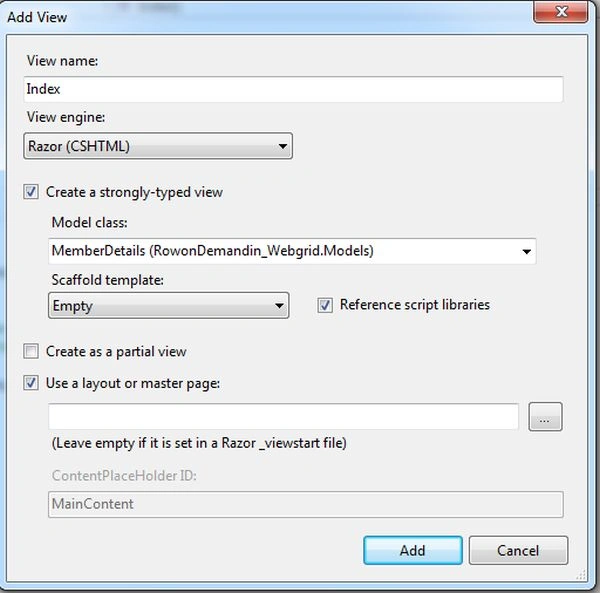
- Inside this just keep the name as it is.
- And in the Model class select the Model “MemberDetails” that we created.
- Just click Add.
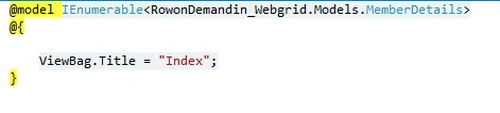
- After adding, you will only see this part.
- After adding the Webgrid to the View the View will look as in the following:
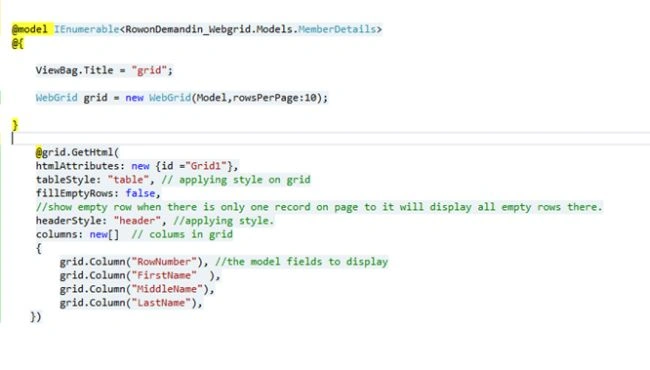
- Now you can run and check it; you will see a normal web grid only.
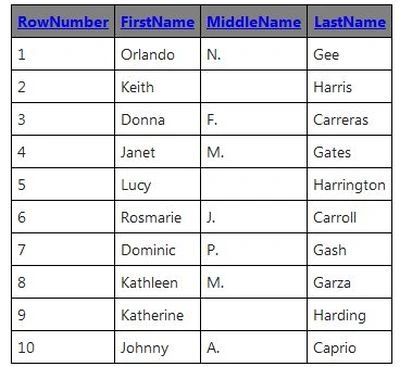
- Now this is a normal grid, that is displayed here we want rows on demand as we scroll our grid for that I will be using jQuery Ajax and Jsonresult.
- Now first I will add a JSON result for getting the data as we scroll our grid it will call this Jsonresult and depending on parameters it will load data.
- The following is a Snapshot of the Controller.
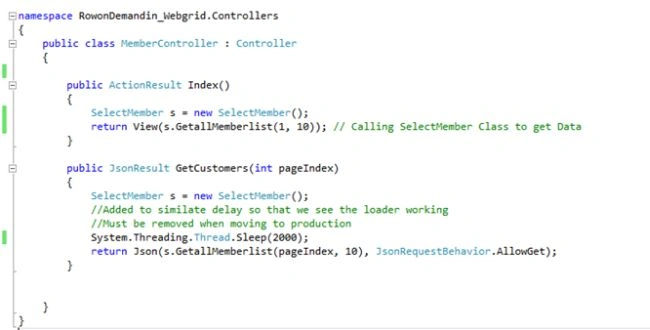
- Here is the JSON result that is created with the name GetCustomer with the parameter Pageindex as input to it.
- Inside this use threading to make the effect of loading data.
- We are calling the same method that we called in the ActionResult Index. But here we are passing “Pageindex” from JSON on the scroll of the grid.
- This jsonresult will return the Data in JSON format to the client script.
- Now let's create the client script.
- Before that, let's add a Div to the Webgrid.
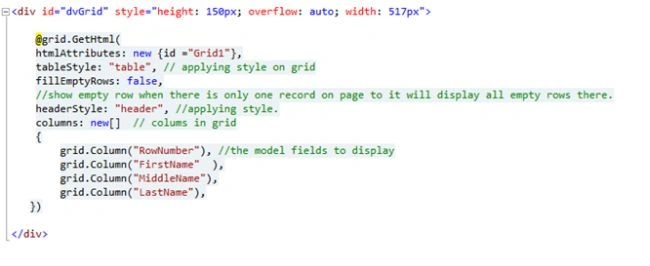
- After adding the div with height and width let's do some scripting.
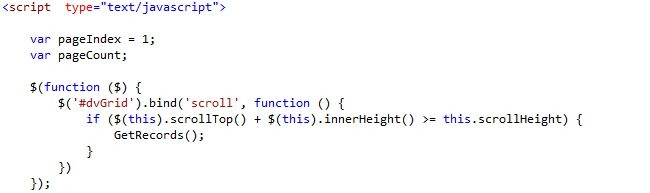
- In the following script I have bound a Scroll to a Div tag. Load the Webgrid rows when the DIV is scrolled.
- In this part of the script I have just appended an image at the bottom of the webgrid (show loader). And below that there is an ajax method where I am posting a “pageindex” to jsonresult as Input. And the URL that we use in this is: "/Member/GetCustomers".
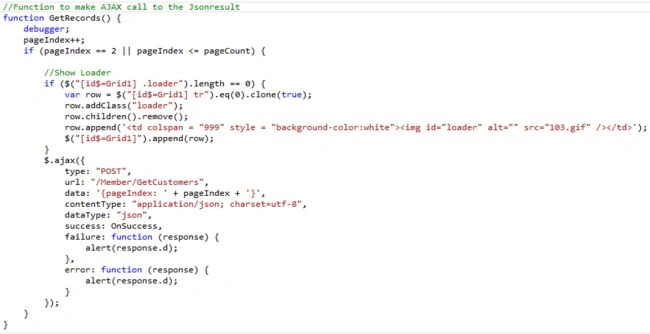
For success I have written another function called Onsuccess.
- In this last function below with the name Onsuccess I am removing the loader because I want to add rows below it.
Using the Response that I am getting from the Jsonresult we need to add rows to the grid for that I had use the .append function and inside that I created a table rows and columns using <tr> <td> and inside that added data that we need to display using “ + dataval.MiddleName + ”.
Finally assigning a data value from the database to JSON pagecount variable and hiding the loader.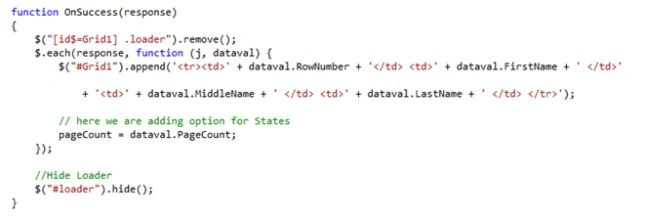
Now we have completed everything, just run the application and check it.
You can download the entire code and check for any issues.
Final output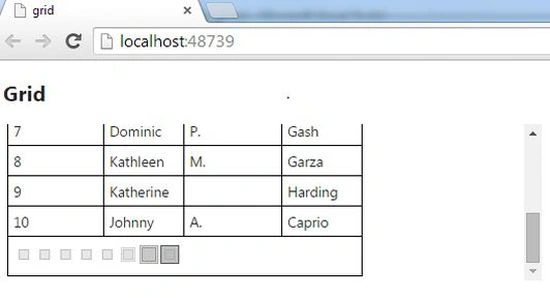
Rahul SharmaPosted Apr 27, 2017, 1:26 PM
Hi Sain, I just want to load rows without scrolling the div, then at what event GetRecords method will be called?
Prashant MishraPosted May 3, 2016, 10:54 AM
Or can refresh webgrid only for particular page using page index so that can retain paging and sorting. Please reply ASAP if possible.
Prashant MishraPosted May 3, 2016, 10:51 AM
Can we preserve sorting and paging in webgrid in between form reload
Ajay KadamPosted Jan 12, 2016, 2:08 AM
http://stackoverflow.com/questions/8209279/mvc3-webgrid-creating-columns-dynamically-foreach is not working please share if you have implemented dynamic column in webgrid
Ajay KadamPosted Jan 11, 2016, 5:40 AM
Saineshwar Bageri Sir in your example why are you not using database first entity framework for entity creation???
Ajay KadamPosted Jan 11, 2016, 4:05 AM
thanks sir..
Ajay KadamPosted Jan 8, 2016, 8:05 AM
please refer above question for MVC only..
Ajay KadamPosted Jan 8, 2016, 8:02 AM
Sir how to add dynamic data from database having more than 100 column into grid of any type like jqxgrid, mvc grid, Whose columns are not fix...???? Please help
Saineshwar BageriPosted Dec 1, 2014, 2:03 AM
thanks Ramchand sir
Ramchand RepallePosted Oct 30, 2014, 5:42 AM
Good one...