

Class in TypeScript
A class declaration declares a class instance type and a constructor function, both with the name given by Identifier, in the containing module. The class instance type is created from the instance members declared in the class body and the instance members inherited from the base class. The constructor function is created from the constructor declaration, the static member declarations in the class body, and the static members inherited from the base class.
The constructor function initializes and returns an instance of the class instance type.
The following example shows how to create and use a class in TypeScript. The example prints "Hello C-sharp corner user....!".
Coding
classdemo.ts
- class Greeter {
- greeting: string;
- constructor(message: string) {
- this.greeting = message;
- }
- greet() {
- return "Hello, " + this.greeting;
- }
- }
- var greeter = new Greeter("C-sharpcorner user.....!");
- var button = document.createElement('button')
- button.onclick = function() {
- alert(greeter.greet())
- }
- document.body.appendChild(button)
classdemo.html
- <html>
- <head></head>
- <body>
- <h1>TypeScript Class Example</h1>
- <script>var Greeter = (function () {
- function Greeter(message) {
- this.greeting = message;
- }
- Greeter.prototype.greet = function () {
- return"Hello, " + this.greeting;
- };
- return Greeter;
- })();
- var greeter = new Greeter("C-sharpcorner user.....!");
- var button = document.createElement('button');
- button.textContent = "Click On Me";
- button.onclick = function () {
- alert(greeter.greet());
- };
- document.body.appendChild(button);
- </script>
- </body>
- </html>
app.js
- var Greeter = (function() {
- function Greeter(message) {
- this.greeting = message;
- }
- Greeter.prototype.greet = function() {
- return "Hello, " + this.greeting;
- };
- return Greeter;
- })();
- var greeter = new Greeter("C-sharpcorner user.....!");
- var button = document.createElement('button');
- button.onclick = function() {
- alert(greeter.greet());
- };
- document.body.appendChild(button);
The output looks like the following:
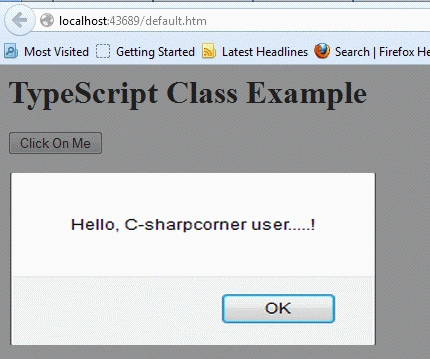
In this simple code example, we saw how to declare and use a class in TypeScript.
Join the conversation! Your thoughts help the community grow.