

Introduction
In this article, I will explain the best way to implement a simple login form to check account information details of a user within a database. If the user details exist in the database then we should instead redirect the user to a Welcome page otherwise we should instead display "Invalid Username/Password". This is very common for all websites before allowing access to it.
Note: This program will work only on Internet Explorer.
First I have created a database EmpDetail then I created a table in this database.
Query Code
- CREATE TABLE [dbo].[LoginDetail](
- [Username] [varchar](50) NULL,
- [Passwrd] [varchar](50) NULL
- ) ON [PRIMARY]
Now insert some data into the LoginDetail table.
Complete Program
SignIn_Page_in_javascript.htm
- <!DOCTYPE html PUBLIC "-//W3C//DTD XHTML 1.0 Transitional//EN" "http://www.w3.org/TR/xhtml1/DTD/xhtml1-transitional.dtd">
- <html xmlns="http://www.w3.org/1999/xhtml">
- <head>
- <title></title>
- <script type="text/javascript">
- function LoginFn()
- {
- var a = 0;
- var txtuname = document.getElementById('txtusername').value;
- var txtpwd = document.getElementById('txtpasswrd').value;
- if (txtuname.length != 0 && txtpwd.length != 0)
- {
- var connection = new ActiveXObject("ADODB.Connection");
- var connectionstring = "Data Source=MCNDESKTOP20;Initial Catalog=EmpDetail;uid=sa;pwd=******;Provider=SQLOLEDB";
- connection.Open(connectionstring);
- var rs = new ActiveXObject("ADODB.Recordset");
- rs.Open("select * from LoginDetail where Username='" + txtuname + "' and Passwrd='" + txtpwd + "'", connection);
- while (!rs.eof)
- {
- alert("Welcome to "+txtuname+"\n you are successfully login");
- a = 1;
- rs.MoveNext();
- }
- if (a == 0)
- {
- alert("Invalid UserName and Password");
- }
- rs.close();
- connection.close();
- }
- else
- {
- alert("Please Enter Values in TextBox ");
- }
- }
- function CancelFn()
- {
- txtpasswrd.innerText = "";
- txtusername.innerText="";
- }
- </script>
- <style type="text/css">
- #main {
- height: 264px;
- }
- </style>
- </head>
- <body>
- <fieldset style="font-size: medium; color: #000000;">
- <legend style="background-color: Aqua; font-size: larger">Sign In Page</legend>
- <br />
- <b>UserName</b>
- <input id="txtusername" type="text" /><br />
- <br />
- <b>Password</b>
- <input id="txtpasswrd" type="password" /><br />
- <br />
- <input id="login" type="button" value="Login" onclick="LoginFn()" />
- <input id="cancel" type="button" value="Cancel" onclick="CancelFn()" />
- </fieldset>
- </body>
- </html>
Output 1
Enter Username and password:
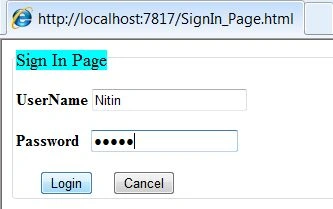
Click on the "Login" button:
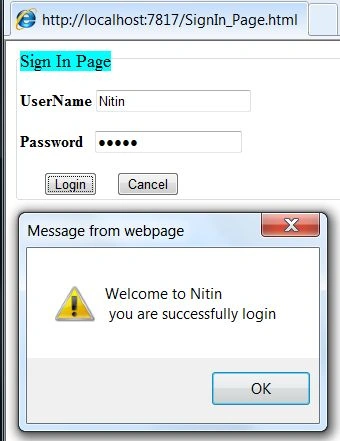
Output 2
If we click on the Login button without entering anything in the TextBox then:


Output 3
If we enter the wrong UserName or Password then:
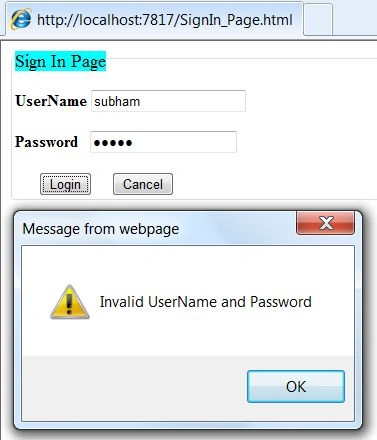
Output 4
If you type the wrong UserName and Password and then click on the "Cancel" button:

After clicking on the Cancel button:

For more information, download the attached sample application.
Join the conversation! Your thoughts help the community grow.