

Today, in this article let's play around by implementing an interesting concept often used on a day-to-day basis in Windows Phone. This concept is highly useful for people who become involved with sharing messages across social networking sites. This article clearly demonstrates necessary information conveying to the reader actual illustrations and work with real-time scenarios that they come across when asked to use ShareStatusTask.
So, let's get it started off now.
The Complete Code of IService1.cs looks like this:
using System;
using System.Collections.Generic;
using System.Linq;
using System.Runtime.Serialization;
using System.ServiceModel;
using System.ServiceModel.Web;
using System.Text;
namespace Share_Status_App_WCF
{
// NOTE: You can use the "Rename" command on the "Refactor" menu to change the interface name "IService1" in both code and config file together.
[ServiceContract]
public interface IService1
{
[OperationContract]
string Status(string a);
}
}
The Complete Code of Service1.svc.cs looks like this:
using System;
using System.Collections.Generic;
using System.Linq;
using System.Runtime.Serialization;
using System.ServiceModel;
using System.ServiceModel.Web;
using System.Text;
namespace Share_Status_App_WCF
{
// NOTE: You can use the "Rename" command on the "Refactor" menu to change the class name "Service1" in code, svc and config file together.
public class Service1 : IService1
{
public string Status(string a)
{
return "" + a;
}
}
}
The Complete Code of Web.Config looks like this:
<?xml version="1.0"?>
<configuration>
<system.web>
<compilation debug="true" targetFramework="4.0" />
</system.web>
<system.serviceModel>
<behaviors>
<serviceBehaviors>
<behavior>
<!-- To avoid disclosing metadata information, set the value below to false and remove the metadata endpoint above before deployment -->
<serviceMetadata httpGetEnabled="true"/>
<!-- To receive exception details in faults for debugging purposes, set the value below to true. Set to false before deployment to avoid disclosing exception information -->
<serviceDebug includeExceptionDetailInFaults="false"/>
</behavior>
</serviceBehaviors>
</behaviors>
<serviceHostingEnvironment multipleSiteBindingsEnabled="true" />
</system.serviceModel>
<system.webServer>
<modules runAllManagedModulesForAllRequests="true"/>
</system.webServer>
</configuration>
The Complete Code of MainPage.xaml looks like this:
<phone:PhoneApplicationPage
x:Class="ShareStatus_Task.MainPage"
xmlns="http://schemas.microsoft.com/winfx/2006/xaml/presentation"
xmlns:x="http://schemas.microsoft.com/winfx/2006/xaml"
xmlns:phone="clr-namespace:Microsoft.Phone.Controls;assembly=Microsoft.Phone"
xmlns:shell="clr-namespace:Microsoft.Phone.Shell;assembly=Microsoft.Phone"
xmlns:d="http://schemas.microsoft.com/expression/blend/2008"
xmlns:mc="http://schemas.openxmlformats.org/markup-compatibility/2006"
mc:Ignorable="d" d:DesignWidth="480" d:DesignHeight="768"
FontFamily="{StaticResource PhoneFontFamilyNormal}"
FontSize="{StaticResource PhoneFontSizeNormal}"
Foreground="{StaticResource PhoneForegroundBrush}"
SupportedOrientations="Portrait" Orientation="Portrait"
shell:SystemTray.IsVisible="True">
<!--LayoutRoot is the root grid where all page content is placed-->
<Grid x:Name="LayoutRoot" Background="Transparent">
<Grid.RowDefinitions>
<RowDefinition Height="Auto"/>
<RowDefinition Height="*"/>
</Grid.RowDefinitions>
<!--TitlePanel contains the name of the application and page title-->
<StackPanel x:Name="TitlePanel" Grid.Row="0" Margin="12,17,0,28">
<TextBlock x:Name="ApplicationTitle" Text="Vijay Share Status Application" FontFamily="Verdana" FontSize="22" Style="{StaticResource PhoneTextNormalStyle}"/>
<TextBlock x:Name="PageTitle" Text="Windows 7 Phone" Margin="9,-7,0,0" Style="{StaticResource PhoneTextTitle1Style}"/>
</StackPanel>
<!--ContentPanel - place additional content here-->
<Grid x:Name="ContentPanel" Grid.Row="1" Margin="12,0,12,0">
<TextBlock Height="30" FontFamily="Verdana" FontSize="22" HorizontalAlignment="Left" Margin="128,41,0,0" Name="textBlock1" Text="Please Enter Status" VerticalAlignment="Top" />
<TextBox Height="72" HorizontalAlignment="Left" Margin="105,96,0,0" Name="textBox1" VerticalAlignment="Top" Width="277" />
<Button Content="Button" Height="72" HorizontalAlignment="Left" Margin="165,197,0,0" Name="button1" VerticalAlignment="Top" Width="160" Click="button1_Click" />
<TextBlock Height="30" Margin="58,312,6,0" Name="textBlock2" VerticalAlignment="Top" FontFamily="Verdana" FontSize="22" />
</Grid>
</Grid>
<!--Sample code showing usage of ApplicationBar-->
<!--<phone:PhoneApplicationPage.ApplicationBar>
<shell:ApplicationBar IsVisible="True" IsMenuEnabled="True">
<shell:ApplicationBarIconButton IconUri="/Images/appbar_button1.png" Text="Button 1"/>
<shell:ApplicationBarIconButton IconUri="/Images/appbar_button2.png" Text="Button 2"/>
<shell:ApplicationBar.MenuItems>
<shell:ApplicationBarMenuItem Text="MenuItem 1"/>
<shell:ApplicationBarMenuItem Text="MenuItem 2"/>
</shell:ApplicationBar.MenuItems>
</shell:ApplicationBar>
</phone:PhoneApplicationPage.ApplicationBar>-->
</phone:PhoneApplicationPage>
The Complete Code of MainPage.xaml.cs looks like this:
using System;
using System.Collections.Generic;
using System.Linq;
using System.Net;
using System.Windows;
using System.Windows.Controls;
using System.Windows.Documents;
using System.Windows.Input;
using System.Windows.Media;
using System.Windows.Media.Animation;
using System.Windows.Shapes;
using Microsoft.Phone.Controls;
using Microsoft.Phone.Tasks;
using Microsoft.Phone.Shell;
using ShareStatus_Task.ServiceReference1;
namespace ShareStatus_Task
{
public partial class MainPage : PhoneApplicationPage
{
// Constructor
public MainPage()
{
InitializeComponent();
}
PhoneApplicationService objPhone = PhoneApplicationService.Current;
private void button1_Click(object sender, RoutedEventArgs e)
{
if (textBox1.Text == "")
{
textBlock2.Text = "Please Enter Status";
textBlock2.Foreground = new SolidColorBrush(Colors.Red);
}
else
{
Service1Client objClient = new Service1Client();
objClient.StatusCompleted += new EventHandler<StatusCompletedEventArgs>(StatusCall);
objClient.StatusAsync(textBox1.Text);
}
}
static void StatusCall(object sender, StatusCompletedEventArgs e)
{
ShareStatusTask objTask = new ShareStatusTask();
objTask.Status = e.Result;
objTask.Show();
}
protected override void OnNavigatedTo(System.Windows.Navigation.NavigationEventArgs e)
{
object sample;
if (objPhone.State.TryGetValue("statusp", out sample))
textBox1.Text = sample as string;
base.OnNavigatedTo(e);
}
protected override void OnNavigatedFrom(System.Windows.Navigation.NavigationEventArgs e)
{
objPhone.State["statusp"] = textBox1.Text;
base.OnNavigatedFrom(e);
}
}
}
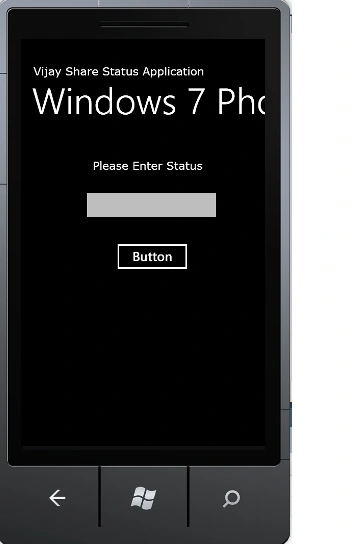
The Output of the Application looks like this:
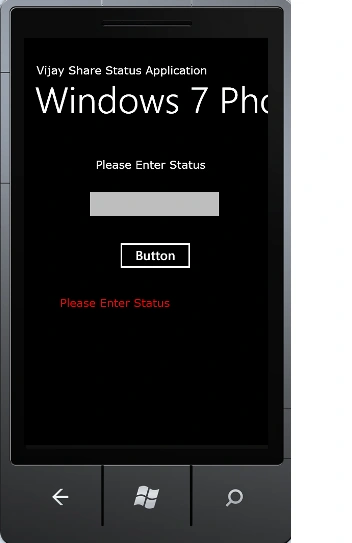
The Nothing Entered Output of the Application looks like this:
I hope this article is useful for you. I look forward to your comments and feedback.
Arjun PanwarPosted Jan 28, 2012, 11:55 PM
Really this article is so nice