

Named and Optional Arguments
Today, Let's see the one of the main feature of C# 4.0 i.e. Named and Optional
arguments. Firstly, we will do theory based session to understand this and later
we will try to implement these concepts. This concept is very useful and we can
code in much organized way using these two arguments.
Named Arguments:
The Named Arguments allows us to code in such a manner where we can specify our
arguments of particular calling function as per our requirement, This provides a
greater flexibility for us to access and organize the code to prioritize and
keep the parameters in any fashion rather than a simple static way as per method
structure.
Optional Arguments:
The Optional Arguments allows us to code in such a manner where we can specify
some default values to the parameters of particular method. It provides a
greater flexibility for us to access and organize the code when the method is
invoked, it's optionally chooses some default values if the user does the
specify values for other parameters. It will only choose the values optionally
for such parameters where it has been already initialized in the method. So,
this argument helps in better way to pass on some default values for particular
method where ever it is been invoked.
Now, firstly we will see clear Implementation of how to perform Named Arguments
Operation:
Code Toolbox Requirement:
- 3 TextBoxes, 3 Buttons and 3 Labels.
The Named Argument Method is declared with
some parameters:
protected void
NamedArguments(string Name,
string Position, int
Age)
{
}
In the case 1:
We are Passing the Parameters as per declared similar in the method with Name,
Position and Age. Where the code for this looks like this:
NamedArguments(Name:
TextBox1.Text, Position: TextBox2.Text, Age: Convert.ToInt32(TextBox3.Text));
Label1.Text = "<strong>Name: </strong> "
+ TextBox1.Text;
Label1.ForeColor = System.Drawing.Color.Brown;
Label2.Text = "<strong>Position: </strong> "
+ TextBox2.Text;
Label2.ForeColor = System.Drawing.Color.Brown;
Label3.Text = "<strong>Age: </strong> " +
TextBox3.Text;
Label3.ForeColor = System.Drawing.Color.Brown;
In the case 2:
We are Passing the Parameters as per declared similar in the method with
Position, Name and Age. Where the code for this looks like this:
NamedArguments(Position: TextBox1.Text, Name: TextBox2.Text, Age:
Convert.ToInt32(TextBox3.Text)); Label1.Text
= "<strong>Position: </strong> " +
TextBox1.Text;
Label1.ForeColor = System.Drawing.Color.Brown;
Label2.Text = "<strong>Name: </strong> "
+ TextBox2.Text;
Label2.ForeColor = System.Drawing.Color.Brown;
Label3.Text = "<strong>Age: </strong> " +
TextBox3.Text;
Label3.ForeColor = System.Drawing.Color.Brown;
In the case 3:
We are Passing the Parameters as per declared similar in the method with Age,
Name and Position. Where the code for this looks like this:
NamedArguments(Age:
Convert.ToInt32(TextBox1.Text), Name:
TextBox2.Text, Position: TextBox3.Text);
Label1.Text = "<strong>Age: </strong> " +
TextBox1.Text;
Label1.ForeColor = System.Drawing.Color.Brown;
Label2.Text = "<strong>Name: </strong> "
+ TextBox2.Text;
Label2.ForeColor = System.Drawing.Color.Brown;
Label3.Text = "<strong>Position: </strong> "
+ TextBox3.Text;
Label3.ForeColor = System.Drawing.Color.Brown;
Now, we are done with Named Arguments as we have passed the parameters as per
our requirements regardless of position based in normal static way. Now, it's
time for use to go and implement Optional Arguments.
The code logic for optional arguments looks like this where we specify some
default values and if the user does not pass any values the default values will
be invoked automatically.
protected
int OptionalArguments(int
x, int y = 10, int
z = 5)
{
return x + y + z;
}
Only specified value for X parameters like this:
Response.Write("<b><center>The
Sum of the three Numbers are <h1>" +
OptionalArguments(x: 25) + "</h1></b></center>");
The values specified for three parameters looks like this:
Response.Write("<b><center>The
Sum of the three Numbers are <h1>" +
OptionalArguments(x: 25, y:22, z: 10) + "</h1></b></center>");
So, the Complete Code of WebForm1.aspx looks like this:
<%@
Page Language="C#"
AutoEventWireup="true"
CodeBehind="WebForm1.aspx.cs"
Inherits="Named_and_Optional_Arguments.WebForm1"
%>
<!DOCTYPE html PUBLIC "-//W3C//DTD XHTML 1.0 Transitional//EN" "http://www.w3.org/TR/xhtml1/DTD/xhtml1-transitional.dtd">
<html
xmlns="http://www.w3.org/1999/xhtml">
<head
id="Head1" runat="server">
<title></title>
</head>
<body>
<form
id="form1" runat="server">
<div><center>
Please Enter
Values Here: <asp:TextBox
ID="TextBox1"
runat="server"></asp:TextBox>
<br
/>
<br
/>
Please Enter Values Here:
<asp:TextBox
ID="TextBox2"
runat="server"></asp:TextBox><br
/>
<br
/>
Please Enter Values Here:
<asp:TextBox
ID="TextBox3"
runat="server"></asp:TextBox>
</center>
<center>
<asp:Button
ID="Button1" runat="server"
Text="Case 1 "
onclick="Button1_Click"
/><br
/>
<br
/>
<asp:Button
ID="Button2" runat="server"
Text="Case 2 "
onclick="Button2_Click"/><br
/><br
/>
<asp:Button ID="Button3" runat="server" Text="Case 3 " onclick="Button3_Click"/><br /><br />
</center>
<center>
<asp:Label
ID="Label1" runat="server"></asp:Label><br
/>
<br
/>
<asp:Label
ID="Label2" runat="server"></asp:Label><br
/>
<br
/>
<asp:Label
ID="Label3" runat="server"></asp:Label><br
/>
<br
/>
</center>
</div>
</form>
</body>
</html>
The Complete Code of WebForm1.aspx.cs looks like this:
using
System;
using
System.Collections.Generic;
using
System.Linq;
using
System.Web;
using
System.Web.UI;
using
System.Web.UI.WebControls;
namespace
Named_and_Optional_Arguments
{
public partial
class WebForm1
: System.Web.UI.Page
{
protected void
Page_Load(object sender, EventArgs e)
{
Response.Write("<b><center>The Sum of
the three Numbers with X specified value only <h1>" + OptionalArguments(x:
25) + "</h1></b></center>");
Response.Write("<b><center>The Sum of
the three Numbers are <h1>" + OptionalArguments(x: 25, y: 22, z: 10) +
"</h1></b></center>");
}
protected void
NamedArguments(string Name,
string Position, int
Age)
{
}
protected int
OptionalArguments(int x,
int y = 10, int
z = 5)
{
return x + y + z;
}
protected void
Button1_Click(object sender, EventArgs e)
{
NamedArguments(Name: TextBox1.Text, Position: TextBox2.Text, Age:
Convert.ToInt32(TextBox3.Text));
Label1.Text = "<strong>Name: </strong> "
+ TextBox1.Text;
Label1.ForeColor = System.Drawing.Color.Brown;
Label2.Text = "<strong>Position:
</strong> " + TextBox2.Text;
Label2.ForeColor = System.Drawing.Color.Brown;
Label3.Text = "<strong>Age: </strong> "
+ TextBox3.Text;
Label3.ForeColor = System.Drawing.Color.Brown;
}
protected void
Button2_Click(object sender, EventArgs e)
{
NamedArguments(Position: TextBox1.Text, Name: TextBox2.Text, Age:
Convert.ToInt32(TextBox3.Text));
Label1.Text = "<strong>Position:
</strong> " + TextBox1.Text;
Label1.ForeColor = System.Drawing.Color.Brown;
Label2.Text = "<strong>Name: </strong> "
+ TextBox2.Text;
Label2.ForeColor = System.Drawing.Color.Brown;
Label3.Text = "<strong>Age: </strong> "
+ TextBox3.Text;
Label3.ForeColor = System.Drawing.Color.Brown;
}
protected void
Button3_Click(object sender, EventArgs e)
{
NamedArguments(Age: Convert.ToInt32(TextBox1.Text), Name:
TextBox2.Text, Position: TextBox3.Text);
Label1.Text = "<strong>Age: </strong> "
+ TextBox1.Text;
Label1.ForeColor = System.Drawing.Color.Brown;
Label2.Text = "<strong>Name: </strong> "
+ TextBox2.Text;
Label2.ForeColor = System.Drawing.Color.Brown;
Label3.Text = "<strong>Position:
</strong> " + TextBox3.Text;
Label3.ForeColor = System.Drawing.Color.Brown;
}
}
}
The Output of this application looks like this:
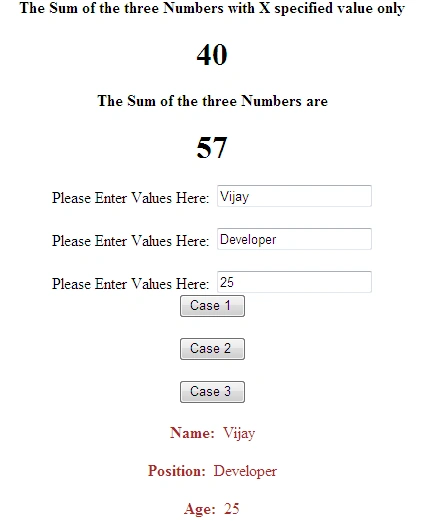
For Case 1 :
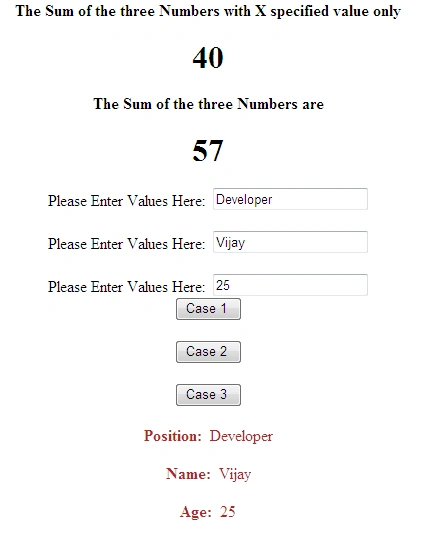
For Case 2:
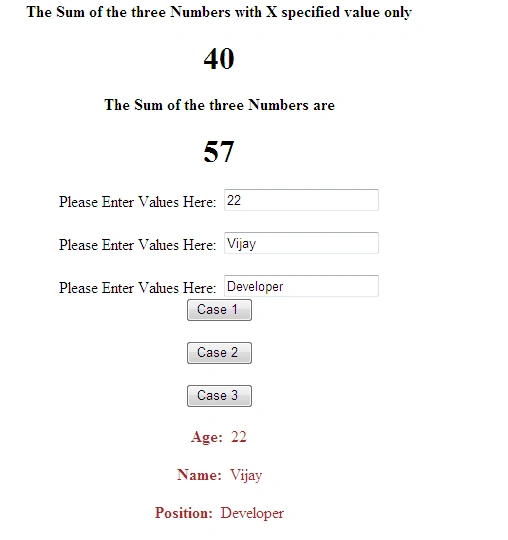
For Case 3:

I hope this article is useful for you.
James VeronicaPosted Dec 6, 2011, 11:55 PM
Nice Post
Alok PandeyPosted Dec 6, 2011, 11:48 PM
Good Article.