

Introduction
Today, in this article let's play around with one of the interesting and most useful concepts in SharePoint 2010.
Question: What is Site Action Menu?
In simple terms "It enables creation of a menu item with some action in the site actions menu using an empty element".
Step 1: Open SharePoint 2010 Central Administration and navigate to a specific site.
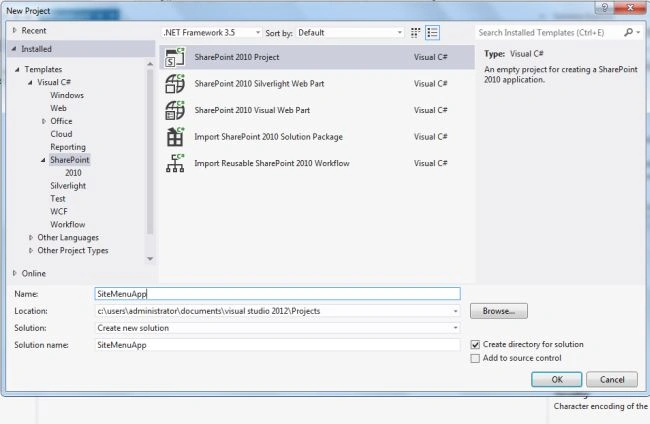
Step 2: Open up Visual Studio 2012 and create an "Empty SharePoint project":
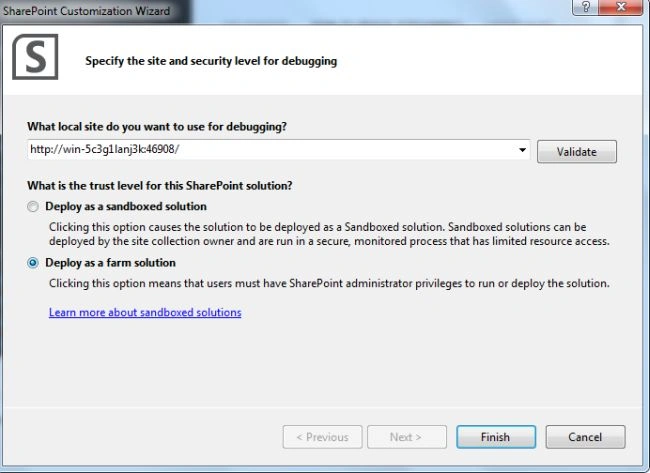
Step 3: Select "Deploy as a farm solution" as in the following and click the "Finish" button. Now an empty project is created.
Step 4: Add a new empty element for that project.

Step 5: The complete code of Element.xml looks like this:
<?xml version="1.0" encoding="utf-8"?>
<Elements xmlns="http://schemas.microsoft.com/sharepoint/">
<CustomAction Id="SiteActionsToolbar"GroupId="SiteActions"Location="Microsoft.SharePoint.StandardMenu"Sequence="1000"ImageUrl="http://cs411130.userapi.com/v411130244/994/FevM7PsZQnQ.jpg"Rights="FullMask"Title="Microsoft"Description=
"Click For Microsoft">
<UrlAction Url="http://www.microsoft.com"/>
</CustomAction>
</Elements>
Step 6: The output of the application looks like this: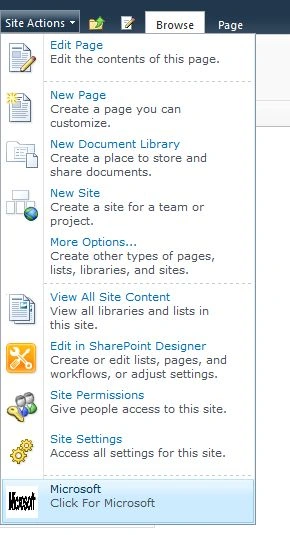
I hope this article is useful for you.
Tiago SarriPosted May 23, 2015, 6:10 PM
how do I show on a specific site?
Kiran Kumar TalikotiPosted Jan 14, 2014, 2:00 AM
Thank you for Sharing :)