

Today, in this article let's concentrate on another Silverlight application, whereby communicating with a WCF Service to perform some operation.
The Telerik Rad Controls for Silverlight can be found from http://www.telerik.com/products/silverlight/overview.aspx.
Question: What is RadHtmlPlaceHolder?
In simple terms "It is the special controls which enables to render external WebPages into Silverlight App".
Let's get this implemented practically for a better idea of this!!!
Step 1: The complete code of the IService1.cs looks like this:
using System;
using System.Collections.Generic;
using System.Linq;
using System.Runtime.Serialization;
using System.ServiceModel;
using System.ServiceModel.Web;
using System.Text;
namespace Wcf_RadPlaceHolder
{
// NOTE: You can use the "Rename" command on the "Refactor" menu to change the interface name "IService1" in both code and config file together.
[ServiceContract]
public interface IService1
{
[OperationContract]
string url(string a);
}
}
Step 2: The complete code of the Service1.svc.cs looks like this:
using System;
using System.Collections.Generic;
using System.Linq;
using System.Runtime.Serialization;
using System.ServiceModel;
using System.ServiceModel.Web;
using System.Text;
namespace Wcf_RadPlaceHolder
{
// NOTE: You can use the "Rename" command on the "Refactor" menu to change the class name "Service1" in code, svc and config file together.
public class Service1 : IService1
{
public string url(string a)
{
return a;
}
}
}
Step 3: The complete code of the Web.Config looks like this:
<?xml version="1.0"?>
<configuration>
<system.web>
<compilation debug="true" targetFramework="4.0" />
</system.web>
<system.serviceModel>
<behaviors>
<serviceBehaviors>
<behavior>
<!-- To avoid disclosing metadata information, set the value below to false and remove the metadata endpoint above before deployment -->
<serviceMetadata httpGetEnabled="true"/>
<!-- To receive exception details in faults for debugging purposes, set the value below to true. Set to false before deployment to avoid disclosing exception information -->
<serviceDebug includeExceptionDetailInFaults="false"/>
</behavior>
</serviceBehaviors>
</behaviors>
<serviceHostingEnvironment multipleSiteBindingsEnabled="true" />
</system.serviceModel>
<system.webServer>
<modules runAllManagedModulesForAllRequests="true"/>
</system.webServer>
</configuration>
Step 4: The complete code of the Clientaccesspolicy.xml looks like this (to avoid a cross domain problem in Silverlight):
<?xml version="1.0" encoding="utf-8"?>
<access-policy>
<cross-domain-access>
<policy>
<allow-from http-request-headers="SOAPAction">
<domain uri="*"/>
</allow-from>
<grant-to>
<resource path="/" include-subpaths="true"/>
</grant-to>
</policy>
</cross-domain-access>
</access-policy>
Step 5: The complete code of the MainPage.xaml looks like this:
<UserControl x:Class="RadPlaceHolderApplication.MainPage"
xmlns="http://schemas.microsoft.com/winfx/2006/xaml/presentation"
xmlns:x="http://schemas.microsoft.com/winfx/2006/xaml"
xmlns:d="http://schemas.microsoft.com/expression/blend/2008"
xmlns:mc="http://schemas.openxmlformats.org/markup-compatibility/2006"
xmlns:telerik="http://schemas.telerik.com/2008/xaml/presentation"
mc:Ignorable="d" d:DesignWidth="640" d:DesignHeight="480">
<Grid x:Name="LayoutRoot">
<telerik:RadHtmlPlaceholder x:Name="placeHolder1"
ScrollViewer.HorizontalScrollBarVisibility="Visible"
ScrollViewer.VerticalScrollBarVisibility="Visible"
Margin="11,74,13,0" />
<TextBlock Height="23"
HorizontalAlignment="Left"
Margin="34,16,0,0"
Name="textBlock1"
Text="Please Enter Web URL: "
FontFamily="Verdana"
FontSize="15"
VerticalAlignment="Top" />
<TextBox Height="23"
HorizontalAlignment="Left"
Margin="219,16,0,0"
Name="textBox1"
VerticalAlignment="Top"
Width="212" />
<Button Content="Go"
Background="DeepSkyBlue"
FontFamily="Verdana"
FontSize="15"
Height="23"
HorizontalAlignment="Left"
Margin="429,15,0,0"
Name="button1"
VerticalAlignment="Top"
Width="75"
Click="button1_Click"/>
</Grid>
</UserControl>
Step 6: The complete code of the MainPage.xaml.cs looks like this:
using System;
using System.Collections.Generic;
using System.Linq;
using System.Net;
using System.Windows;
using System.Windows.Controls;
using System.Windows.Documents;
using System.Windows.Input;
using System.Windows.Media;
using System.Windows.Media.Animation;
using System.Windows.Shapes;
using Telerik.Windows.Controls;
using RadPlaceHolderApplication.ServiceReference1;
namespace RadPlaceHolderApplication
{
public partial class MainPage : UserControl
{
public MainPage()
{
InitializeComponent();
}
private void url_Call(object sender, urlCompletedEventArgs e)
{
placeHolder1.SourceUrl = new Uri(e.Result.ToString(), UriKind.RelativeOrAbsolute);
}
private void button1_Click(object sender, RoutedEventArgs e)
{
if (string.IsNullOrEmpty(textBox1.Text))
{
MessageBox.Show("Please Enter Some Values", "RadHtmlPlaceHolder- WCF", MessageBoxButton.OKCancel);
}
else
{
objClient.urlCompleted += new EventHandler<urlCompletedEventArgs>(url_Call);
objClient.urlAsync(textBox1.Text);
}
}
#region Instance Variables
Service1Client objClient = new Service1Client();
#endregion
}
}
Step 7: The output of the application looks like this:
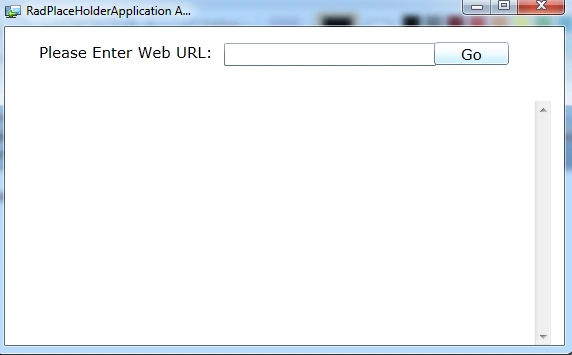
Step 8: The output of the Nothing Entered Application looks like this:
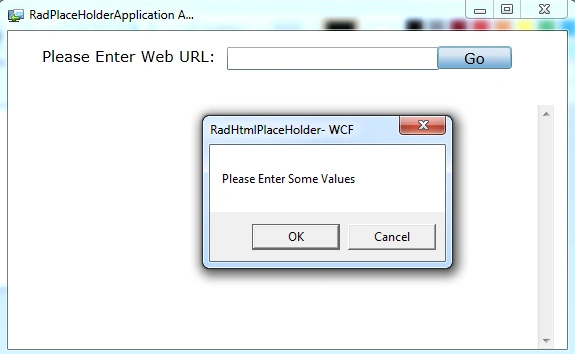
Step 9: The output of URL Entered Application looks like this:
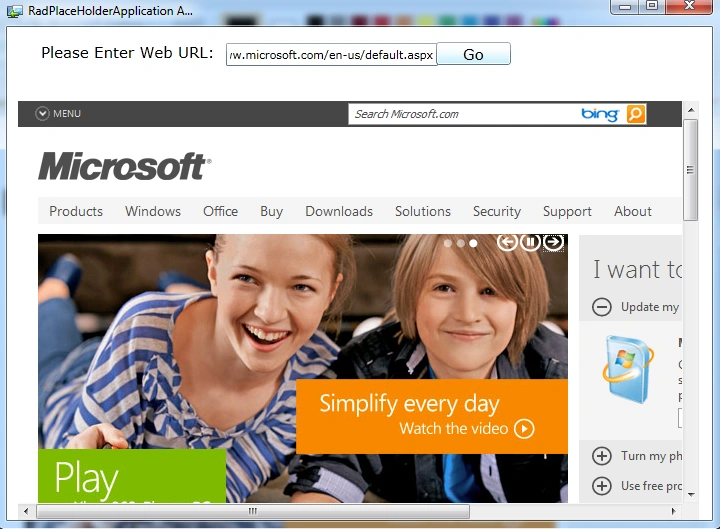
I hope this article is useful for you.
Join the conversation! Your thoughts help the community grow.