

Description
You simply need to do the following:
- Install a Certificate (Issued by Certificate Authority) on the Web Server.
- Create a Web Application using .Net.
- Configure the Web Application to use SSL in IIS.
1. Install Certificate
Normally in the Production environment we need to buy the certificate from well know Certification Authority (CA). In the development environment we can make use of .Net SDK's MakeCert.exe which comes with .Net 2.0 SD.
- Path to the Exe.
/Program Files/Microsoft Visual Studio 8/SDK/v2.0/bin/MakeCert.exe
- Create and Install the certificate on the Local Machine
Makecert -sr LocalMachine –ss My –n CN=ServiceModelSamples-HTTPS-Server –sky exchange –sk ServiceModelSamples-HTTPS-Key.
2. Create Web Application using .Net
3. Configure Web Application to use SSL in IIS
- Type inetmgr in Run dialog box and open IIS.
- On the Default Website Properties, Select the Directory Security tab:
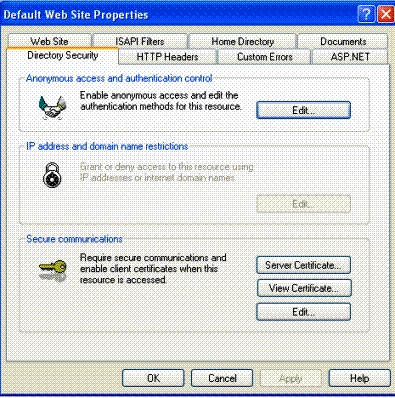
- Select 'Server Certificate' from 'Secure Communication' section.
- In the popup Wizard, select 'Assign an Existing Certificate'.
- Click and Select HTTPS-Server certificate and finish the wizard.
- Now right-click on your web Application Virtual directory in IIS and select Properties.
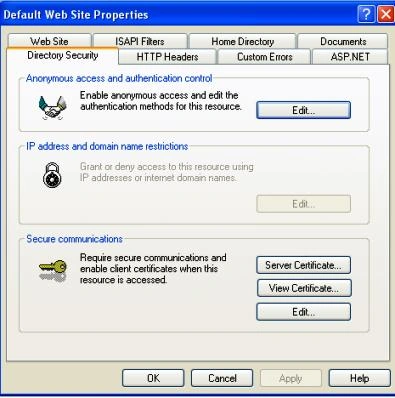
- Select Directory Security tab.
- Click on Edit button.
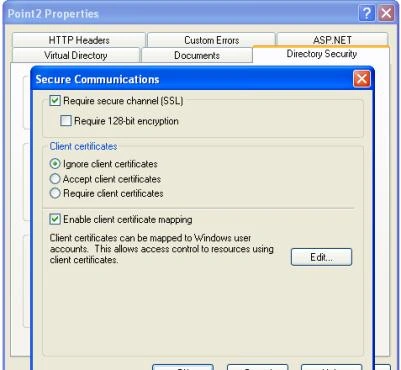
- Check Require Secure Channel (SSL).
- Press OK and Exit the Properties.
View Result
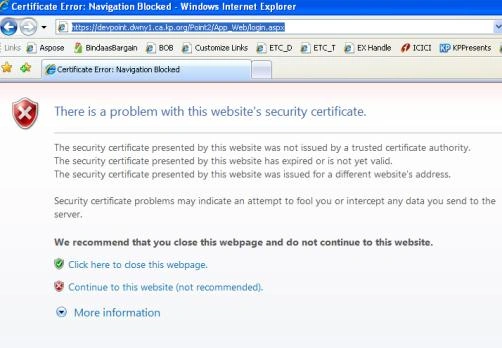
Test the Web Application for HTTPS.
Now in the browser, browse to your web Application, such as:
https://devpoint.dwny1.ca.kp.org/Point2/App_Web/login.aspx
The Browser will show "The page must be viewed over a secure channel".
Shalini JunejaPosted Jul 5, 2011, 12:49 AM
Good Article