

Background
If you want analysis of more performance issues then hit the following links.
Introduction
In this article we aren't comparing String and StringBulider theoretically. We are only focusing on Particle. I have read many times StringBulider is faster rather then String but don't know how much faster. In a small article we will prove which rovides the best performance. Let's go with me.
In this article we aren't comparing String and StringBulider theoretically. We are only focusing on Particle. I have read many times StringBulider is faster rather then String but don't know how much faster. In a small article we will prove which rovides the best performance. Let's go with me.
I have no special tools for checking performance. Don't worry about the tools, as we know we are Indian and Indian people are famous for imrovising temporary tools (called in Hindi Jugad). In this article we will use for loops. These loops can test the performance and determine which is the best.
In a console application there are two methods, one is GetperformanceString() and another is GetPerformanceStringBulder().
- static void Main(string[] args)
- {
- Program p = new Program();
-
- p.GetperformanceString(); //Call String Method here
- p.GetPerformanceStringBulider(); // Call stringBuilder method here
- }
- string str; //Str is declared Globally....
- public void GetperformanceString()
- {
- //Do stuff here....
- }
- string startingTime = DateTime.Now.ToLongTimeString(); //Set the Loop start Time.
- for (int i = 0; i < 100000; i++)
- {
- str += "j"; //Concatenation "j" every time until the Loop run.
- }
- endtime = DateTime.Now.ToLongTimeString(); //Set the end loop time.
- TimeSpan t1 = DateTime.Parse(endtime).Subtract(DateTime.Parse(startingTime)); //Set the take loop time for processing
- Console.WriteLine(t1);
- string str;
- public void GetperformanceString()
- {
- Console.WriteLine("Don't worry be Relex your System is Ok ☺");
- Console.WriteLine("String Method Call here ");
- string endtime = DateTime.Now.ToLongTimeString();
- string startingTime = DateTime.Now.ToLongTimeString();
- for (int i = 0; i < 100000; i++)
- {
- str += "j";
- }
- endtime = DateTime.Now.ToLongTimeString();
- TimeSpan t1 = DateTime.Parse(endtime).Subtract(DateTime.Parse(startingTime));
- Console.WriteLine(t1);
- }
Empty method like this type.
- StringBuilder StrBuilder=new StringBuilder(); //Make the object of StringBulider StrBulider.
- public void GetPerformanceStringBulider()
- {
- }
- string startingTime = DateTime.Now.ToLongTimeString();
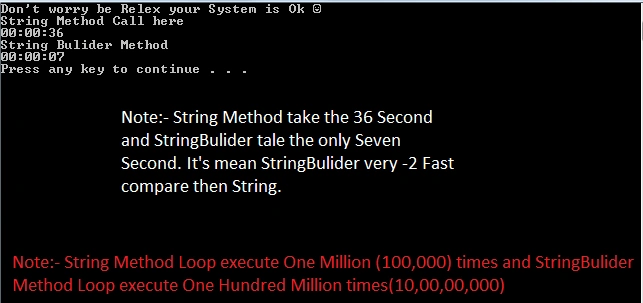
Note: It takes around ten seconds but that can vary. It depends on your system performance.
- for (int i = 0; i < 100000000; i++)
- {
- }
Append one word to strbulider.
- StrBuilder.Append("j"); // it's append until loop is running.
- endtime = DateTime.Now.ToLongTimeString();
- TimeSpan t1 = DateTime.Parse(endtime).Subtract(DateTime.Parse(startingTime));
- Console.WriteLine(t1);
-
Final word
I hope everything is clear, if you have any questions drop your question in the comment box.
I hope everything is clear, if you have any questions drop your question in the comment box.
Note: You can check Live Demo.
Onlymorons onthiswebsitePosted Feb 1, 2015, 5:52 PM
A string is very much like an array. So everytime you want to concatenate 2 strings, new memory must be allocated. Therefore, concatenating n strings of fixed length will take O(n*n) time. On the other hand if you use the stringbuilder, new memory is allocated only once -upon calling stringbuilder.tostring()-, resulting in O(n) running time.
K P Singh ChundawatPosted Dec 31, 2014, 1:41 PM
Nice permanence checker "jugad"..... Joginder Banger sir .....love this performance series ...Keep it up ....Thanks for sharing
Sam HobbsPosted Dec 31, 2014, 1:30 PM
Performance comparisons such as this are not as easy as people might think. Was a debug build or a release build used? There is often a big difference between debug builds and release builds. Also note that the runtime code often optimizes the execution whenever possible so small programs such as this can provide misleading results. Also note that developer performance is also important. When the number of times that a String class is used during execution is small then it might be more efficient to use a String if it saves time for the developer.
Joginder BangerPosted Dec 31, 2014, 3:18 AM
Thanks Sumit Jolly sir, I will trying clear storage occupies issue in next example.
Guest UserPosted Dec 31, 2014, 3:08 AM
Also is there any memory implication apart from execution time, e.g., how much string occupies v/s stringbuilder?
Guest UserPosted Dec 31, 2014, 3:01 AM
Hi Joginder Banger I'm really liking this performance series! Keep it up.
Manish Kumar ChoudharyPosted Dec 29, 2014, 11:50 PM
Nice one..