This article will help you add the Key and Value to the web.config file dynamically.
This is simple and useful application for those who wants dynamic changes in the web.config file. The sample source code allows you to change the key and value pair. There is no need to open web.config file. The application also allows you to update and delete the key/value pair.
Before
you start any operation, you need to select one of the option buttons - Add, Update, or Delete.
Let's have to UI design Home Page.
Step 1:
The UI for adding a new key/value looks like following:

For updating the previous tag, Just select the Key values from Dropdown and
update the new values with previous one
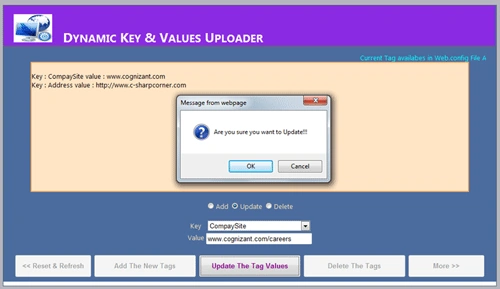
For Delete Operation, select the Key from dropdown which you want delete.


Step 2:
Please find the Code (.cs)
- protected void Add_values(object sender, EventArgs e)
- {
- if (TextBox1.Text == string.Empty && TextBox2.Text==string.Empty)
- {
-
- }
- else
- {
- string Key_c = TextBox1.Text.ToString().Trim();
- string Value_c = TextBox2.Text.ToString().Trim();
- Configuration webConfigApp = WebConfigurationManager.OpenWebConfiguration("~");
- webConfigApp.AppSettings.Settings.Add(Key_c, Value_c);
- webConfigApp.Save();
- DisplayConfigTags();
- Label1.Visible = true;
- Response.Redirect("Default.aspx");
- }
- }
-
- protected void update_values(object sender, EventArgs e)
- {
- Configuration webConfigApp = WebConfigurationManager.OpenWebConfiguration("~");
- string Key_c = KeyList1.SelectedItem.Value;
- string Value_c = TextBox2.Text.ToString();
- webConfigApp.AppSettings.Settings[Key_c].Value = Value_c;
- webConfigApp.Save();
- Label1.Visible = true;
- Response.Redirect("Default.aspx");
- TextBox2.Text = string.Empty;
- }
- protected void detele_values(object sender, EventArgs e)
- {
- string Key_c = KeyList1.SelectedItem.Value;
- string Value_c = TextBox2.Text.ToString();
- Configuration webConfigApp = WebConfigurationManager.OpenWebConfiguration("~");
- webConfigApp.AppSettings.Settings.Remove(Key_c);
- webConfigApp.Save();
- Label1.Visible = true;
- Response.Redirect("Default.aspx");
- }
Download the attached source code for more details.


Mohamad AhmadPosted Jul 3, 2012, 6:23 AM
Hi Rajendra, Thanks for this great Article. Thanks for sharing.
Monika AroraPosted Dec 1, 2011, 12:21 AM
Hi Rajendra. Nice article.
Dinesh BeniwalPosted Dec 1, 2011, 12:04 AM
Good start, Welcome to the Mindcracker community.