

Introduction
This article is a sequel to my previous article about "XML Digital Signature in Java" posted in this site. Based upon the various feedbacks and comments from my friends, colleagues and well-wishers, I will present a brief glimpse of the creation of a digital signature with plain text. This article is more about a technical overview of digital signature creation with the Java API. As you know, we use digital signatures to authenticate the actual message. In the case of plain text, we can use a detached digital signature to verify that the message contents has not yet been tampered with by unauthorized users. To have a practical feeling of signature creation we can use a Java API called "Signature" to create a digital signature.
Technicalities
To understand the concept of digital signature creation, we need to use the following procedure. In this case we use asymmetric cryptography to generate the keys. The procedure is given below.
- Create a pair of keys called Private and Public keys
- Use the private key and your text message to generate a digital signature
- Send the public key, actual text message and digital signature separately to the destination
- Use the public key, text message and digital signature to verify the message
- If the verification is successful then process the message otherwise throw an exception and discard the message.
To provide a better understanding I provide the following activity diagram.
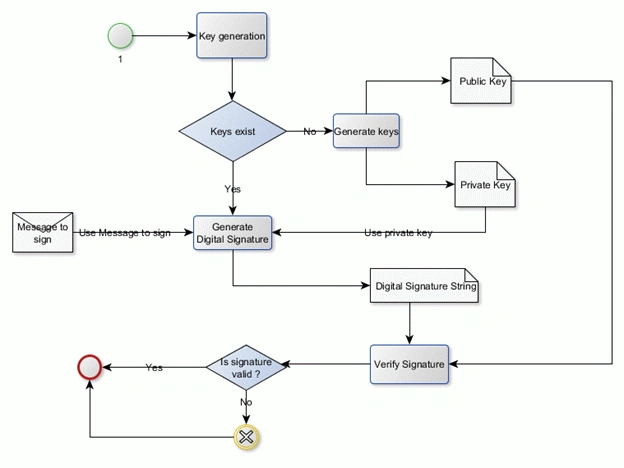
Digital Signature Creation with Java API
Let us see the code below about how to create a digital signature and verify the signature.
- //To create digital signature
- Signature sig = Signature.getInstance(ALGORITHM);
- sig.initSign(privateKey);
- sig.update(textBuffer);
- byte[] signedData = sig.sign();
- //To verify digital signature
- Signature sig = Signature.getInstance(ALGORITHM);
- sig.initVerify(publicKey);
- byte[] sigBuffer = originalContents.getBytes("UTF8");
- sig.update(sigBuffer);
- isSignOk = sig.verify(signedData);
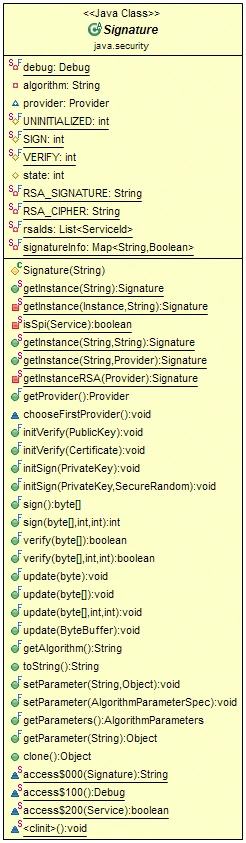
The class signature is an abstract one that provides the basic functionality to create a signature and to verify the signature. It supports the cryptographic algorithms like MD2withRSA, MD5withRSA and SHA1withRSA.
As a part of the example, I provide the following complete example of how to create and verify a digital signature for a plain text. Let us see the code below.
- package com.ddlab.rnd.crypto;
- import java.io.File;
- import java.security.PrivateKey;
- import java.security.PublicKey;
- /**
- * The Class TestDigitalSignature is used to test the concept of digital
- * signature for a plain string.
- *
- * @author <a href="mailto:[email protected]">Debadatta Mishra</a>
- * @since 2013
- */
- public class TestDigitalSignature {
- /**
- * Creates the keys.
- */
- public static void createKeys() {
- if (!new File("keys" + File.separator + "privatekey.key").exists()
- && !new File("keys" + File.separator + "publickey.key")
- .exists()) {
- KeyGenerator keyGen = new KeyGenerator();
- keyGen.storeKeyPairs("keys");
- System.out
- .println("Private key and Public Keys generated successfully...");
- }
- }
- /**
- * Generate digital signature.
- *
- * @param secretInfoStr
- * the secret info str
- * @param privateKeyPath
- * the private key path
- * @return the byte[]
- */
- public static byte[] generateDigitalSignature(String secretInfoStr,
- String privateKeyPath) {
- PrivateKey privateKey = KeyUtil.getStoredPrivateKey(privateKeyPath);
- byte[] signedDataBytes = DigitalSignatureUtil.getDigitalSignature(
- secretInfoStr, privateKey);
- return signedDataBytes;
- }
- /**
- * Verify digital signature.
- *
- * @param secretInfoStr
- * the secret info str
- * @param signedDataBytes
- * the signed data bytes
- * @return true, if successful
- */
- public static boolean verifyDigitalSignature(String secretInfoStr,
- byte[] signedDataBytes) {
- PublicKey publicKey = KeyUtil.getStoredPublicKey("keys"
- + File.separator + "publickey.key");
- boolean flag = DigitalSignatureUtil.isTextAndSignatureValid(
- secretInfoStr, signedDataBytes, publicKey);
- return flag;
- }
- /**
- * The main method.
- *
- * @param args
- * the arguments
- * @throws Exception
- * the exception
- */
- public static void main(String[] args) throws Exception {
- // Create Keys if the keys do not exist
- createKeys();
- String mySecretMsg = "This is my secret and authentic message .";
- String privateKeyPath = "keys" + File.separator + "privatekey.key";
- // Use Private key and Secret message to generate digital signature
- byte[] signedBytes = generateDigitalSignature(mySecretMsg,
- privateKeyPath);
- String digitalSignatureStr = new String(signedBytes);
- System.out.println("Digital Signature : \n" + digitalSignatureStr);
- // Verify Digital Signature
- boolean flag = verifyDigitalSignature(mySecretMsg, signedBytes);
- System.out.println("Digital Signature Verification Status : " + flag);
- }
- }
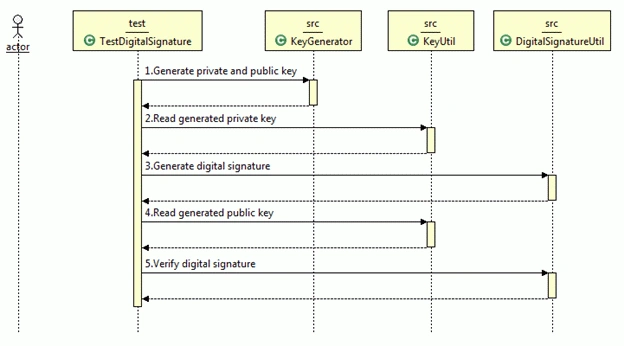
The class diagram is given below.
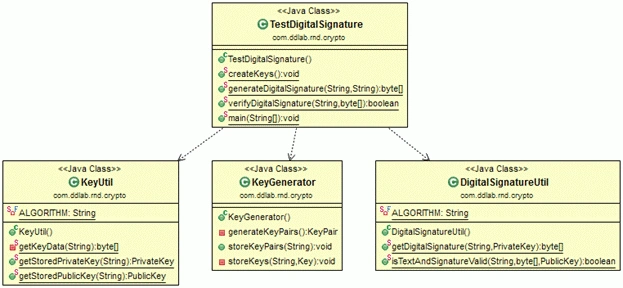
You can download the complete project from this site. If you encounter a problem in viewing the images then you can find all the relevant images inside the diagram folder of the attached project.
Configuration
Download the complete project. You can configure the complete project in Eclipse and run the test classes available inside the test source folder.
Conclusion
I hope you have enjoyed my small article about digital signatures for plain text or strings in Java. Download the complete project and go through the source code to understand the concept and its usage. Based upon the complexity and design, you can decide whether to use this concept. For any kind of issues and errors you can contact me at [email protected].
Join the conversation! Your thoughts help the community grow.