
Introduction:
In this article, I am creating two web
services and using (consuming) them in a web application. We can consume more
than one web service into one web application. The method for consuming more web
services is same as consuming simple web service in web application. Here, first
web service returns a string and second web service returns records from
student_detail table.
At first we create a web service. Create an ASP.NET Web
Service application and replace the
code with the following code.
using
System;
using
System.Collections.Generic;
using
System.Linq;
using
System.Web;
using
System.Web.Services;
namespace
SERVICE1
{
///
<summary>
/// Summary
description for Service1 ///
</summary>
[WebService(Namespace =
"http://EXAMPLE1.ORG",Name="SIMPLE
EXAMPLE")]
[WebServiceBinding(ConformsTo =
WsiProfiles.BasicProfile1_1)]
[System.ComponentModel.ToolboxItem(false)]
// To allow this Web Service to be called from
script, using ASP.NET AJAX, uncomment the following line.
// [System.Web.Script.Services.ScriptService]
public class
Service1 : System.Web.Services.WebService
{
[WebMethod]
public string
SHOW(string NAME)
{
return
"Hello, "+NAME+" !";
}
}
}
Run the application. Now create another web service. Repeat the same procedure
for creating a web service and replace the default code with the following code.
using
System;
using
System.Collections.Generic;
using
System.Linq;
using System.Web;
using
System.Web.Services;
using
System.Data.SqlClient;
using
System.Data;
namespace
SERVICE2
{
///
<summary>
/// Summary
description for Service1
///
</summary>
[WebService(Namespace =
"http://EXAMPLE2",Name="COMPLEX
EXAMPLE")]
[WebServiceBinding(ConformsTo =
WsiProfiles.BasicProfile1_1)]
[System.ComponentModel.ToolboxItem(false)]
// To allow this Web Service to be called from
script, using ASP.NET AJAX, uncomment the following line.
// [System.Web.Script.Services.ScriptService]
public class
Service1 : System.Web.Services.WebService
{
[WebMethod]
public
DataSet DATA(int ID)
{
SqlDataAdapter DA =
new SqlDataAdapter("SELECT
* FROM STUDENT_DETAIL WHERE STUDENT_DETAIL.ID=ID ",
"Data
Source=SERVER_NAME;Initial
Catalog=STUDENT;Integrated Security=True");
DataSet DS =
new DataSet();
DA.Fill(DS);
return DS;
}
}
}
Run the application. Now, we create
a web application. Take a ASP.NET Web Application. To add service reference, go
to Solution Explorer -> right click at your web project.
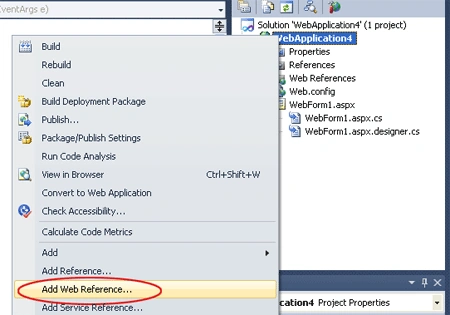
Select Add Web Reference. A new window will be open. Copy the URL of your
running service and paste to it at URL of new opened window.
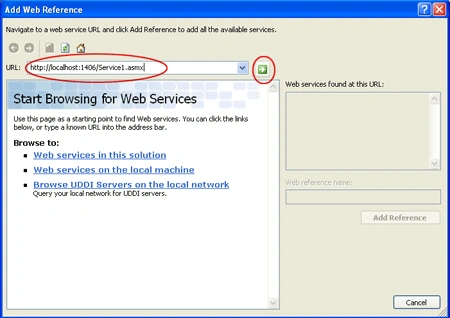
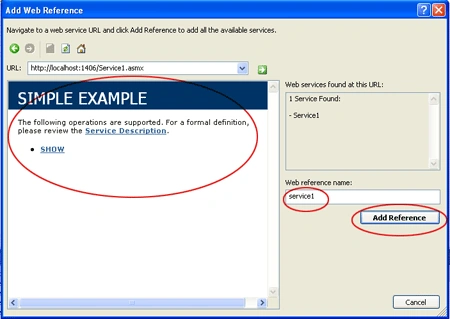
Now click the "Go" button. After clicking the button you can see your service
here. You can set Web Reference Name. The default reference name is "localhost".
Now click at Add Reference to add service reference in your web application.
Look at below screen - shot.
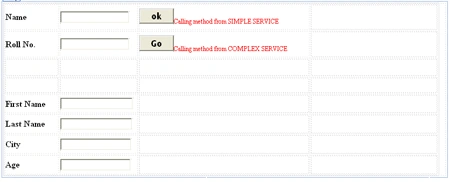
Again add another web
reference. After adding web reference, we take some UI controls ( Given in below
figure ) on design page of web application, so that we can access the web
methods.
Now write the following code on .aspx.cs page.
using
System;
using
System.Collections.Generic;
using
System.Linq;
using System.Web;
using
System.Web.UI;
using
System.Web.UI.WebControls;
using
WebApplication4.sservice2;
using
WebApplication4.service1;
using
System.Data;
namespace
WebApplication4
{
public partial
class WebForm1
: System.Web.UI.Page
{
protected void
Page_Load(object sender,
EventArgs e)
{
}
protected void
btnok_Click(object sender,
EventArgs e)
{
SIMPLEEXAMPLE obj =
new SIMPLEEXAMPLE();
lblshow.Text = obj.SHOW(txtservice1.Text);
}
DataSet ds =
new DataSet();
protected void
btngo_Click(object sender,
EventArgs e)
{
COMPLEXEXAMPLE OBJ =
new COMPLEXEXAMPLE();
int aa =
int.Parse(txtservice2.Text);
ds = OBJ.DATA(aa);
if (ds.Tables[0].Rows.Count > 0)
{
lblnorecord.Text = "";
txtfname.Text = ds.Tables[0].Rows[0][1].ToString();
txtlname.Text = ds.Tables[0].Rows[0][2].ToString();
txtcity.Text = ds.Tables[0].Rows[0][3].ToString();
txtage.Text = ds.Tables[0].Rows[0][4].ToString();
}
else
{
txtfname.Text = "";
txtlname.Text = "";
txtcity.Text = "";
txtage.Text = "";
lblnorecord.Text = "No Record Found";
}
}
}
}
Output:
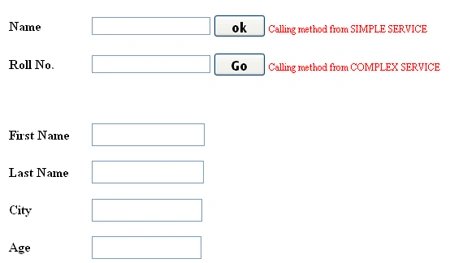
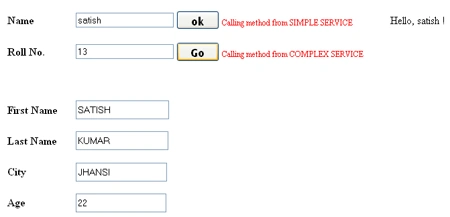
Type a name in textbox and click "ok" button. It will simply return the name
with hello from first web service application.

Write any number (Roll No.) and click the "Go" button. Records will be shown
in textboxes from second web service.
Join the conversation! Your thoughts help the community grow.