
Introduction
In this article, I am saving a record into the database using a stored procedure in a web
service application. At first create a database and a stored procedure.
Creating Database: I am creating a table "userdet" which has four
columns as "userid", "username", "city" and "age".
create table userdet
(
UserId int primary key,
UserName varchar(30),
city varcahar(20),
age int
)
Creating Stored Procedure: I am creating a stored procedure "myprocedure".
ALTER PROCEDURE myprocedure
(
@puserid int,
@pusername varchar(30),
@pcity varchar(20),
@page int
)
AS
BEGIN
insert into userdet values(@puserid,@pusername,@pcity,@page)
END
Now create a web service application. Follow the given steps.
- Go to Visual Studio 2010 and create a New Project.
- Select an ASP.NET Web Application.
- Go to Solution explorer and right click at your project.
- Add a Web Service Application.
- Give it a name and click ok button.
using
System;
using
System.Collections.Generic;
using
System.Linq;
using
System.Web;
using
System.Web.Services;
using
System.Data.SqlClient;
namespace
usingparameterwebservice
{
///
<summary>
///
Summary description for mywebservice
///
</summary>
[WebService(Namespace = "mystoredprocedure.org")]
[WebServiceBinding(ConformsTo = WsiProfiles.BasicProfile1_1)]
[System.ComponentModel.ToolboxItem(false)]
// To allow this Web Service to be called from
script, using ASP.NET AJAX, uncomment the following line.
// [System.Web.Script.Services.ScriptService]
public
class mywebservice :
System.Web.Services.WebService
{
string constring =
"Database=emp;server=.;user=sa;password=Password$2";
SqlConnection conn;
SqlCommand comm;
[WebMethod(Description="Simple Example")]
public string
data(int id,string
name,string city,int
age)
{
conn = new SqlConnection(constring);
conn.Open();
comm = new SqlCommand();
comm.Connection=conn;
comm.CommandType = System.Data.CommandType.StoredProcedure;
comm.CommandText = "myprocedure";
comm.Parameters.AddWithValue("@puserid",
id);
comm.Parameters.AddWithValue("@pusername",
name);
comm.Parameters.AddWithValue("@pcity",
city);
comm.Parameters.AddWithValue("@page",
age);
try
{
comm.ExecuteNonQuery();
return
"Record Saved";
}
catch (Exception)
{
return
"Not Saved";
}
finally
{
conn.Close();
}
}
}
}
Run the application
Output:
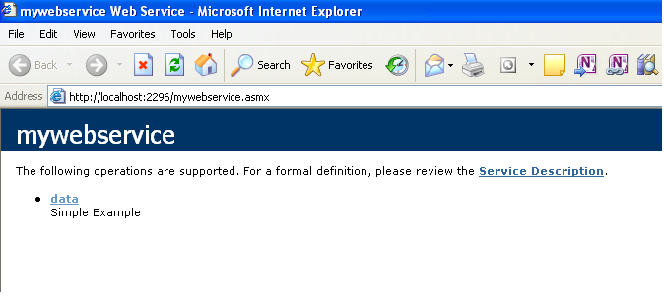
Click "data" to go on the test page. Fill the form with value which is to be insert into database table. Click the invoke button.
Output:
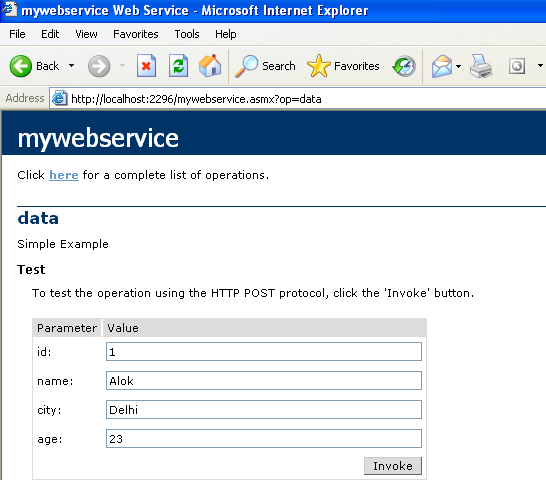
Click the invoke button. If user do right form entry, then record will be saved otherwise it will not be saved.
Output:

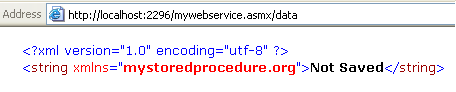
The record will not be saved because id is taken as primary key and it can be unique value and here we are saving another record with id 1.
Output:
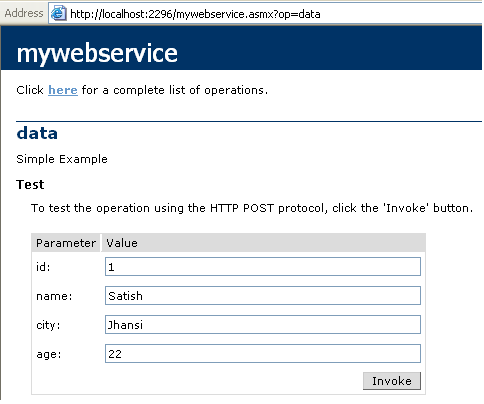
Click the "invoke" button.
Output:
Rahul PatilPosted Dec 25, 2019, 1:05 AM
@Aktop100 how to return the save record data??
Niyazi TorosPosted Mar 2, 2016, 7:30 AM
How secure is this web-services?
Mayank TripathiPosted Nov 28, 2014, 2:12 AM
a good reference can be taken from following artcle: http://www.mindstick.com/Articles/fb497b8d-f075-4138-8ed0-b55182eec695/CRUD%20Operation%20C%20Using%20Stored%20Procedure%20Web%20Service%20Windows%20Service%20and%20Crystal%20Report
Peter MokaloPosted Jun 21, 2013, 6:54 AM
i'm new to programming generally and i stumbled upon this and it helped me alot. thanks
kokhila mylsamyPosted Aug 14, 2012, 9:09 AM
Very good and it's useful
kokhila mylsamyPosted Aug 14, 2012, 9:09 AM
Very good and it's useful
Manoj Singh PanwarPosted Dec 23, 2011, 11:27 PM
I wish you could upload the source code as well..