

Introduction
Before reading this article, I highly recommend reading the previous parts:
- Getting Started With ASP.Net Web API 2: Day 1
- Getting Started With ASP.Net Web API 2: Day 2
- Getting Started With ASP.Net Web API 2: Day 3
- Getting Started With ASP.Net Web API 2: Day 4
- Getting Started With ASP.Net Web API 2: Day 5
- Getting Started With ASP.Net Web API 2: Day 6
- Getting Started With ASP.Net Web API 2: Day 7
This class generates the two tokens. The first one is a cookie and the other is a string-based token. These tokens are embedded into a form or a request header. For the prevention of an attack the Web API includes both of the tokens that will validate on the server side.
Since we know the token generation within the context of a MVC application, let's try to understand using an example.
- <form id="myForm">
- @Html.AntiForgeryToken()
- </form>
The helper uses the AntiForgery class and writes the cookies token to the response and generates a field name _RequestVerificationToken, that is sent along to the form data. For the validation we call the static Validation method on the Antiforgery class, this class is called without the parameter and it uses the HttpContext.Current. In the Web API a custom handler is responsible for the CSRF token validation and it can intercept every request as as enter in the Web API, it will perform the checks and continue with the pipeline execution.
So before starting this article, I suggest you read my previous articles on the Web API, they make the concepts more clear.
We can now start the coding to learn the the concept of CSRF.
Prerequisites
There are the following things we need to use when developing a Web API 2 application.
-
Visual Studio 2013
-
ASP.NET Web API 2
Getting Started
In this section we will follow some important procedures and these are:
-
Create ASP.NET Web API
-
Add Web API 2 Controller
-
Add a class inside the model.
We need to use a basic procedure to do CSRF protection.
Step 1
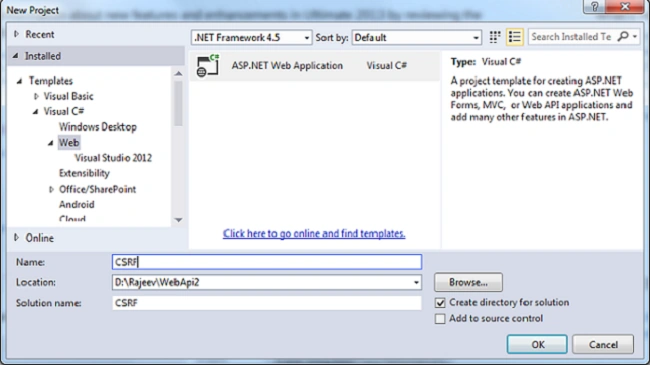
Open the Visual Studio 2013 and click New Project.
Step 2
Select the ASP.NET Web Application and provides a nice name for the project.
Step 3
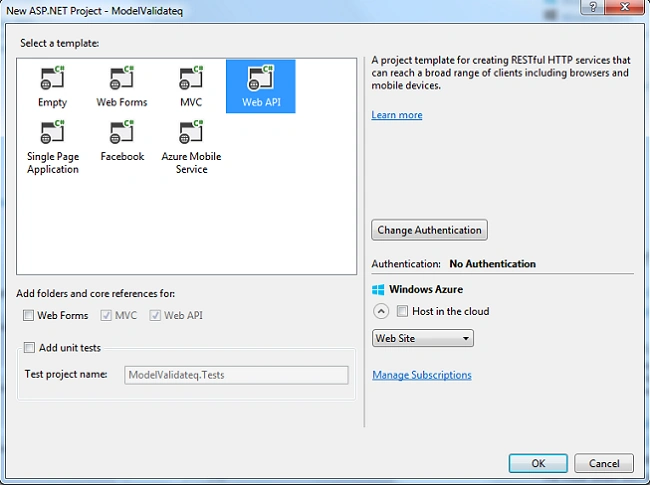
Select the Web API template and click the OK button, by default it will choose MVC along with the Web API.
Step 4
Right-click on the Model folder and add a Student class to the model where the name fields are defined.
- namespace CSRF.Models
- {
- public class Student
- {
- public string Name { get; set; }
- }
- }
Right-click on the Controller folder and select the Web API 2 empty controller and provide a nice name. For this project I took valueController and added a HomeController and StudentController inside them.
- namespace CSRF.Controllers
- {
- public class FormController : ApiController
- {
- public Student Post(Student st)
- {
- return st;
- }
- }
- public class StudentController : ApiController
- {
- public Student Post(Student stData)
- {
- return stData;
- }
- }
- }
Create a HttpRequestMessageExtensions class.
- namespace CSRF
- {
- public static class HttpRequestMessageExtensions
- {
- public static bool IsAjaxRequest(this HttpRequestMessage req)
- {
- IEnumerable<string> headers;
- if (req.Headers.TryGetValues("X-Requested-with", out headers))
- {
- var header = headers.FirstOrDefault();
- if (!string.IsNullOrEmpty(header))
- {
- return header.ToLowerInvariant() == "xmlhttprequest";
- }
- }
- return false;
- }
- }
- }
And again a AntiForgeryHandler class.
- namespace CSRF
- {
- public class AntiForgeryHandler: DelegatingHandler
- {
- protected override async Task<HttpResponseMessage> SendAsync(HttpRequestMessage req, CancellationToken cancellationToken)
- {
- string cookieToken = null;
- string formToken = null;
- if (req.IsAjaxRequest())
- {
- IEnumerable<string> tokenHeaders;
- if(req.Headers.TryGetValues("_RequestVerificationToken", out tokenHeaders))
- {
- var cookie = req.Headers.GetCookies(AntiForgeryConfig.CookieName).FirstOrDefault();
- if (cookie != null)
- {
- cookieToken = cookie[AntiForgeryConfig.CookieName].Value;
- }
- formToken = tokenHeaders.FirstOrDefault();
- }
- }
- try
- {
- if (cookieToken != null && formToken != null)
- {
- AntiForgery.Validate(cookieToken, formToken);
- }
- else
- {
- AntiForgery.Validate();
- }
- }
- catch (HttpAntiForgeryException)
- {
- return req.CreateResponse(HttpStatusCode.Forbidden);
- }
- return await base.SendAsync(req,cancellationToken);
- }
- }
- }
- <div class="row">
- <div class="col-md-4">
- <h2>CSRF Html Page</h2>
- <div>
- <form id="form1" method="post" action="/api/form" enctype="application/x-www-form-urlencoded">
- @Html.AntiForgeryToken()
- <div>
- <label for="name">Name</label>
- </div>
- <div>
- <input type="text" name="name" placeholder="Enter some data" />
- </div>
- <div>
- <button id="postData" name="postData">Post to Form</button>
- </div>
- </form>
- </div>
- </div>
- <div id="jsData" class="col-md-6">
- <h2> Ajax Safe</h2>
- @Html.AntiForgeryToken()
- <input id="ItemJs" type="text" disabled="disabled" name="text" placeholder="Enter some data" />
- <div>
- <button id="postJS" name="postJS"> Post JS</button>
- </div>
- </div>
- </div>
- @section scripts {
- <script type="text/javascript">
- $(function () {
- $("#postJS").on("click", function () {
- $.ajax({
- dataType: "json",
- data: JSON.stringify({ name: $("#ItemJs").val() }),
- type: "POST",
- headers: {
- //"_RequestVerificationToken": $("#jsData input[name='_RequestVerificationToken']").val()
- "_RequestVerificationToken":"hello"
- },
- contentType: "application/json; charset=utf-8",
- url: "/api/Student"
- }).success(function (res) {
- alert(res.name);
- });
- });
- });
- </script>
- }
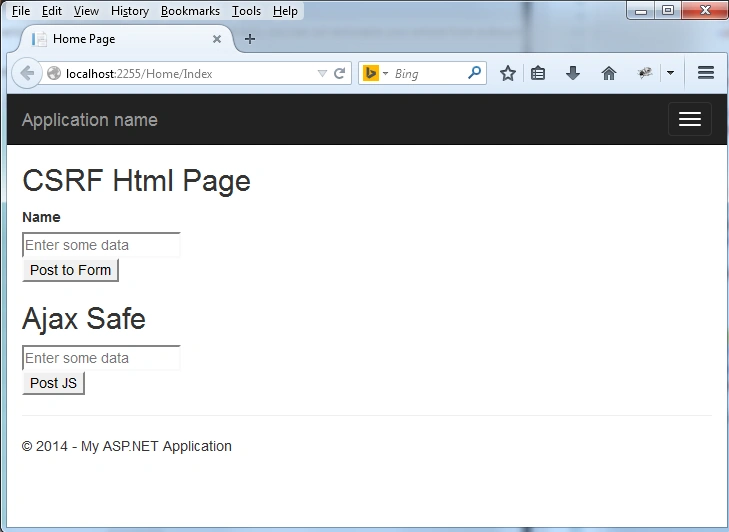
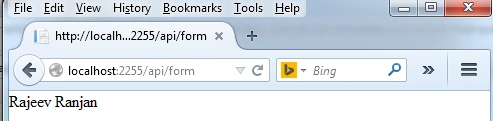
Enter the data inside the Name and hit the button. The Form controller will handle the operation and display the data.
Further Reading
Getting Started with ASP.NET Web API 2 : Day 9
Arweb AroshanzamirPosted Feb 9, 2015, 3:46 PM
nice one.. thanks sir
Kalyani BharadPosted Dec 12, 2014, 5:37 AM
ya i have the same question which shivom has asked u
Shivom BhattPosted Dec 12, 2014, 4:24 AM
Ok, but what if i don't want to use html page. I can use weforms and it is also possible to retrieve data using EF 6 with use of REST ?
Shivom BhattPosted Dec 12, 2014, 2:41 AM
hello Rajeev, I have one query regarding UI, Can i use Webforms instead of MVC web pages in web api