What is Web API?
ASP.NET Web API is a powerful platform for building HTTP enabled service APIs that expose service and data. It can be consumed by a broad range of clients including browsers, mobiles, desktop and tablets. As it is HTTP service, so it can reach a broad range of client.
ASP.NET Web API is very much similar to ASP.NET MVC because it contains the ASP.NET MVC feature like routing, controllers, action results, filter, model, etc. Note ASP.NET Web API is not a part of MVC framework. It is a part of the core ASP.NET. You can use Web API with ASP.NET MVC or any other type of web application. You can also create a stand-alone service using the Web API.
Note: Using ASP.NET Web API we can only create HTTP services which are non-SOAP based.
Why do we need Web API?
As you know, today we all are connected with internet. Only web based application is not enough to reach to everyone. Now a days, we all are using apps through mobile devices, tablets which makes our life easy. So, if you want to expose your service to everyone which is accessible on browser as well as modern devices [Mobiles and Tablets Apps] and run fast then you need to expose your service as API which is compatible with every browser as well as these modern devices.
ASP.NET Web API uses the full features of HTTP like request/response headers, caching, versioning, etc. It is also a great platform where you can create your REST-FUL services. You don’t need to define extra configuration setting for different devices unlike WCF REST Services.

Note:
I want to clear one misconception that Web API does not replace to WCF. WCF is still a powerful programming model for creating SOAP based services which supports a variety of transport protocols like HTTP, TCP, Named Pipes or MSMQ etc.
Start with First Web API Project
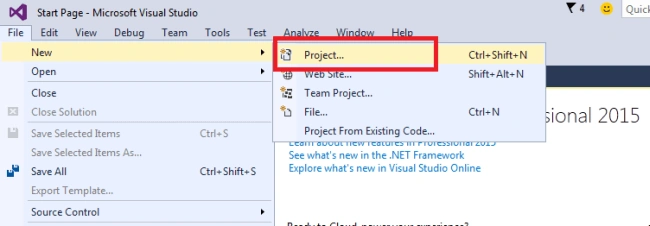
Open Visual Studio (I am using Visual studio 2015) and from the File menu, select New and then click on the Project. It will open a New Project window.
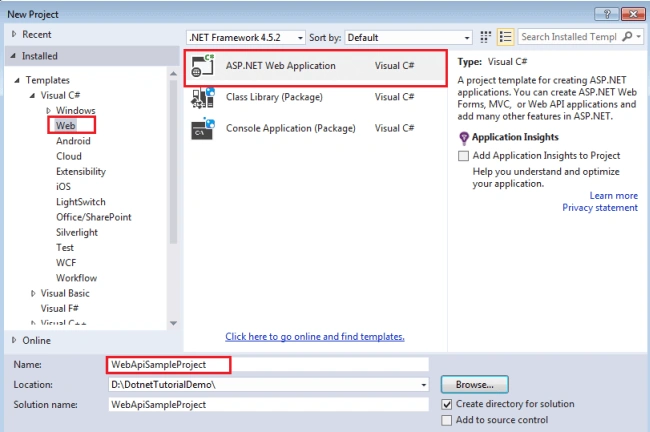
I am using C#, so from the Installed Templates, choose the Visual C# node and under Visual C#, select Web. In the list of project templates, choose ASP.NET Web Application. Give the following name to the project, "WebApiSampleProject" and click OK. It will open a new ASP.NET Project dialog where you can select many types of template for the project.
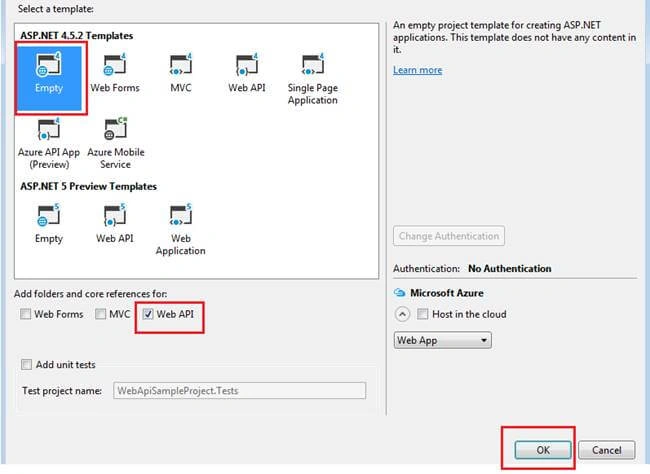
In the new ASP.NET Project dialog, select the Empty template and check Web API. Click OK.
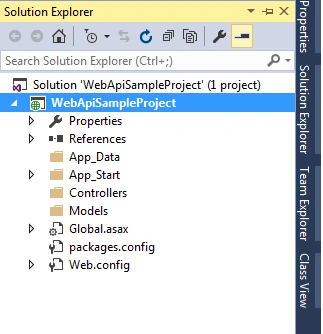
So, finally you have created a Web API project. It will create a default structure for the project.
Add a model class
Model represents the data. It is an object of your data. The model contains all application logic such as business logic, validation logic, data access logic, etc. Web API can automatically serialize the model data to JSON, XML or some other format. The serialize data write into the body of HTTP response message. Client can access the data after de-serialization.
To add new model class, in the Solution Explorer, right click on the Models, select Add and Class.
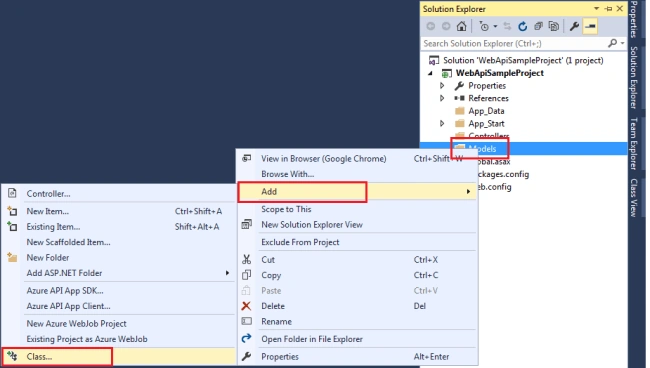
It will open a dialog for Add New Item, select Visual C# node and select Class and give the proper name “Employee” for the model class and select Add. Modify the code for the model as below:
namespace WebApiSampleProject.Models
{
    public class Employee
    {
        public int EmployeeId
        {
            get;
            set;
        }
        public string EmployeeName
        {
            get;
            set;
        }
        public string Address
        {
            get;
            set;
        }
        public string Department
        {
            get;
            set;
        }
    }
}
Add a controller
Web API Controller is responsible for handling all HTTP requests which can come from browser, mobile device, desktop web application or any other.
In Solution Explorer, right click the Controllers folder and select Add and then select controller.
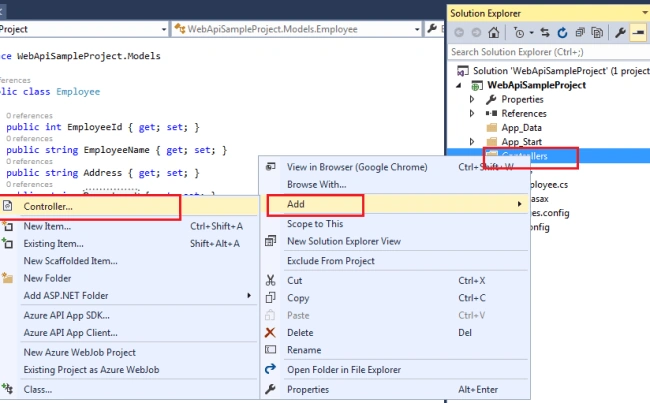
Note: Web API controller inherits the ApiController class instead of the Controller class.
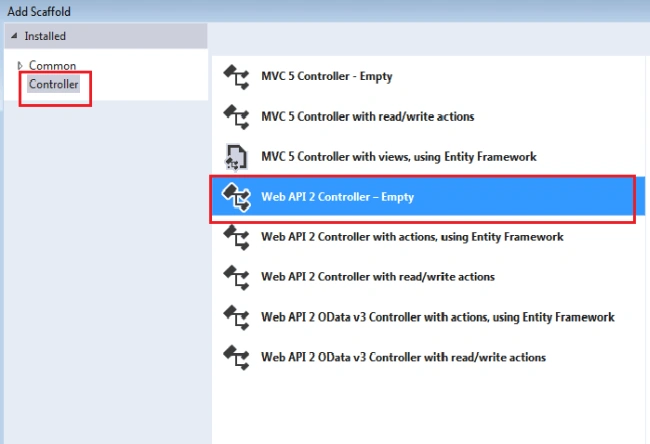
It will open Add Scaffold dialog, select the Web API Controller - Empty template and click on Add.
In the Add Controller dialog, give a proper name to the controller, "EmployeeController" and click on Add.
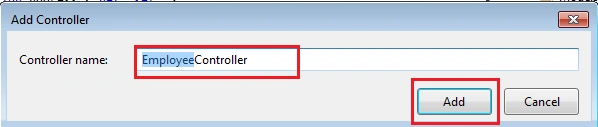
You will see scaffolding creates an “EmployeeController.cs” class inside the controller folder.
Add two methods in the controller “GetAllEmployees” and “GetEmployeeDetails” and make dummy data for the Employee. See the following code:
using System;
using System.Collections.Generic;
using System.Linq;
using System.Net;
using System.Net.Http;
using System.Web.Http;
using WebApiSampleProject.Models;
namespace WebApiSampleProject.Controllers
{
    public class EmployeeController: ApiController
    {
        IList < Employee > employees = new List < Employee > ()
        {
            new Employee()
                {
                    EmployeeId = 1, EmployeeName = "Mukesh Kumar", Address = "New Delhi", Department = "IT"
                },
                new Employee()
                {
                    EmployeeId = 2, EmployeeName = "Banky Chamber", Address = "London", Department = "HR"
                },
                new Employee()
                {
                    EmployeeId = 3, EmployeeName = "Rahul Rathor", Address = "Laxmi Nagar", Department = "IT"
                },
                new Employee()
                {
                    EmployeeId = 4, EmployeeName = "YaduVeer Singh", Address = "Goa", Department = "Sales"
                },
                new Employee()
                {
                    EmployeeId = 5, EmployeeName = "Manish Sharma", Address = "New Delhi", Department = "HR"
                },
        };
        public IList < Employee > GetAllEmployees()
        {
            //Return list of all employees
            return employees;
        }
        public Employee GetEmployeeDetails(int id)
        {
            //Return a single employee detail
            var employee = employees.FirstOrDefault(e => e.EmployeeId == id);
            if (employee == null)
            {
                throw new HttpResponseException(Request.CreateResponse(HttpStatusCode.NotFound));
            }
            return employee;
        }
    }
}
In the above controller you can see that the method “GetAllEmployees” return the list of all employees and the method “GetEmployeeDetails” returns the detail of single employee. See the following chart which shows how controller use route URL to perform action.
| Controller Method |
Route URI |
| GetAllEmployees |
/api/employee |
| GetEmployeeDetails |
/api/employee/id |
Run the Web API
To see the result, you can just create a client application which will use this web API or you can just simply press F5 or Ctrl+F5. It will open the browser with Url like http://localhost:53037/
To get all employees list, you need to make changes in the Url such as http://localhost:53037/api/employee.
To get the details of single employee, you need to pass the employee id in the Url http://localhost:53037/api/employee/4
Thanks for reading this article, hope you enjoyed it.


Keith JohnsonPosted Aug 19, 2022, 7:35 PM
Excellent article Mukesh - thank you and namaste.
ravi chilakaPosted Mar 6, 2021, 6:38 AM
I am using visual studio community edition Microsoft Visual Studio Community 2019Version 16.8.4, but my solution explorer is not showing neither models nor controller . How to bring models and controller under solution explorer.
Dinesh GabhanePosted Nov 13, 2019, 12:08 AM
Good One. Thanks
Amit MohantyPosted Jun 30, 2019, 11:30 PM
Good description..
Jerin GeorgePosted Mar 28, 2019, 6:05 AM
Hi, Mukesh, I have created a sample Wep API based on this and it was working fine but unfortunately when I added a new controller to the same project, the new controller is not working but the previous one is still working. Can you please help me out?
P.Suresh KumarPosted Mar 22, 2019, 3:46 AM
Hey Mukesh, this article was very much helpful for static data. But, can you please put an article for dynamic data?
SWATI SHARMAPosted Jan 9, 2019, 10:11 PM
Hi I want a program in which the user should be able to provide the details instead of hard coded values using postman POST method.pls help me!
bestin SebastianPosted Nov 28, 2018, 7:31 AM
Hello, How can I call this function(GetAllEmployees,GetEmployeeDetails from the above example) from an aspx page?
Tausif KhanPosted Jul 18, 2018, 8:36 AM
Hi Mukesh, i have just started with API. I want to encrypt the password that the user is passing through parameter, compare it with the database password n throw the result. Can you please help.
jaya varmaPosted Jul 5, 2018, 11:23 AM
Hi Mukesh, I need the continuation of this code for http Post,put,delete methods.could you please provide.
Da muPosted May 22, 2018, 1:49 AM
Routing is not defined, hence this application will not access APIs.
mohammed irfanPosted Mar 24, 2018, 12:30 PM
Very Good..simple way to understand Web API Concept. Thank you.
Padmalatha DronamrajuPosted Feb 12, 2018, 6:42 AM
Nice Article!!! very easy to understand Web API Concept. Thank you.
Anand MathurPosted Jul 8, 2017, 3:57 AM
Good Explaination.......
Amatya AgyeyPosted May 8, 2017, 7:03 AM
Can i add the records after running the application?
sandeep kumarPosted Apr 7, 2017, 1:17 PM
Blog is good for freshers
Munchun KumarPosted Apr 7, 2017, 4:18 AM
How to use web api in other application
Ramadoss EPosted Dec 13, 2016, 5:32 AM
Simple and easy to understand the basic concept of API
Zeeshan AzimPosted Dec 23, 2015, 9:11 AM
Please explain how to set routing for your written code ??
Praveen KPosted Nov 23, 2015, 8:53 AM
Nice one
Talha Bin AfzalPosted Nov 20, 2015, 1:44 PM
great
Sourabh SomaniPosted Nov 20, 2015, 10:03 AM
Nice One :)
Santhakumar MunuswamyPosted Nov 20, 2015, 9:01 AM
Good One
Nitesh KejriwalPosted Nov 20, 2015, 6:06 AM
Good one
Sibeesh VenuPosted Nov 20, 2015, 4:40 AM
Nice Share
Manas MohapatraPosted Nov 20, 2015, 12:05 AM
Good One
Muhammad Aqib ShehzadPosted Nov 19, 2015, 1:08 PM
nice one dear
Raja TPosted Nov 19, 2015, 8:26 AM
Nice, Thanks for sharing
Banketeshvar NarayanPosted Nov 19, 2015, 7:48 AM
Good One
Upendra Pratap ShahiPosted Nov 19, 2015, 6:47 AM
nice..
Humayun Kabir MamunPosted Nov 19, 2015, 6:44 AM
Nice...
Debasis SahaPosted Nov 19, 2015, 6:44 AM
Nice article..
Ajay GandhiPosted Nov 19, 2015, 6:27 AM
Nice Article