

F# is a functional programming language for the .NET Framework. This means that F# has access to the .NET Framework APIs and conversely that other .NET languages can use F# libraries. F# programming is basically a combination of three {somethings} Functional Programming as well as Imperative and Object Oriented Programming Concepts. F# is a language which can take advantage of core libraries like Windows Communication Foundations (WCF), Windows Presentation Foundations (WPF) etc. F# runs on the CLR, embraces object oriented programming, and has features to ensure a smooth integration with the .NET Framework. F# has its root in a programming language called OCaml and has the capability to cross compile OCaml code, which means that F# can compile simple OCaml programs without modification.
Paradigms of F#
-
Functional Programming- The first paradigm is functional programming, which is the oldest of the three. Functional Programming doesn't have typical variables that are used for storing a state of some operation, by reading and writing a value of the variable after executing a single variable. Variables in functional programming are immutable, which means that you can't change the value of the Variable once it has been initialized. Functional code is easier to test and parallelize.
-
Object Oriented Programming- Object Oriented Programming is used in F# for implementing elementary data types. This programming also enables interoperability with other .NET languages. Object Oriented Programming is also helpful when working with Object Oriented user interface Frameworks.
-
Language Oriented Programming- Language Oriented Programming is mainly focused on development. Like developing a small code of example which is in a language structure.
Advantages of F#
F# is the world's first language which contains the following features:
-
Easy Integration- F# has very easy integration of compilers and Domain Specific languages.
-
.NET Interoperability- This is the main advantage of F#: that is, it is deeply integrated with .NET. The main strength of the F# language is that you can get the power of Functional Programming with the whole CLR.
-
Asynchronous workflow- Asynchronous Programming in F# is extremely easy, where as for this the corresponding C# code is much larger.
-
Syntax- F# syntax is more flexible than the C# language.
-
Rich Data Structure- F# has a rich data structure that we can use to build Lists and Arrays into languages with syntactic support.
-
Expressive static type System- F# contains a static expressive system, which finds bugs during compilation and provides machine verified documentation.
Getting Started with first F# program
Here we are discussing a simple example in F#, how to print Text in F#.
Step1- First open Visual Studio 2010 then create a project; from the Visual F# category select F# application and from F# Application project Template.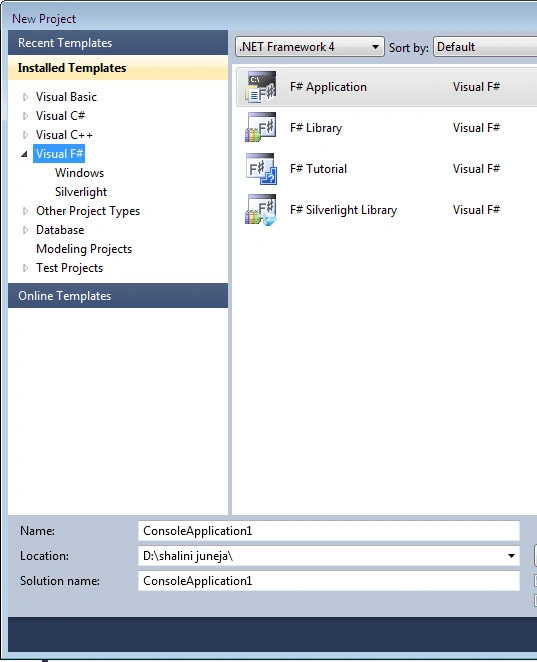
Step 2- when you will click ok it will create a file with a .fs extension in your Solution Explorer like below.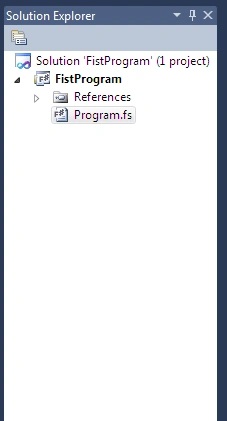
Step 3- To start your code click on the Program.fs file which is displayed in the Solution Explorer. When you click on this file the F# editor will open where you can write your code.
Code For Printing Text
If you want to print text in F# you just need to put your text in a printfn function like below.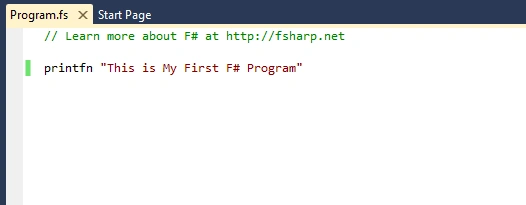
Step 5- Write Code in F# editor
// Learn more about F# at http://fsharp.net
printfn "This is My First F# Program"
Here you don't need to put semicolon for termination.
Step 6- Now run your program. You need to press CTRL+F5 to run the F# program.
Output-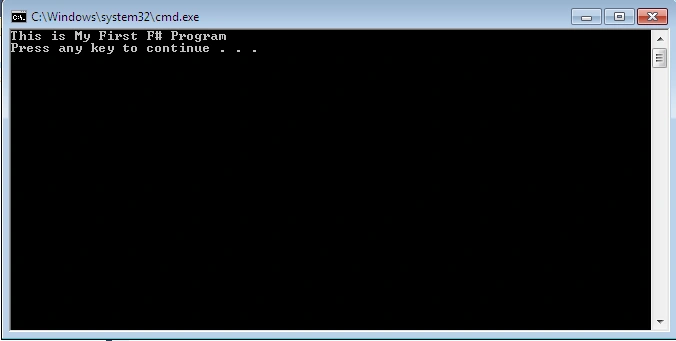
Summary
In this article I have provided an introduction to F# with a simple F# example.
kalu singh raoPosted Apr 1, 2016, 12:46 PM
Nice...
Karthikeyan KPosted Apr 1, 2016, 3:56 AM
Good one..
Vignesh ManiPosted Mar 31, 2016, 8:51 AM
Nice
Asfend YarPosted Mar 31, 2016, 4:28 AM
Good
Gopi ChandPosted Mar 31, 2016, 4:21 AM
Nice start buddy
Mohammed IbrahimPosted Mar 31, 2016, 3:42 AM
nice
Sibeesh VenuPosted Mar 31, 2016, 2:27 AM
Nice Share
Debasis SahaPosted Mar 31, 2016, 1:03 AM
Good One..