

Introduction
This article talks you through the use of an ADODB connection in a .NET application using the C# language through SQLEXPRESS. The example details the data access using ADODB, fetching a recordset and inserting a record into the database.
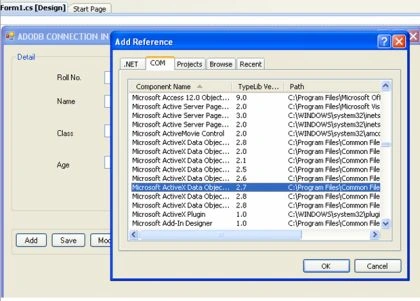
Step 1 : Add a Reference for ADODB
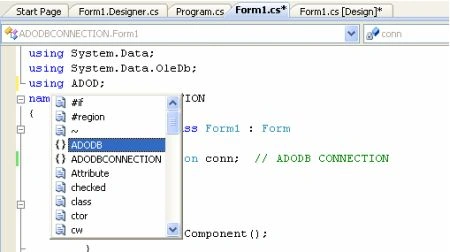
Step 2 : Use ADODB in program
/* THIS IS DEMO OF ADODB CONNECTION IN C#.NET USING SQLEXPRESS
* AND SQL SERVER
* IN THIS PROGRAM SHOW HOW TO RETRIEVE RECORD USING ADODB RECORDSET
* AND EXECUTE QUERY
* AUTHER : SATYAVEER SINGH
* EMAIL: [email protected]
* INDIA
*/
using System;
using System.Collections.Generic;
using System.ComponentModel;
using System.Drawing;
using System.Linq;
using System.Text;
using System.Windows.Forms;
using System.Data;
using System.Data.OleDb;
using ADODB; // ADODB
namespace ADODBCONNECTION
{
public partial class Form1 : Form
{
ADODB.Connection conn; // ADODB CONNECTION
bool flag;
string sql;
public Form1()
{
InitializeComponent();
}
private void Form1_Load(object sender, EventArgs e)
{
// string str = "Provider=SQLOLEDB.1;uid=sa;password=1;database=Student;DataSource={local}";
string str = "Provider=SQLOLEDB;Data Source=.\\SQLEXPRESS;Integrated Security=SSPI;Initial Catalog=Student;Initial File
Name=E:\\DotNetWebSite\\ADODBCONNECTION\\ADODBCONNECTION\\Student.mdf";
conn = new ADODB.Connection();
conn.Open(str, "", "", -1); // connection Open
CmdAdd.Enabled = true; // Enable and Desable the buttons
cmdDel.Enabled = true;
cmdmodify.Enabled = true;
cmdCan.Enabled = false;
cmdCan.Enabled = false;
cmdSave.Enabled = false;
groupBox1.Enabled = false;
fillrecord();
}
private void CmdAdd_Click(object sender, EventArgs e)
{
sql = "select max(rollno) as rn from detail";
int num;
string str;
ADODB.Recordset rs = new ADODB.Recordset();
groupBox1.Enabled = true;
groupBox3.Enabled = false;
CmdAdd.Enabled = false;
cmdDel.Enabled = false;
cmdmodify.Enabled = false;
cmdCan.Enabled = true;
cmdCan.Enabled = true;
cmdSave.Enabled = true;
txtage.Text = "";
txtclass.Text = "";
txtname.Text = "";
flag = false;
rs.Open(sql, conn, ADODB.CursorTypeEnum.adOpenStatic, ADODB.LockTypeEnum.adLockBatchOptimistic, 0);
if (rs.Fields[0].Value == null)
{
num = 1;
}
else
{
num = int.Parse(rs.Fields["rn"].Value.ToString()) + 1;
}
if (num >= 0 && num < 10)
{
str = "00" + num.ToString();
}
else if (num >= 10 && num < 100)
{
str = "0" + num.ToString();
}
else
{
str = num.ToString();
}
txtroll.Text = str;
}
private void cmdCan_Click(object sender, EventArgs e)
{
CmdAdd.Enabled = true;
cmdDel.Enabled = true;
cmdmodify.Enabled = true;
cmdCan.Enabled = false;
cmdCan.Enabled = false;
cmdSave.Enabled = false;
if (flag == false)
{
txtage.Text = "";
txtclass.Text = "";
txtname.Text = "";
txtroll.Text = "";
}
groupBox1.Enabled = false;
groupBox3.Enabled = true;
flag = false;
}
private void cmdmodify_Click(object sender, EventArgs e)
{
flag = true;
groupBox3.Enabled = false;
groupBox1.Enabled = true;
CmdAdd.Enabled = false;
cmdDel.Enabled = false;
cmdmodify.Enabled = false;
cmdCan.Enabled = true;
cmdCan.Enabled = true;
cmdSave.Enabled = true;
}
private void cmdSave_Click(object sender, EventArgs e)
{
string sql;
object ret;
if (flag == false)
{// Sql query for insert data
sql = "insert into detail values('" + txtroll.Text + "','" + txtname.Text + "','" + txtclass.Text + "'," + txtage.Text + ")";
}
else
{// Sql query for ipdate data
sql = "update detail set name='" + txtname.Text + "',class='" + txtclass.Text + "',age=" + txtage.Text + " where rollno='" + txtroll.Text + "'";
}
conn.Execute(sql, out ret, 0); // Execute the query through ADODB CONNECTION
CmdAdd.Enabled = true;
cmdDel.Enabled = true;
cmdmodify.Enabled = true;
cmdCan.Enabled = false;
cmdCan.Enabled = false;
cmdSave.Enabled = false;
groupBox1.Enabled = false;
groupBox3.Enabled = true;
flag = false;
fillrecord();
}
private void cmdDel_Click(object sender, EventArgs e)
{
object ret;
if (txtroll.Text == "")
{
MessageBox.Show("there is no record to delete plz select record", "Alert");
}
else
{// Query To delete Record
sql = "delete from detail where rollno='" + txtroll.Text + "'";
conn.Execute(sql, out ret, 0);
txtage.Text = "";
txtclass.Text = "";
txtname.Text = "";
txtroll.Text = "";
fillrecord();
}
}
private void fillrecord() // Show tha all Record
{
ADODB.Recordset rs = new ADODB.Recordset(); // ADODB RECORDSET
sql = "select rollno,name from detail";
// RECORDSET OPEN
rs.Open(sql, conn, ADODB.CursorTypeEnum.adOpenStatic, ADODB.LockTypeEnum.adLockBatchOptimistic, 0);
listBox1.Items.Clear();
while (rs.EOF == false)
{
listBox1.Items.Add(rs.Fields[0].Value.ToString() + " || " + rs.Fields[1].Value.ToString());
rs.MoveNext();
}
}
private void listBox1_SelectedIndexChanged(object sender, EventArgs e)
{
string rollno;
rollno = listBox1.SelectedItem.ToString().Substring(0, 3);
ADODB.Recordset rs = new ADODB.Recordset();
sql = "select * from detail where rollno='" + rollno + "'";
rs.Open(sql, conn, ADODB.CursorTypeEnum.adOpenStatic, ADODB.LockTypeEnum.adLockBatchOptimistic, 0);
txtroll.Text = rollno;
txtname.Text = rs.Fields[1].Value.ToString();
txtclass.Text = rs.Fields[2].Value.ToString();
txtage.Text = rs.Fields[3].Value.ToString();
}
}
}
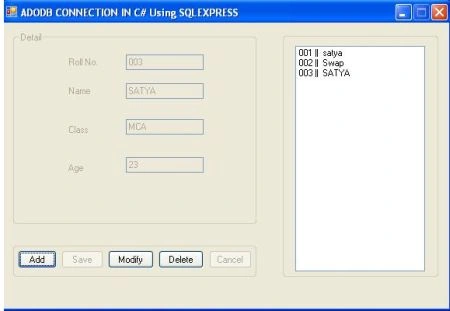
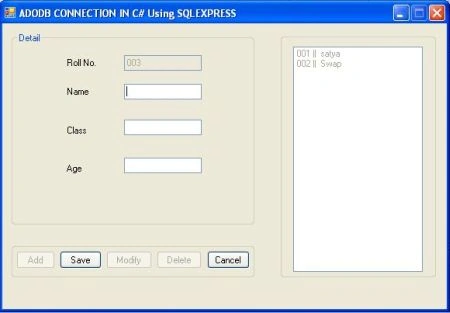
Add record
Seth OrquestaPosted Jul 28, 2017, 11:42 PM
Thank you, very helpful to me
Ranjeet kumareditedPosted Apr 6, 2012, 1:36 AMEdited Apr 6, 2012, 1:50 AM
This post is nice.... but i want to know how to insert video file in sql databse. if you know please send me. my email id is: [email protected]
Giulio GmaileditedPosted Jan 31, 2012, 12:38 AMEdited Jan 31, 2012, 12:42 AM
Could you apply mvvm here? Thanks a lot! Btw, what differences in using odbc instead of adodb?
Abhi KumarPosted Jan 30, 2012, 11:30 PM
Very useful article. I was searching for this.
Aaron CronjePosted Jan 30, 2012, 11:26 PM
Good Work... what is ADODB Connection?
Dinesh BeniwalPosted Jan 30, 2012, 10:59 PM
Good start, Welcome to the C# Corner.
Monika AroraPosted Jan 30, 2012, 10:58 PM
Its a very nice and useful article.