SIGN UP MEMBER LOGIN:    
ARTICLE

Using Crystal Reports 9 in Windows Application

Posted by Krishnan LN Articles | Crystal Reports C# January 18, 2006
This article shows an application for storing the data using Microsoft Access and generating report using Crystal reports.
Reader Level:
Download Files:
 

This application uses Microsoft Access as the backend database for storing the data.

It uses crystal reports to report data to the user. In my project I have used the 3-tier architecture to differentiate the different layers.

The main form is as shown below. Using this form you can navigate between the records either using the menu or using the buttons.
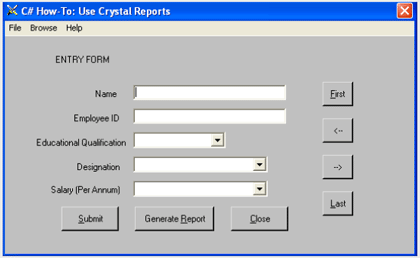
When you click the "Generate Report",the following window is displayed.
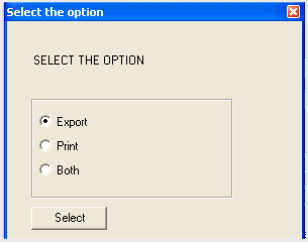

 
There are 3 options specified to output the reports.

To change the data, you can access the Employees.mdb in the project directory.

Login to add your contents and source code to this article
share this article :
post comment
 

Good code standard.. Keep it up.

Posted by behin roy Aug 28, 2010

Nice presentation

Posted by Mushakraj G Dec 29, 2008
Nevron Gauge for SharePoint
Become a Sponsor
PREMIUM SPONSORS
  • Get 2 Months Free of ASP.NET Hosting for Only $4.95/month! Receive FREE MS SQL and MySQL Databases Including ASP.NET 4/3.5, MVC 3.0, Silverlight 4, Windows 2008/IIS 7.0 Plus FREE IIS 7 Modules. Host UNLIMITED ASP.NET Web Sites - Click Here!
    Get 2 Months Free of ASP.NET Hosting for Only $4.95/month! Receive FREE MS SQL and MySQL Databases Including ASP.NET 4/3.5, MVC 3.0, Silverlight 4, Windows 2008/IIS 7.0 Plus FREE IIS 7 Modules. Host UNLIMITED ASP.NET Web Sites - Click Here!
Team Foundation Server Hosting
Become a Sponsor