

Introduction
Would you like to add a help file to your application? I think it is easy to do
with VB.NET. You can read another article (How to make help file with C#).
This is an uncomplicated trial to add help to your project, it is easy to
create.
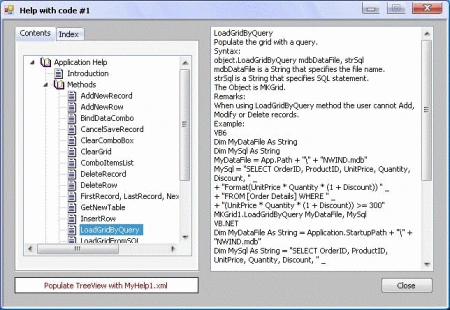
I wrote an article before
about new ActiveX control (MKGrid), and wrote its help using Microsoft HTML
Workshop and it was necessary to write more than sixty HTML files because every
item of my help needs one file, and that was so boring!
I think It's probably a good idea to make my help file by myself, this trial
will not be costing me more than a TreeView control and XML file.
Now, this article explains how to create a help for my ActiveX MKGrid; you need
a little code to create a help using a TreeView control and populate it with a
XML file.
Step 1: Write
XML file:
Use "MS FrontPage" or "MS Word" or any word processor to write XML file for
help, see my sample MyHelp1.xml and MyHelp2.xml in the folder (DataFiles) which
I wrote for the MKGrid control.
Step 2: Add
the following reference to your code:
Imports System.Xml
Step 3: Design
help form.
My project has three forms:
frmMain form: this
form is an example for main form of your project.
I used this form to show the ActiveX control MKGrid which I wrote help for it,
you can add MKGrid control to the ToolBox as (COM Components) from (MyActiveX)
folder.
frmHelp1 form: my article about
this form; this form has the following controls:
TextBox (its
name: txtHelp, to display help)
Button (its
name: btnClose, to close help form)
TabControl (its
name:tabHelp)
This tab has two pages: ContentsPage,
IndexPage
TreeView (its
name: tvHelp) put on (ContentsPage)
ComboBox (its
name: cmbHeading, its type: Simple) put on (IndexPage)
Label (its
name: lblHint, its text: Type Keyword to find) put on (IndexPage)
Button (its
name: btnDisplay) put on (IndexPage)
frmHelp2 form: has
the same controls of frmHelp1 form.
Using the Code
Add the following variables to frmHelp1 and frmHelp2:
Private MyHelpFile As
String
Private XmlDoc As
New XmlDocument
Add the following code to the Form_Load procedure:
'init TreeView
tvHelp.Nodes.Clear()
tvHelp.ImageList = IconImages
tabHelp.SelectedTab = ContentsPage
cmbHeading.Items.Clear()
in frmHelp1:
MyHelpFile = Application.StartupPath + "\DataFiles\" + "MyHelp1.xml"
in frmHelp2:
MyHelpFile = Application.StartupPath
+ "\DataFiles\"
+ "MyHelp2.xml"
XmlDoc.Load(MyHelpFile)
Code for frmHelp1:
We shall set the nodes name to tvHelp TreeView control by the following
procedure:
Private Sub LoadTreeView()
Dim xNodeList As XmlNodeList
Dim xNode As XmlNode
Dim strNode As String
Try
'
set root node of TreeView.
tvHelp.Nodes.Add("Application
Help")
tvHelp.Nodes(0).Tag = "AppHelp"
tvHelp.Nodes(0).ImageIndex = 0
tvHelp.Nodes(0).SelectedImageIndex = 0
'
set Introduction node to TreeView.
tvHelp.Nodes(0).Nodes.Add("Introduction")
tvHelp.Nodes(0).Nodes(0).Tag = "Introduction"
tvHelp.Nodes(0).Nodes(0).ImageIndex = 2
tvHelp.Nodes(0).Nodes(0).SelectedImageIndex = 2
'
set Methods node to TreeView.
tvHelp.Nodes(0).Nodes.Add("Methods")
tvHelp.Nodes(0).Nodes(1).Tag = "Methods"
tvHelp.Nodes(0).Nodes(1).ImageIndex = 0
tvHelp.Nodes(0).Nodes(1).SelectedImageIndex = 0
'
set Properties node to TreeView.
tvHelp.Nodes(0).Nodes.Add("Properties")
tvHelp.Nodes(0).Nodes(2).Tag = "Properties"
tvHelp.Nodes(0).Nodes(2).ImageIndex = 0
tvHelp.Nodes(0).Nodes(2).SelectedImageIndex = 0
'
set all Method nodes to TreeView.
xNodeList = XmlDoc.SelectNodes("//Method")
For Each xNode In xNodeList
strNode = xNode.SelectSingleNode("title").InnerText
tvHelp.Nodes(0).Nodes(1).Nodes.Add(strNode)
'
add Method title to ComboBox
cmbHeading.Items.Add(strNode)
Next
'
set Method nodes image
For i As Integer =
0 To tvHelp.Nodes(0).Nodes(1).Nodes.Count
- 1
tvHelp.Nodes(0).Nodes(1).Nodes(i).ImageIndex = 2
tvHelp.Nodes(0).Nodes(1).Nodes(i).SelectedImageIndex = 2
Next
'
set all Property nodes to TreeView.
xNodeList = XmlDoc.SelectNodes("//Property")
For Each xNode In xNodeList
strNode =
xNode.SelectSingleNode("title").InnerText
tvHelp.Nodes(0).Nodes(2).Nodes.Add(strNode)
'
add Property title to ComboBox
cmbHeading.Items.Add(strNode)
Next
'
set Method nodes image
For i As Integer =
0 To tvHelp.Nodes(0).Nodes(2).Nodes.Count
- 1
tvHelp.Nodes(0).Nodes(2).Nodes(i).ImageIndex = 2
tvHelp.Nodes(0).Nodes(2).Nodes(i).SelectedImageIndex = 2
Next
cmbHeading.SelectedIndex = 0
Catch ex As Exception
MessageBox.Show(ex.Message)
End Try
End Sub
How to read a help when
clicking any item? The following procedure can do the job:
Private Sub DisplayHelp(ByVal strName As String)
Dim xNode As XmlElement
Dim strHelp As String
'
if user click any title
xNode = XmlDoc.SelectSingleNode("//*[title='" +
strName + "']")
strHelp = xNode.InnerText
txtHelp.Text = strHelp
End Sub
We need three events to display help when click tvHelp node, when click
btnDisplay or when click any item of cmbHeading ComboBox:
Please read the code of tvHelp_AfterSelect (), btnDisplay_Click()
andcmbHeading_MouseDoubleClick ()
If you don't like the code of frmHelp1 form and MyHelp1.xml file, you can use
the following code of frmHelp2 form and MyHelp2.xml file.
Code for frmHelp2:
We shall read a nodes name from the MyHelp2.xml file to set it to tvHelp
TreeView control, we do this by two procedures LoadHeading() and AddNextNodes():
Private Sub LoadHeading()
Dim XmlDoc As New XmlDocument
XmlDoc.Load(MyHelpFile)
'
Add first node (the Root)
tvHelp.Nodes.Add(New TreeNode(XmlDoc.DocumentElement.Name))
Dim tNode As New TreeNode
tNode = tvHelp.Nodes(0)
'
Add next nodes
AddNextNodes(XmlDoc.DocumentElement, tNode)
End Sub
Private Sub AddNextNodes(ByVal xmlNode As XmlNode, ByVal treeNode As TreeNode)
Dim xNode As XmlNode
Dim tNode As TreeNode
Dim nodeList As XmlNodeList
If xmlNode.HasChildNodes Then 'The
current node has children
nodeList = xmlNode.ChildNodes
'
Set all child nodes
For i As Integer =
0 To nodeList.Count
- 1
xNode = xmlNode.ChildNodes(i)
'
Get the name of node (we want set the head of help item)
If xNode.NodeType
= XmlNodeType.Element Then
'
Add child nodes to TreeView
treeNode.Nodes.Add(New TreeNode(xNode.Name))
'
Add node name to ComboBox
cmbHeading.Items.Add(xNode.Name)
cmbHeading.SelectedIndex = 0
tNode = treeNode.Nodes(i)
'
Add next child nodes if any
AddNextNodes(xNode, tNode)
'
Set image to the node
Dim strName As String =
xNode.Name
Select Case strName
Case "EasyHelp" '
Heading
tNode.ImageIndex = 0
tNode.SelectedImageIndex = 1
Case "Methods" '
Heading
tNode.ImageIndex = 0
tNode.SelectedImageIndex = 1
Case "Properties" '
Heading
tNode.ImageIndex = 0
tNode.SelectedImageIndex = 1
Case Else '
other nodes (Pages)
tNode.ImageIndex = 2
tNode.SelectedImageIndex = 2
End Select
End If
Next
End If
'
We shall Remove Introduction, Methods, Properties from ComboBox:
'
We do not want to display the (Introduction) in Index
cmbHeading.Items.Remove("Introduction")
'
(Methods) hasn't any help
cmbHeading.Items.Remove("Methods")
'
(Properties) hasn't any help
cmbHeading.Items.Remove("Properties")
End Sub
The following procedure can read
help:
Private Sub ReadHelp(ByVal strNode As String)
Dim textReader As XmlTextReader
= Nothing
Dim s As String = ""
Try
textReader = New XmlTextReader(MyHelpFile)
While textReader.Read()
If textReader.Name
= strNode Then
s = textReader.ReadString()
txtHelp.Text = s
End If
End While
Catch ex As Exception
MessageBox.Show(ex.Message)
Finally
If textReader.EOF Then textReader.Close()
End Try
End Sub
Remarks
When extracting the files EasyHelp_VBNET.zip you can find:
VB.NET (2008) project with three forms.
- The folder (MyActiveX) includes KGrid.ocx ActiveX control.
- The folder (DataFiles) includes MyMarket.mdb, MyHelp1.xml and MyHelp2.xml.
- The folder (Icons) includes three icons.
I hope this article is useful; if you have any idea, please tell me.
Joao NetoPosted Oct 23, 2012, 7:52 AM
Hi Mostafa. Thank you for your reply. I've just sent you an e-mail with everything you need to check out what the problem is. Thanks for your time.
Mostafa KaisounPosted Oct 20, 2012, 11:12 AM
Dear Joao Neto, this is my e-mail: [email protected] thanks.
Joao NetoPosted Oct 19, 2012, 10:03 AM
Hi there. I've tried using your code on my application, everything is ok, no errors displayed (not even warnings). I have my .xml file working just fine, I'm 99% sure the nodes are well defined. When I run my application and try to use the help file, I get the exception error triggered and afterwards the application continues running, shows me the Help file with the 1st 2 nodes and the text of the 2nd node is displayed on the textbox (as it should), the rest of the nodes do not appear. The error I get is the following: Specified argument was out of the range of valid values. Parameter name: index So after seeing this error, I went for debug and checked the "locals" tab, it appears that the exception is throwed everytime the program reaches this line of code: tvHelp.Nodes(0).Nodes(0).Tag = "Intro" So i tried changing the indexes of the nodes, but I still get the same error, so the next thing I did was to delete on of the nodes in the code and it worked fine... which makes sense, but I don't want to have the "Introduction" node on the same level as the "root" node... If I do the same process for the rest of the code it works up until I reach the code where you have to set up the image for the nodes, where the index is out of bounds... yet again. May you explain to me what's wrong here? P.S. If you give me your e-mail address I can send you the application and .xml file so you can see it for yourself
Amit MaheshwariPosted Apr 5, 2012, 12:10 AM
Good job, It's such a great effort to do it. So keep it up and thanks for sharing..........
Manish SinghPosted Apr 5, 2012, 12:06 AM
Hi mostafa, really helpful article.Thanks for sharing...