

This article provides a simple sample of an application that clicks a button in another application. The technique could be used for other controls too. For the purpose of a simple sample the program is a console program. The sample will click the "=" button in the Windows Calculator Acesssory.
Note that I am using Windows 7; if the Windows Calculator Acesssory in Windows 8 is different and/or cannot be used in the manner it is used here then I hope you can find another program to use.
The first thing to do is to determine what button to click and the circumstances of when to click it. Execute the Windows Calculator Acesssory. Type "2+2=" into it. The result should be 4 of course. Then click the "=" button. Each time "=" is clicked, the value will be increased by 2. So that is something very simple to automate. We can "manually" execute Calculator and type "2+2=" into it. Then when we execute our sample application it can just click the "=" button and we can see the result.
The next thing to do is to determine the identity of the button to be clicked so our program can click it. With the Windows Calculator Acesssory executing, go to Visual Studio. In the "Tools" menu is "Spy++". If your system is a 64-bit system then you might need to use the 64-bit version of Spy++. The Spy++ toolbar will look like:

Click on the "Find Window" icon; it is a binoculars with a window in the top-left; it looks like:

That will open a "Find Window" dialog. Now first, ensure that Calculator is visible; at least the "=" button part of it. Then click on the "Finder Tool" icon (the square with a circle in it that looks like a target). The "Find Window" dialog looks like:
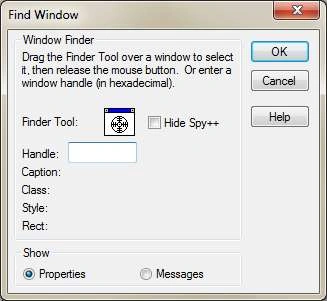
With the mouse button down, drag from the Finder Tool icon to the "=" button and release the mouse. The Find Window dialog will be filled in with the "=" button's handle and other data. Click on "OK". You will then get a "Window Properties" window with a tab control with five tabs. The five tabs are General, Styles, Windows, Class and Process. The wndow will look like:
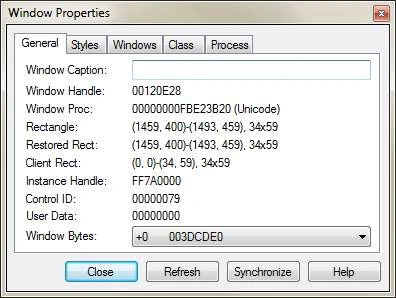
Look for "Contol ID" near the botom of the first (General) tab. It will probably have the value "00000079". It is a hexadecimal value. Whatever the value is, it will probably be that value every time you execute that program. At the Windows API level, controls are often identified by a control id. We can use the Contol ID shown in the Window Properties window in our program.
We are ready to write the application. I assume you can create a console application. If your system is 64-bit then you will need to change the "Platform Target" to "x64". The .Net Process class cannot do everything we need it to do when our application is not the same as the other application in terms of bits (32-bits and 64-bits). The "Platform Target" property is in the Build tab of the project's properties. If you need to automate a 32-bit application from a 64-bit application or 64-bit from 32-bit then you can do that but you will need to use the Windows API directly to do the equivalent of what we are using the .Net Process class to do.
You need to add a "using" for the "System.Diagnostics" and "System.Runtime.InteropServices" namespaces. You will also need to add the following to the "Program" class:
const int WM_COMMAND = 0x0111;
const int BN_CLICKED = 0;
const int ButtonId = 0x79;
const string fn = @"C:\Windows\system32\calc.exe";
[DllImport("user32.dll")]
static extern IntPtr GetDlgItem(IntPtr hWnd, int nIDDlgItem);
[DllImport("user32.dll")]
static extern IntPtr SendMessage(IntPtr hWnd, int Msg, int wParam, IntPtr lParam);
The sample program will first look at the processes to find Calculator. We will assume the exe is at:
C:\Windows\system32\calc.exe
When we find a process that is executed from there, we know for sure it is the one we are looking for. Note that there are very many processes in a system; many more than most people are aware of. Each Windows Service is a process. Windows Services and other processes that we need to ignore do not have a window, so we can ignore all processes without a window. The following code will do all that:
IntPtr handle = IntPtr.Zero;
Process[] localAll = Process.GetProcesses();
foreach (Process p in localAll)
{
if (p.MainWindowHandle != IntPtr.Zero)
{
ProcessModule pm = GetModule(p);
if (pm != null && p.MainModule.FileName == fn)
handle = p.MainWindowHandle;
}
}
if (handle == IntPtr.Zero)
{
Console.WriteLine("Not found");
return;
}
The GetModule function is shown later in this article.
We are ready to click the button from within our application. To click the button we will send a BN_CLICKED notification message to the button's parent, the Calculator main window. To do that we will need both the button id (as in the preceding) and the handle of the button. The handle varies for each execution but we can determine the handle based on the handle of its parent and the control id. The Windows API function GetDlgItem does that, as in:
IntPtr hWndButton = GetDlgItem(handle, ButtonId);
Windows messages are sent to a window as determined by the window handle. Messages also have a message id that specifies what the message is for. We will send a WM_COMMAND message. The other two parameters we need to send the message is a wParam and a lParam. The value of those depend on what the message is (the message id). For a WM_COMMAND message doing what we are doing, the control id is passed as the high word of wParam and the low word of wParam is the notification code (BN_CLICKED). The lParam is the handle of the control. It seems unnecessary to pass both the control id and the control window's handle but that is the way it works. The following sends the message:
int wParam = (BN_CLICKED << 16) | (ButtonId & 0xffff);
SendMessage(handle, WM_COMMAND, wParam, hWndButton);
When the processes are being searched, since some modules might be restricted from access for security purposes, we catch errors using the GetModule function. It is very simple, as in the following:
private static ProcessModule GetModule(Process p)
{
ProcessModule pm = null;
try { pm = p.MainModule; }
catch
{
return null;
}
return pm;
}
To test the program, execute Calculator and type in "2+2=". Then execute the sample program. Every time it executes, 2 will be added to the Calculator value.
Christopher WorkmanPosted Jun 25, 2020, 12:40 AM
I know its an old article but was trying press a button in a app except the solution waits for the popup window to close before my app moves on.. how can i just press the button on the other app without it waiting for that popup to close???
Jack McPosted May 13, 2019, 9:08 AM
I am wonder how to get a handle to the menu-option. For example in Calculator how do I click EDIT->COPY option. Spy++ gives me a handle to the the entire menu (combanied with View-Edit-Help)
Nassim B.Posted Dec 21, 2018, 4:20 PM
Hi it's been a long time since you published your article but i wonder if i could do it using vb i tried converting it's not a huge deal but i'am having trouble with hex values as in vb.net they are not accepted how should i proceed? thank for your articles great job you're helping a lot we need more people like you that explain smoothly and clearly.
Phillip MauzoulPosted Oct 27, 2017, 4:45 PM
Hi Sam - this seems straight forward but I can't seem to get this working. I have an application, I get the handle from the processes MainWindowHandle no problem. Using Spy++, I can find the control ID (in my case it's 0000108F), when I set the int to 0x108F, and pass in the applications handle to the GetDlgItem, I get a 0 back.
Pete JeyPosted Oct 3, 2017, 10:36 AM
Hi Sam - thank you for the tutorial - the buttonID I am trying to click is 0000000000620E44 - I assume this isn't hexdecimal - how do I handle this?
rami HeledPosted Jul 2, 2017, 2:44 PM
Hi Sam, i would like to popup window once some specific web page is opened ( based on some fields in this page). any direction you can suggest? thanks
Pappu KumarPosted Feb 6, 2017, 6:36 AM
Hi Sam! I need your help like i have a two windows application and that content multiple button but i want one application is running in background mode but when another application is open and click on a specify button then background application is fired action on the basis of specify button
Sam HobbsPosted May 8, 2016, 7:12 PM
For Windows 10 (and I assume Windows 8 and above) the Windows Calculator Accessory cannot be used for this. We can however use the Windows Character Map Accessory. To do that use ButtonId = 0x67 and fn = @"C:\Windows\system32\charmap.exe". I hope you know how to use the Windows Character Map Accessory enough to see this program working. I will update the article later.
Bongyong UhPosted Mar 28, 2016, 10:05 AM
Hello Sam! big thanks for your wonderful article. It is simple, easy to follow with insight, which figured out my problem so quickly. Thanks again!
Hashim ShafiqPosted Aug 21, 2015, 10:15 PM
Nice
Luke HislopPosted Jan 23, 2015, 1:37 AM
Hi Sam, Thanks for this fairly straight forward demonstration. It is just what I've been searching for (and was hard to find) however I can't get it to work. I have checked the variable values at key points and it seems to all work up to the final SendMessage... command which apears to do nothing. I am running this trough Visual Studio 2013 Community on Win 7 64 Bit.
shekhar singhPosted Mar 5, 2014, 3:55 AM
Hey Sam, That was really helpful for me. But, I could not understand the reason for "int wParam = (BN_CLICKED << 16) | (ButtonId & 0xffff);" Please Explain the bit operations you have performed.
Sam HobbsPosted Nov 21, 2013, 8:40 AM
To send text to an application, avoid doing that by sending keystrokes. Do not simulate typing if possible. Instead, get the TextBox (whichever one you need to) and put the text in it using a WM_SETTTEXT message.
JeyPosted Nov 21, 2013, 8:17 AM
Hi Sam, Lets take calculator is my target application and i want to pass 2 2 from my application instead of typing manually in calculator. How do i send "2 2" string to calculator application using windows API. Thanks Jey.
SIDDARTHA KAVILIPATIPosted May 18, 2013, 6:38 PM
Hi Sam, Thanks for the reply I have posted my question here http://www.c-sharpcorner.com/Forums/Thread/210468/extracting-data-from-a-listbox-in-another-application.aspx I need send message command to extract data and store it in C#. Any sample code would be greatly appreciated. Many Thanks for your feedback. Awaiting for your reply Sid
Sam HobbsPosted May 11, 2013, 10:49 AM
Sorry Sid that I did not see your message sooner. Yes, it is possible for some controls. That kind of thing can be done for Listboxes because they are older controls that existed in 16-bit Windows. You just need to get the window handle of the Listbox then use SendMessage to send messages using the unmanaged Windows API to interface with the windows. Create a question in the forums or send me a message for a little more help.
SIDDARTHA KAVILIPATIPosted May 6, 2013, 3:09 PM
Sam, this solution has worked great for me. I am wondering if I can do the same thing to extract data from a windows Froms Listbox. Do you have any solutions for that? Many Thanks Sid
Sam HobbsPosted Jan 6, 2013, 3:43 PM
Andrew, I assume you need help with C#. The forums are a great place to get help with the language. Note that I set this article to be an "Intermediate" article. As a C# beginner and as a beginner to Windows programming, I am not surprised that you are having difficulty. You will likely get help in the forums but please understand that you need to also spend some time learning.
andrew macePosted Jan 6, 2013, 2:41 PM
This works but I'm not familiar with c#. I'm trying to convert it using using several code converters but it is not working. Any advice? I would also like to make it so on button1.click it simulates the "=" click
Sam HobbsPosted Dec 13, 2012, 6:32 AM
Abhimanyu, I am not sure what you mean by "this". Nothing I show in this article would be good for web forms. It might be possible with web forms but for web forms such as you describe, I would use the WebBrowser control or the InternetExplorer object. I would and I do in my tool I use to edit articles every day. My other article about web site scraping would be useful for that. I have been thinking about a design for a tool that others such as you can use and I intend to write articles about that.
Abhimanyu K VatsaPosted Dec 13, 2012, 2:54 AM
Sam! is this possible on web forms? like i publish my articles on my blog as well as here, can i automate it by developing a new web application having title, tags, description, article etc controls and a submit button. after typing my article related data in controls when i press submit button will manipulate data in controls available on my blog publish page and also on C# corner's article publish page??
Sam HobbsPosted Dec 12, 2012, 11:22 PM
I am not sure I understand what you are asking since this program does not actually "send keys". If you are asking about this program then it works even if the program is minimized; in other words, it works even if Calculator is not active. I hope you are able to try it yourself.
Jean PaulPosted Dec 12, 2012, 10:18 PM
That's a cool one Sam! Can you please confirm, we can send keys to window without making it foreground.