

Introduction
If you want to add or find the sum of all values which are being checked by the user then you need to add some jQuery methods to set it.
Here is my sample screen:
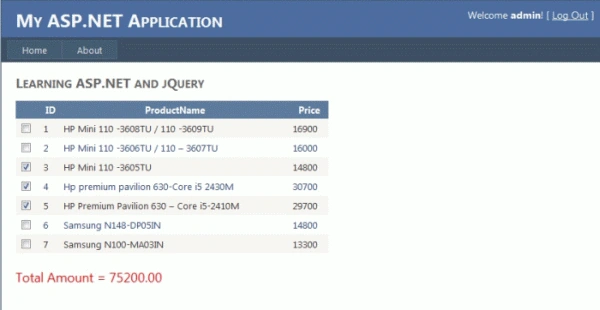
Follow the steps to develop such system:
Step 1:
Add the reference of jQuery file in head, for example:
<script type='text/javascript' src="Scripts/jquery-1.4.1.min.js"></script>
Step 2:
Now add jQuery method in the head section, for example:
<script type="text/javascript">
$(function () {
$('input:checkbox').click(function (e) {
findSum(4);
});
function findSum(ColID) {
total = 0.0;
$("tr:has(:checkbox:checked) td:nth-child(" + ColID + ")").each(function () {
total += parseFloat($(this).text());
});
$('#pTotal').text("Total Amount = " + total.toFixed(2));
}
});
</script>
Step 3:
In the GridView add a Template Field, for example:
<asp:TemplateField>
<ItemTemplate>
<asp:CheckBox ID="chkSel" runat="server" />
</ItemTemplate>
</asp:TemplateField>
Step 4:
Add a sample <p> paragraph tag by id "pTotal" when jQuery will display the result, for example:
<p id="pTotal" style="color:Red; font-size:large;">
</p>
Now look at the complete code that I'll be using on my system; remember I'm using MasterPage, I recommend you download the attached project.
Complete Code
<%@ Page Title="Home Page" Language="C#" MasterPageFile="~/Site.master" AutoEventWireup="true"
CodeFile="Default.aspx.cs" Inherits="_Default" %>
<asp:Content ID="HeaderContent" runat="server" ContentPlaceHolderID="HeadContent">
<%--Adding jQuery--%>
<script type='text/javascript' src="Scripts/jquery-1.4.1.min.js"></script>
<script type="text/javascript">
$(function () {
$('input:checkbox').click(function (e) {
findSum(4);
});
function findSum(ColID) {
total = 0.0;
$("tr:has(:checkbox:checked) td:nth-child(" + ColID + ")").each(function () {
total += parseFloat($(this).text());
});
$('#pTotal').text("Total Amount = " + total.toFixed(2));
}
});
</script>
</asp:Content>
<asp:Content ID="BodyContent" runat="server" ContentPlaceHolderID="MainContent">
<h2>
Learning ASP.NET and jQuery
</h2>
<p>
<asp:GridView ID="GridView1" runat="server" AutoGenerateColumns="False"
DataSourceID="SqlDataSource1"
EmptyDataText="There are no data records to display." CellPadding="4"
ForeColor="#333333" GridLines="None" Width="438px">
<AlternatingRowStyle BackColor="White" ForeColor="#284775" />
<Columns>
<asp:TemplateField>
<ItemTemplate>
<asp:CheckBox ID="chkSel" runat="server" />
</ItemTemplate>
</asp:TemplateField>
<asp:BoundField DataField="ID" HeaderText="ID" ReadOnly="True"
SortExpression="ID" />
<asp:BoundField DataField="ProductName" HeaderText="ProductName"
SortExpression="ProductName" />
<asp:BoundField DataField="Price" HeaderText="Price" SortExpression="Price" />
</Columns>
<EditRowStyle BackColor="#999999" />
<FooterStyle BackColor="#5D7B9D" Font-Bold="True" ForeColor="White" />
<HeaderStyle BackColor="#5D7B9D" Font-Bold="True" ForeColor="White" />
<PagerStyle BackColor="#284775" ForeColor="White" HorizontalAlign="Center" />
<RowStyle BackColor="#F7F6F3" ForeColor="#333333" />
<SelectedRowStyle BackColor="#E2DED6" Font-Bold="True" ForeColor="#333333" />
<SortedAscendingCellStyle BackColor="#E9E7E2" />
<SortedAscendingHeaderStyle BackColor="#506C8C" />
<SortedDescendingCellStyle BackColor="#FFFDF8" />
<SortedDescendingHeaderStyle BackColor="#6F8DAE" />
</asp:GridView>
<asp:SqlDataSource ID="SqlDataSource1" runat="server"
ConnectionString="<%$ ConnectionStrings:ASPNETDBConnectionString1 %>"
ProviderName="<%$ ConnectionStrings:ASPNETDBConnectionString1.ProviderName %>"
SelectCommand="SELECT [ID], [ProductName], [Price] FROM [Products]">
</asp:SqlDataSource>
</p>
<p id="pTotal" style="color:Red; font-size:large;">
</p>
</asp:Content>
So, that's all about this title. I hope like it. Thanks.
SIVAPosted Mar 12, 2012, 9:53 AM
Awesome stuff... Great miracles with JQuery
Abhimanyu K VatsaPosted Feb 8, 2012, 3:16 AM
There may be many ways (i) implement above jQuery method and add a variable:[[ var lable1JQueryObject = $('#Label1'); document.getElementById('Label1') = lable1JQueryObject; ]] and now create event in your code-behind to store this. (ii) call web services using jQuery to store that in database but it will be a tough job. Thanks.
sundar lakhmanPosted Feb 8, 2012, 1:27 AM
Thanks for coding..... But if i need to store <p> tag added value, what can i do? pls help me sooooooonnnnnnn
Arjun PanwarPosted Feb 6, 2012, 11:00 PM
Appreciate for this great article ,thanks
Vineet Kumar SainiPosted Feb 6, 2012, 11:45 AM
Hi...Abhi, Your article very useful .......
Shirsendu NandiPosted Feb 6, 2012, 6:56 AM
wonderfull dude.....good use of jquery