

Introduction
In Part 2 of this article series we discussed how to Display Data in Multiple Columns with a DataList Control but now in this article we will discuss how to use Template Fields with a DataList Control.
Using Template Fields with a DataList Control
A DataList Control supports all the same templates as the Repeater control:
- ItemTemplate: It formats each item from the data source.
- AlternatingItemTemplate: It formats every other item from the data source.
- SeparatorTemplate: It provides formating between each item from the data source.
- HeaderTemplate: It formats before all items from the data source.
- FooterTemplate: It formats after all items from the data source.
A DataList Control also supports the following templates:
- EditItemTemplate: It displays when a row is selected for editing.
- SelectedItemTemplate: It displays when a row is selected.
The following example includes both a HeaderTemplate and a FooterTemplate. The HeaderTemplate contains the caption for the table. The FooterTemplate contains a Label control that displays the total for all the preceding rows.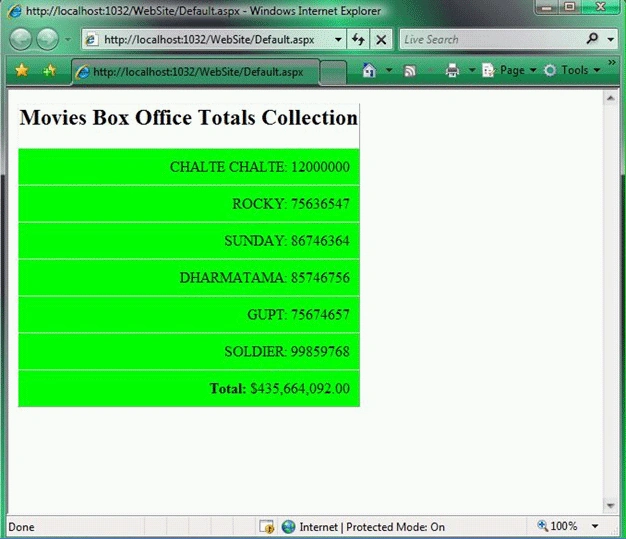
<%@ Page Language="VB" %>
<!DOCTYPE html PUBLIC "-//W3C//DTD XHTML 1.0 Transitional//EN" "http://www.w3.org/TR/xhtml1/DTD/xhtml1-transitional.dtd">
<script runat="server">
Dim totals As Decimal
Protected Sub dlstMovies_ItemDataBound(ByVal sender As Object, ByVal e As DataListItemEventArgs)
If Not IsNothing(e.Item.DataItem) Then
totals += CType(DataBinder.Eval(e.Item.DataItem, "BoxOfficeTotal"), Decimal)
End If
If e.Item.ItemType = ListItemType.Footer Then
Dim lblTotal As Label = CType(e.Item.FindControl("lblTotal"), Label)
lblTotal.Text = totals.ToString("c")
End If
End Sub
</script>
<html xmlns="http://www.w3.org/1999/xhtml">
<head id="Head1" runat="server">
<style type="text/css">
.movies td
{
padding:10px;
text-align:right;
background-color:Lime;
}
</style>
<title></title>
</head>
<body>
<form id="form1" runat="server">
<div>
<asp:DataList
id="dlstMovies"
DataSourceID="SqlDataSource1"
GridLines="Horizontal"
UseAccessibleHeader="true"
OnItemDataBound="dlstMovies_ItemDataBound"
CssClass="movies"
Runat="server" >
<HeaderTemplate>
<h2>Movies Box Office Totals Collection</h2>
</HeaderTemplate>
<ItemTemplate>
<%#Eval("Title")%>:
<%# Eval("BoxOfficeTotal")%>
</ItemTemplate>
<FooterTemplate>
<b>Total:</b>
<asp:Label
id="lblTotal"
Runat="server" />
</FooterTemplate>
</asp:DataList>
</div>
<asp:SqlDataSource ID="SqlDataSource1" runat="server" ConnectionString="<%$ ConnectionStrings:DatabaseConnectionString1 %>"
ProviderName="<%$ ConnectionStrings:DatabaseConnectionString1.ProviderName %>"
SelectCommand="SELECT Id,Title,Director,BoxOfficeTotal FROM Movies">
</asp:SqlDataSource>
</form>
</body>
</html>
The total displayed in the FooterTemplate is calculated by the ItemDataBound event handler. The Label control is extracted by the FindControl() method and the total is assigned to the control's Text property.
Note: Continued in the Next Part.
HAVE A GREAT CODING!
Join the conversation! Your thoughts help the community grow.