

Introduction
Being as an ASP.NET guy, I always wish to deliver the best apps to the client so that they call WOW!! If you want to highlight the row when user clicks on it and if he clicks on the row again then it removes the highlight. In this article we are going to do that using jQuery.
Look at the screenshot example.
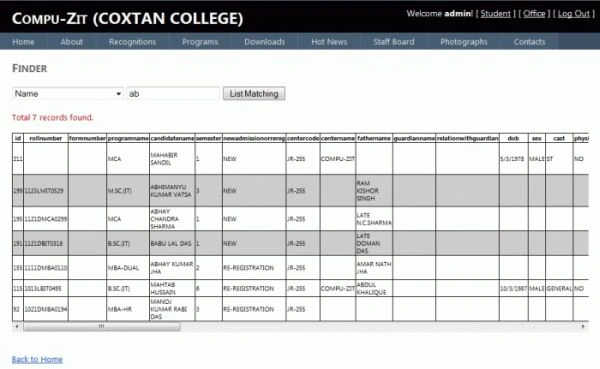
So, let's start developing such a system.
First of all you need to add the reference of your jQuery file in the <head> area. In my case I'm using master page so, I'll place it in ContentPlaceHolder.
<script src="../../../../Scripts/jquery-1.4.1.min.js" type="text/javascript"></script>
Now you need to place the jQuery methods and styles to apply it in grid view. Here is the method code and styles.
<script type="text/javascript">
$(document).ready(function () {
$("tr").filter(function () {
return $('td', this).length && !$('table', this).length
}).click(function () {
$(this).toggleClass('currRow');
});
});
</script>
<style type="text/css">
.currRow
{
background-color:#CCCCCC;
cursor:pointer;
}
</style>
In above style I'm using #CCCCCC color code to highlight the row. Now look at the complete code that I'll be using.
Complete Code
<%@ Page Title="" Language="C#" MasterPageFile="~/Site.master" AutoEventWireup="true" CodeFile="Default.aspx.cs" Inherits="Profile_Office_2012_Finder_Default" %>
<asp:Content ID="Content1" ContentPlaceHolderID="HeadContent" Runat="Server">
<script src="../../../../Scripts/jquery-1.4.1.min.js" type="text/javascript"></script>
<script type="text/javascript">
$(document).ready(function () {
$("tr").filter(function () {
return $('td', this).length && !$('table', this).length
}).click(function () {
$(this).toggleClass('currRow');
});
});
</script>
<style type="text/css">
.currRow
{
background-color:#CCCCCC;
cursor:pointer;
}
</style>
</asp:Content>
<asp:Content ID="Content2" ContentPlaceHolderID="MainContent" Runat="Server">
<h2>
Finder
</h2>
<br />
<div style="color:Black;">
<asp:DropDownList ID="DropDownList1" runat="server"
onselectedindexchanged="DropDownList1_SelectedIndexChanged" AutoPostBack="true">
<asp:ListItem>Please Select</asp:ListItem>
<asp:ListItem>Name</asp:ListItem>
<asp:ListItem>Father's Name</asp:ListItem>
<asp:ListItem>Mobile Number</asp:ListItem>
<asp:ListItem>Roll Number</asp:ListItem>
<asp:ListItem>Application Form Number</asp:ListItem>
<asp:ListItem>Semester</asp:ListItem>
<asp:ListItem>DD Number</asp:ListItem>
<asp:ListItem>Data by User</asp:ListItem>
<asp:ListItem>Program Name</asp:ListItem>
<asp:ListItem>New/Re-Registration</asp:ListItem>
</asp:DropDownList>
<asp:TextBox ID="txtHint" runat="server"></asp:TextBox>
<asp:Button ID="btnFind" runat="server" Text="List Matching"
onclick="btnFind_Click" />
<br /><br />
<asp:Label ID="Label1" runat="server" Text="" ForeColor="Red"></asp:Label>
<br /><br />
<div style="overflow:auto;">
<asp:GridView ID="GridView1" runat="server" Font-Size="Smaller">
</asp:GridView>
</div>
</div>
<br /><br />
<asp:HyperLink ID="HyperLink1" runat="server" NavigateUrl="~/Profile/Office/2012/Default.aspx">Back to Home</asp:HyperLink>
</asp:Content>
I hope you like it. Thanks.
Join the conversation! Your thoughts help the community grow.