Blue Theme Orange Theme Green Theme Red Theme
 
Home | Forums | Videos | Photos | Downloads | Blogs | Interviews | Jobs | Beginners | Training
 | Consulting  
Submit an Article Submit a Blog 
 Jump to
Skip Navigation Links
TechnologyExpand Technology
WebsiteExpand Website
 Resources  
Close
 Our Network  
Close
Search :       Advanced Search »
Home » ASP.NET & Web Forms » Sending E-mails with ASP.NET 2.0 using C#

Sending E-mails with ASP.NET 2.0 using C#


In this article, Anand examines how to send e-mails using ASP.NET 2.0 in both text and HTML formats using C# with the help of an example.

Total page views :  36493
Total downloads :  1114
   Print Read/Post comments Post a comment  Similar Articles  
   Email to a friend  Bookmark  Author's other articles  
Download Files:
Source_Code.zip
 
Become a Sponsor

Nowadays, web masters prefer to receive information from their users or customers through a contact or feedback form placed on the website. ASP.NET 2.0 provides a simplified approach to achieve the task as compared to ASP.NET 1.1. In this part of the series, we will examine how to send e-mails in plain text and HTML formats using C#.

Let us start our discussion by creating a simple user interface as shown below

Figure 1
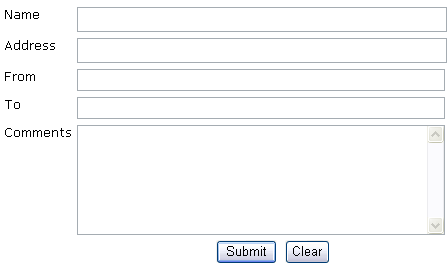
The code to create the above WebForm is given below.

<form id="Form1" runat="server">

<div align="left">

<table border="0" width="544">

<tr>

<td valign="top"><font face="Verdana" size="2">Name</font></td>

<td height="24" valign="top"> <asp:TextBox runat="server" Height="25px" Width="370px" ID="txtName"></asp:TextBox>

<asp:RequiredFieldValidator ID = "reqName" ControlToValidate = "txtName" Runat = "server" ErrorMessage = "*"></asp:RequiredFieldValidator></td>

</tr>

<tr>

<td valign="top"><font size="2" face="Verdana">Address</font></td>

<td height="24" valign="top">

<asp:TextBox runat="server" Height="25px" Width="370px" ID="txtAddress"></asp:TextBox> </td>

</tr>

<tr>

<td valign="top"><font face="Verdana" size="2">From</font></td>

<td height="24" valign="top"> <asp:TextBox runat="server" Height="22px" Width="368px" ID="txtFrom"></asp:TextBox>

<asp:RequiredFieldValidator ID = "reqFrom1" ControlToValidate = "txtFrom" runat = "server" ErrorMessage = "*" ></asp:RequiredFieldValidator>

<asp:RegularExpressionValidator ID = "regFrom2" ControlToValidate = "txtFrom" runat = "server" ErrorMessage = "Invalid Email" ValidationExpression="\w+([-+.]\w+)*@\w+([-.]\w+)*\.\w+([-.]\w+)*"></asp:RegularExpressionValidator>

<br></td>

</tr>

<tr>

<td valign="top"><font face="Verdana" size="2">To</font></td>

<td height="24" valign="top">

<asp:TextBox runat="server" Height="22px" Width="368px" ID="txtTo"></asp:TextBox>

<asp:RequiredFieldValidator ID = "reqTo1" ControlToValidate = "txtTo" runat = "server" ErrorMessage = "*" ></asp:RequiredFieldValidator>

<asp:RegularExpressionValidator ID = "reqTo2" ControlToValidate = "txtTo" runat = "server" ErrorMessage = "Invalid Email" ValidationExpression="\w+([-+.]\w+)*@\w+([-.]\w+)*\.\w+([-.]\w+)*"></asp:RegularExpressionValidator>

</td>

</tr>

<tr>

<td valign="top"><font face="Verdana" size="2">Comments</font></td>

<td height="112" valign="top"><asp:TextBox runat="server" Height="110px" TextMode="MultiLine" Width="368px" ID="txtComments"></asp:TextBox>

<asp:RequiredFieldValidator ID = "reqComments" ControlToValidate = "txtComments" Runat = "server" ErrorMessage = "*"></asp:RequiredFieldValidator> </td>

</tr>

<tr>

<td colspan="2" valign="top" height="30">

<p align="center">


<asp:Button Runat = server ID = btnSubmit OnClick = btnSubmit_Click Text = "Submit"></asp:Button>

&nbsp;<input id="Reset1" type = "reset" runat = "server" value = "Clear"></td>

</tr>

</table>

</div>

<p>&nbsp;</p>

<p><br>

<!-- Insert content here -->

</p>

</form>

As you can see we have applied validation controls to prevent input errors. The next process is to provide the required code for sending e-mails upon submission of the form. We will analyze each process in a series of steps for better understanding.

Step 1: Importing Namespace

<%@ Page Language="C#" %>

<%@ Import Namespace="System.Net.Mail" %>

Step 2: Creating objects of SmtpClient and MailMessage classes

SmtpClient smtpClient = new SmtpClient();

MailMessage objMail = new MailMessage();

Step 3: Creating and Specifying From, To Addresses

//From Address will be assigned from the e-mail specified in the From TextField

MailAddress objMail_fromaddress = new MailAddress(txtFrom.Text);


You can also give the code given below.


MailAddress objMail_fromaddress = new MailAddress(txtFrom.Text, "Learnxpress Support");


The above code inserts the text Learnxpress Support instead of the From e-mail address.


//To Address will be assigned from the e-mail specified in the To TextField

MailAddress objMail_toaddress = new MailAddress(txtTo.Text);


//Assigning From address to the MailMessage class

objMail.From = objMail_fromaddress;


//Assigning To address to the MailMessage class as a collection

objMail.To.Add(objMail_toaddress);

Step 4: Creating the Subject and Message Body Text Format

objMail.Subject = "E-mail Example - CSharp - Text";
objMail.Body = "Name: " +txtName.Text + "\r\n" +"Address: " + txtAddress.Text + "\r\n" + "Comments: "  + txtComments.Text;

Step 5: Specifying the HTML Header

objMail.IsBodyHtml =
true;

Step 6: Creating the Subject and Message Body HTML Format

objMail.Subject = "E-mail Example - CSharp - HTML";
objMail.Body = "<html><head><title>Sending E-mails with ASP.NET 2.0 using CSharp</title></head><body>"   +"<p>Name : " +txtName.Text + "</p>" +"<p>Address : " +txtAddress.Text + "</p>" +"<p>Comments : " +txtComments.Text + "</p>" +"</body></html>";

Step 7: Specifying Mail Priority

objMail.Priority = MailPriority.High;

Step 8: Enabling SMTP Authentication

Sometimes, you will need to provide the code for SMTP authentication to send e-mails. The required code snippet is given below.

smtpClient.Host = "mail.domain.com";
smtpClient.Credentials = new System.Net.NetworkCredential("username@domain.com","Password");

Note: domain should be substituted with your real domain name such as c-sharpcorner, learnxpress.

Step 9: Handling Exceptions and Delivering E-mail

try
{
smtpClient.Send(objMail);
Response.Redirect("http://www.c-sharpcorner.com");
}
catch (Exception exc)
{
Response.Write("Send failure: " + exc.ToString());
}

In the above code, we have specified that the page should be redirected to c-sharpcorner website after the successful submission of the form. You can also create a separate page called thankyou.aspx and redirect users to the page so that users will know that the mail has been successfully delivered. Once you understood the basics of System.Net.Mail namespace then it is very easy to write the code. Moreover, we now have a simplified coding mechanism as compared to ASP.NET 1.1.

You can download the complete source code of this sample application and customize it as per your requirements.


Login to add your contents and source code to this article
 About the author
 
Anand Narayanaswamy
Anand Narayanaswamy, a Microsoft Most Valuable Professional (MVP), works as an independent consultant and runs NetAns Technologies (www.netans.com) which provides web hosting services based in Trivandrum, India. He is the author of Community Server Quickly (Packt Publishing - November 2006). You can find more information about the book at http://www.packtpub.com/community-server/book. Anand also works as a technical editor lead for ASPAlliance.com. He runs Learnxpress.com (www.learnxpress.com), Dotnetalbum.com (www.dotnetalbum.com) and Csharpfaq.com (www.csharpfaq.com). Find out more about him at www.visualanand.net.
Looking for C# Consulting?
C# Consulting is founded in 2002 by the founders of C# Corner. Unlike a traditional consulting company, our consultants are well-known experts in .NET and many of them are MVPs, authors, and trainers. We specialize in Microsoft .NET development and utilize Agile Development and Extreme Programming practices to provide fast pace quick turnaround results. Our software development model is a mix of Agile Development, traditional SDLC, and Waterfall models.
Click here to learn more about C# Consulting.
 
Introducing MaxV - one click. infinite control. Hyper-V Hosting from MaximumASP.
Finally – a virtual platform that delivers next-generation Windows Server 2008 Hyper-V virtualization technology from a managed hosting partner you can truly depend on. Visit www.maximumasp.com/max for a FREE 30 day trial. Hurry offer ends soon. Climb aboard the MaxV platform and take advantage of High Availability, Intelligent Monitoring, Recurrent Backups, and Scalability – with no hassle or hidden fees. As a managed hosting partner focused solely on Microsoft technologies since 2000, MaximumASP is uniquely qualified to provide the superior support that our business is built on. Unparalleled expertise with Microsoft technologies lead to working directly with Microsoft as first to offer IIS 7 and SQL 2008 betas in a hosted environment; partnering in the Go Live Program for Hyper-V; and product co-launches built on WS 2008 with Hyper-V technology.
Dynamic PDF
ceTE software specializes in components for dynamic PDF generation and manipulation. The DynamicPDF™ product line allows you to dynamically generate PDF documents, merge PDF documents and new content to existing PDF documents from within your applications.
SQL and .NET performance profiling in one place
Investigate SQL and .NET code side-by-side with ANTS Performance Profiler 6, so you can see which is causing the problem without switching tools.
Go.NET
Build custom interactive diagrams, network, workflow editors, flowcharts, or software design tools. Includes many predefined kinds of nodes, links, and basic shapes. Supports layers, scrolling, zooming, selection, drag-and-drop, clipboard, in-place editing, tooltips, grids, printing, overview window, palette. 100% implemented in C# as a managed .NET Control. Document/View/Tool architecture with many properties&events. Optional automatic layout.
Dundas Software
Dundas Chart for .NET is the most advanced .NET charting package available today.  With an extremely complete feature set, elegant architecture and easy implementation, Dundas Chart can quickly add advanced Charting functionality to enhance and transform ASP.NET and Windows Forms applications.  Whether you are implementing charting into internal projects, or building applications for clients, Dundas Chart offers advanced technology and advanced results to get the most out of data.
60 FREE UI Controls from DevExpress
Register for your FREE copy on over 60 free presentation controls from DevExpress - Absolutely Free-of-Charge without any royalties or distribution costs. Visit Devexpress.com/60 today. Free controls include advanced lists box, dropdown calendar, rich text edit, spin edit, tab control and so much more!

DevExpress engineers feature rich presentation controls and reporting tools for WinForms, ASP.NET, WPF, and Silverlight. Our technologies help you build your best, see complex software with greater clarity and deliver compelling business solutions for Windows and the web in the shortest possible time.
Clickatell's SMS Gateway
Clickatell's Developer Solutions allow you to SMS enable any website or application via a range of API's. Learn More about our API connections.
Free access to .NET Memory Management video
Everything you need to know about Garbage Collection, Temporary Objects, Fragmentation, Finalization and common causes of memory leaks in .NET. Watch the video here.
Microsoft Visual Studio 2010
Visualize your workspace with new multiple monitor support, powerful Web development, new SharePoint support with tons of templates and Web parts, and more accurate targeting of any version of the .NET Framework. Get set to unleash your creativity.
Nevron Chart for .NET 2010.1 Now Available
The leading .NET charting control now features PDF, Flash and Silverlight export, visualization of large datasets and more. Deliver true charting functionality to your BI, Scorecard, Presentation or Scientific apps. Download evaluation now.
Developer-Ready ASP.NET 2.0 Web Hosting with 3 MONTHS FREE
Now supporting .NET 3.0 Framework with Windows Workflow Foundation, Windows Communication Foundation (WCF), Windows Presentation Foundation (WPF), windows CardSpace (WCS)! Providing more flexibility for Developers with Web Services Support and a User/Permission Manger. Also supporting MS SQL 2005/2000 with Real-Time Backups, FREE Automated Attach .MDF Tool, FREE SQL Restore and Shrink SQL DB Tools, and SQL
Read the Top 10 Books for Microsoft Developers, 15 Days FREE
Try Safari Books Online - 15 Days FREE + 15% Off for 1 Year
 
 Post a Feedback, Comment, or Question about this article
Subject:
Comment:
Nevron Diagram
Become a Sponsor
 Comments
automatic "to" address?? by Maralynn On July 25, 2007
wondering how i can modify this code to eliminate the input box "txtTo" and instead have the form automatically sent to my email address. Can anyone help?
Reply | Email | Delete | Modify | 
i have error by ramamoorthy On July 30, 2007
Send failure: System.Net.Mail.SmtpFailedRecipientException: Mailbox unavailable. The server response was: 5.7.1 Unable to relay for ramamoorthy.jobs@gmail.com at System.Net.Mail.SmtpTransport.SendMail(MailAddress sender, MailAddressCollection recipients, String deliveryNotify, SmtpFailedRecipientException& exception) at System.Net.Mail.SmtpClient.Send(MailMessage message) at email.Page_Load(Object sender, EventArgs e) in c:\Documents and Settings\ramamoorthy\My Documents\Visual Studio 2005\WebSites\mail\email.aspx.cs:line 34
Reply | Email | Delete | Modify | 
Hello Anand by Emre On October 25, 2007
when I use the script I have an error on line 9. Can you tell me what is the problem? Thanks :) The error is The specified string is not in the form required for an e-mail address. Description: An unhandled exception occurred during the execution of the current web request. Please review the stack trace for more information about the error and where it originated in the code. Exception Details: System.FormatException: The specified string is not in the form required for an e-mail address. Source Error: Line 7: Line 8: SmtpClient smtpClient = new SmtpClient(); Line 9: MailMessage objMail = new MailMessage(); Line 10: MailAddress objMail_fromaddress = new MailAddress(txtFrom.Text); Line 11: MailAddress objMail_toaddress = new MailAddress(txtTo.Text);
Reply | Email | Delete | Modify | 
Re: Hello Anand by Lokesh On December 26, 2007
here you might have used wrong format for the "from" field that should be proper and of e mail address format.i think you have enter email address in wrong format.
Reply | Email | Delete | Modify | 
.net by dilip On December 23, 2007
explain advantages of 3-tier architecture in .net
Reply | Email | Delete | Modify | 
reagrding sending email by mandeepkaur On March 2, 2008
Hi all I use the above code to send the email from remote login, but time and again I get the following error A connection attempt failed because the connected party did not properly respond after a period of time, or established connection failed because connected host has failed to respond Kindly solve my problem
Reply | Email | Delete | Modify | 
Wrong Email address by thariq On March 5, 2008
In the try catch block if there is an error while sending it it will give a message but if the sent Email address is a wrong one how will that be handled. how will we know that it was a wrong email address
Reply | Email | Delete | Modify | 
Sending Email by santhakumar On March 26, 2009
how to send email from my asp.net page using C#.net
Reply | Email | Delete | Modify | 
sending mails using smtp client by Pravara On August 21, 2009
Hi,
can anybody tell me how to send mails from windows application?
i have written following code but it is not working. it throws an exception of relying.

MailMessage mailmessage = new MailMessage();

SmtpClient smtp;

mailmessage.From = new MailAddress("otherid@mydomain.com");

mailmessage.To.Add(new MailAddress("myid@other.com"));

mailmessage.Subject = "Test mail";

mailmessage.Body = "Hi, this is a test mail";

mailmessage.IsBodyHtml = true;

mailmessage.BodyEncoding = System.Text.Encoding.UTF8;

//smtp settings

smtp = new SmtpClient("servername",25);

NetworkCredential objNet = new NetworkCredential("username", "password");

smtp.Credentials = objNet;

smtp.UseDefaultCredentials = false;

try

{

smtp.Send(mailmessage);

MessageBox.Show("Message sent successfully !!!");

}

catch (SmtpException ex)

{

MessageBox.Show("Message sending failure");

MessageBox.Show(ex.Message);

}

}

Reply | Email | Delete | Modify | 
i have error by muna On August 7, 2010
Sending E-mails with ASP.NET 2.0 using CSharpSend failure: System.Net.Mail.SmtpException: Failure sending mail. ---> System.Net.WebException: Unable to connect to the remote server ---> System.Net.Sockets.SocketException: A socket operation was attempted to an unreachable network 65.54.245.40:25 at System.Net.Sockets.Socket.DoConnect(EndPoint endPointSnapshot, SocketAddress socketAddress) at System.Net.Sockets.Socket.InternalConnect(EndPoint remoteEP) at System.Net.ServicePoint.ConnectSocketInternal(Boolean connectFailure, Socket s4, Socket s6, Socket& socket, IPAddress& address, ConnectSocketState state, IAsyncResult asyncResult, Int32 timeout, Exception& exception) --- End of inner exception stack trace --- at System.Net.ServicePoint.GetConnection(PooledStream PooledStream, Object owner, Boolean async, IPAddress& address, Socket& abortSocket, Socket& abortSocket6, Int32 timeout) at System.Net.PooledStream.Activate(Object owningObject, Boolean async, Int32 timeout, GeneralAsyncDelegate asyncCallback) at System.Net.PooledStream.Activate(Object owningObject, GeneralAsyncDelegate asyncCallback) at System.Net.ConnectionPool.GetConnection(Object owningObject, GeneralAsyncDelegate asyncCallback, Int32 creationTimeout) at System.Net.Mail.SmtpConnection.GetConnection(String host, Int32 port) at System.Net.Mail.SmtpTransport.GetConnection(String host, Int32 port) at System.Net.Mail.SmtpClient.GetConnection() at System.Net.Mail.SmtpClient.Send(MailMessage message) --- End of inner exception stack trace --- at System.Net.Mail.SmtpClient.Send(MailMessage message) at ASP.default2_aspx.btnSubmit_Click(Object sender, EventArgs e) in c:\Users\Mona\Documents\Visual Studio 2008\WebSites\EmailApplication\Default2.aspx:line 35
Reply | Email | Delete | Modify | 
ANTS Performance Profiler 6.0
 Hosted by MaximumASP  |  Found a broken link?  |  Contact Us  |  Terms & conditions  |  Privacy Policy  |  Site Map  |  Suggest an Idea  |  Media Kit
Current Version: 5.2010.8.14
 © 2010  contents copyright of their authors. Rest everything copyright Mindcracker. All rights reserved.