
Introduction:
This article shows how to create and use AutoCompleteExtender to display Country and States. When you are typing in txtCountry, it will list out all country names that start with the typed characters, and then when you are typing in txtStates, it will list out all States for that Country (txtCountry).
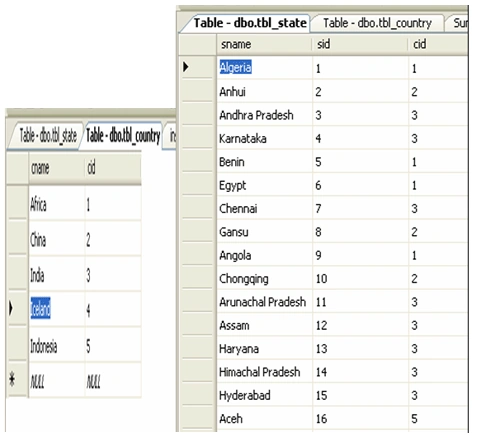
Step 1: Create a table for Country and State
tbl_country Table
Create Table tbl_Country
(
Cid Int Primary Key,
cname Varchar(30)
)
tbl_state Table
Create Table tbl_State
(
sid Int Primary Key,
cid Int Foreign Key References tbl_Country(cid),
sname Varchar(30)
) 
Now drag and drop the two textboxes and two AutoCompleteExtenders
.aspx code :
In the below source code I used JQuery to pass id of the country to another autocomplete extender (acestate).
eventArgs.get_value() The method will return id of selected country (acecountry).
TargetControlID: The textbox control where user type content to be automatically completed.
OnClientItemSelected: It will call the client side javascript method to set contexKey to another AutoCompleteExtender(acestate).
<%@
Page Language="C#"
AutoEventWireup="true"
CodeFile="Default.aspx.cs"
Inherits="_Default"
%>
<%@
Register Assembly="AjaxControlToolkit"
Namespace="AjaxControlToolkit"
TagPrefix="cc1"
%>
<!DOCTYPE
html PUBLIC
"-//W3C//DTD XHTML 1.0 Transitional//EN"
"http://www.w3.org/TR/xhtml1/DTD/xhtml1-transitional.dtd">
<html
xmlns="http://www.w3.org/1999/xhtml">
<head
runat="server">
<title></title>
<script
src="jquery-1.5.min.js"
type="text/javascript"></script>
<script
type="text/javascript">
function IAmSelected(source, eventArgs) {
$find('acestate').set_contextKey(eventArgs.get_value());
}
</script>
<body>
<form id="form1" runat="server">
<div>
<asp:ScriptManager runat="server" ID="sc">
<Services>
<asp:ServiceReference Path="~/WebService.asmx" />
</Services>
</asp:ScriptManager>
<table>
<tr>
<td>
<asp:Label Text="Country" ID="lblcountry" runat="server"></asp:Label>
</td>
<td>
<asp:UpdatePanel runat="server" ID="Up1" UpdateMode="Conditional">
<ContentTemplate>
<asp:TextBox runat="server" ID="txtcountry"></asp:TextBox>
<div>
<cc1:AutoCompleteExtender runat="server" ID="acecountry" TargetControlID="txtcountry"
MinimumPrefixLength="1" ServiceMethod="GetCountryList" ServicePath="WebService.asmx"
EnableCaching="true" OnClientItemSelected="IAmSelected">
</cc1:AutoCompleteExtender>
</div>
</ContentTemplate>
</asp:UpdatePanel>
</td>
</tr>
<tr>
<td>
<asp:Label runat="server" ID="lblstate" Text="State"></asp:Label>
</td>
<td>
<asp:UpdatePanel runat="server" ID="up2" UpdateMode="Conditional">
<ContentTemplate>
<asp:TextBox runat="server" ID="txtstate"></asp:TextBox>
<cc1:AutoCompleteExtender runat="server" ID="acestate" TargetControlID="txtstate"
MinimumPrefixLength="1" ServicePath="WebService.asmx" UseContextKey="true" ServiceMethod="GetStatesList"
</cc1:AutoCompleteExtender>
</ContentTemplate>
</asp:UpdatePanel>
</td>
</tr>
</table>
</div>
</form>
</body>
</html>
Create one webservice in the website, name it as WebService.cs. And add the two service methods in that webservice. Here, the server side methods will return an array of strings.
GetCountryList:
The below method is used to get list of Country names from the database whose letters starts with prefixText
Note : Dont forget to add [System.Web.Script.Services.ScriptService] to Web service class, because if want to access service through asp.net AJAX we have to add above line
[WebMethod]
[System.Web.Script.Services.ScriptMethod]
public string[]
GetCountryList(string prefixText)
{
SqlConnection con =
new SqlConnection("connection
string");
SqlDataAdapter dad =
new SqlDataAdapter("select
cname,cid from tbl_country where cname like '" + prefixText +
"%'", con);
DataSet ds = new
DataSet();
dad.Fill(ds);
List<string>
list = new List<string>(ds.Tables[0].Rows.Count);
foreach (DataRow
dr in ds.Tables[0].Rows)
{
list.Add(AjaxControlToolkit.AutoCompleteExtender.CreateAutoCompleteItem(dr[0].ToString(),
dr[1].ToString()));
}
return list.ToArray();
}
GetStatesList: Used to get list of state for that particular country from database. Here country id is availble in ContextKey parameter of GetStatesList so that we can filter state by country id and prefixText.
[WebMethod]
[System.Web.Script.Services.ScriptMethod]
public string[]
GetStatesList(string prefixText,
int count, string
contextKey)
{
SqlConnection con =
new SqlConnection("connection
string");
SqlDataAdapter dad =
new SqlDataAdapter("select
sname,sid from tbl_state where cid=" + contextKey +
"and sname like '" + prefixText +
"%'", con);
DataSet ds = new
DataSet();
dad.Fill(ds);
List<string>
list = new List<string>(ds.Tables[0].Rows.Count);
foreach (DataRow
dr in ds.Tables[0].Rows)
{
list.Add(AjaxControlToolkit.AutoCompleteExtender.CreateAutoCompleteItem(dr[0].ToString(),
dr[1].ToString()));
}
return list.ToArray();
}
Now run
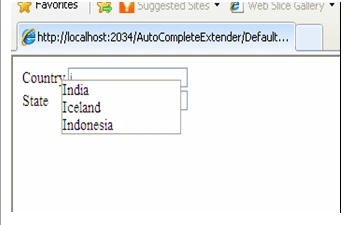
the application and test it , first type 'I' letter in txtcountry textbox then
it will list out all country names whose letter statrs with 'I'.
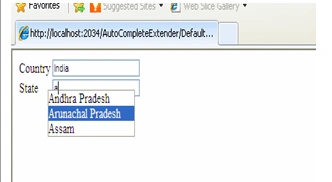
Now type
'A' in txtstate textbox it will list out all state names for a particular
country (ex:India).
Note: It is very
important that you keep the signature of the method same as what given above.
The method must have two parameters namely.
- prefixText (string)
- count (int)
- contextKey(string)
Otherwise the method won't work with AutoCompleteExtender. You can see the demo of this article by downloading this application.
Raj KumarPosted Nov 17, 2011, 12:03 AM
Good article Vidya Rani and very usefull too.