

Hi guys how are you, I hope you are all fine today, I will tell you about heading and paragraphs.
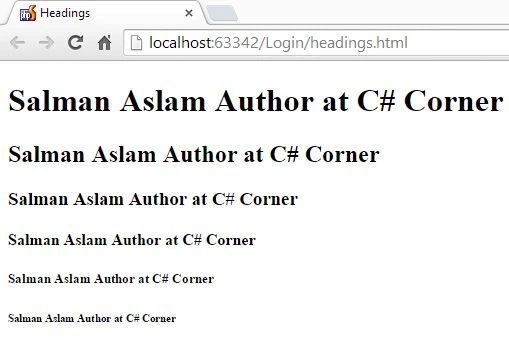
Headings are used to describe the contents below them, it can be a single word or a phrase. In HTML there are six types of headings that are used for various sizes of text.
Headings
- <h1> heading one </h1>
- <h2> heading two </h2>
- <h3> heading three </h3>
- <h4> heading four <h4>
- <h5> heading five </h5>
- <h6> heading six </h6>
- Every tag you open must be closed where its effect ends.
- A <h4> by default has the same text size as a normal paragraph <p>.
Code for headings
- <!DOCTYPE html>
- <html>
- <head lang="en">
- <meta charset="UTF-8">
- <title>Headings</title>
- </head>
- <body>
- <h1> Salman Aslam Author at C# Corner </h1>
- <h2> Salman Aslam Author at C# Corner </h2>
- <h3> Salman Aslam Author at C# Corner </h3>
- <h4> Salman Aslam Author at C# Corner </h4>
- <h5> Salman Aslam Author at C# Corner </h5>
- <h6> Salman Aslam Author at C# Corner </h6>
- </body>
- </html>
Paragraphs
- If you want to explain something on your web you use a paragraph.
- For a paragraph we use a <p> tag.
- Use a <p> followed by what you want for your paragraph followed by a </p>
For example
- <p> This is simple paragraph </p>
- <!DOCTYPE html>
- <html>
- <head lang="en">
- <meta charset="UTF-8">
- <title>Paragraphs</title>
- </head>
- <body>
- <h3> About C# Corner: </h3>
- <p> A place for coders, where you can find programming related stuff</p>
- <h3> About Salman Aslam:</h3>
- <p>I'm doing BSCS from University of Gujrat Pakistan. I 'm entrepreneur and FreeLancer. <br>
- I'm web designer and developer and running a software house "M Technologies Pak " (https://www.facebook.com/MTechnologiesPak).<br>
- My skills are C# ,HTML,CSS,Javascript,Bootstrap,PHP</p>
- </body>
- </html>

Note: <h1> to <h6> and <p> add by default one line break. And <br> is used for a line break.
Ehtesham MehmoodPosted Feb 3, 2015, 6:31 AM
Good keep it up, Want to see some Bootstrap stuff from you :)
Sanjay SinghPosted Feb 3, 2015, 5:26 AM
nice explanation... keep it up !!!