

Introduction
Before reading this article, please go through the following articles:
In this article we will try to learn about the Content Controls category in WPF and its usage.
Content Controls
Content Controls are mainly parent containers to hold the content. It displays information to the user to be viewed but that generally won't be modified.
Before we start with content controls, the following aspects need to be clear:
1. Property: A Property specifies the object's appearance or behavior. For example, the IsEnabled property specifies whether the user can interact with a control or not.
2. Method: A Method is a routine that a control executes to perform something. For example Coa unt Method counts the number of items available for the object or control.
3. Event: An event is related when a control raises one to let your application know that something has happened. For example TextBox raises a TextChanged event whenever its text changes.
Code Snippet
<Button Name="btnAdd" Content="Add" Click="btnAdd_Click" />
A Button is added in the application having "btnAdd" as an id, Add as Content and "btnAdd_Click" is the event.
4. Content Controls WalkThrough
- Border: It draws a broder around a single child control. It is used with the following properties:
- Background: The controls background Brush.
- BorderThickness: Determines the thickness of the Border's edges.
Code Snippet
<BorderHorizontalAlignment="Center"VerticalAlignment="Center"Width="150"Height="100"
CornerRadius="20"BorderBrush="#FFFF8000"BorderThickness="5">
- BulletDecorator: Displays an item and bullet in a bulleted list. This control's most important property is Bullet, which should contain the object to be used as the item's bullet.
Code snippet
<BulletDecorator>
<BulletDecorator.Bullet>
<ImageWidth="20"Height="20"Source="Leaf.bmp"Stretch="None" HorizontalAlignment="Left"VerticalAlignment="Center" >
<Image.BitmapEffect>
<DropShadowBitmapEffect/>
</Image.BitmapEffect>
</Image>
</BulletDecorator.Bullet>
<LabelContent="Cricket"Foreground="Blue"/>
</BulletDecorator>
The above code snippet creates the first item in the Bulleted list. The bullet image can be set in the <Image> source property as shown in the code.
- ToolTip: Displays a tooltip for another object. For example, when a user hovers the mouse on a textbox then a tooltip can be displayed for user input.
Code Snippet
<TextBoxMargin="70,10,10,0"VerticalAlignment="Top"Text="Name"ToolTip="The customer's first name" Name="txtFirstName"Height="20" />
The above code snippet shows the use of tooltip, as it shows "The customers first name".
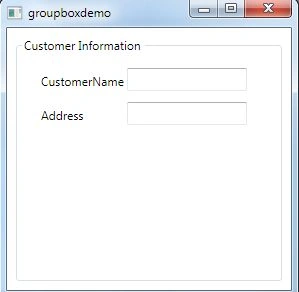
- GroupBox: Displays a header and border around the control.
Code Snippet: The following code snippet creates a separate block to create an eye-catching UI for entering user information.
<GroupBox HorizontalAlignment="Stretch" VerticalAlignment="Stretch" Header="Customer Information" Margin="8" BorderBrush="#FFD5DFE5">
<Grid Margin="5">
<Label Content="CustomerName" Height="28" HorizontalAlignment="Left" Margin="10,10,0,0" Name="label1" VerticalAlignment="Top" />
<TextBox Height="23" HorizontalAlignment="Left" Margin="101,10,0,0" Name="textBox1" VerticalAlignment="Top" Width="120" />
<Label Content="Address" Height="28" HorizontalAlignment="Left" Margin="10,44,0,0" Name="label2" VerticalAlignment="Top" />
<TextBox Height="23" HorizontalAlignment="Left" Margin="101,44,0,0" Name="textBox2" VerticalAlignment="Top" Width="120" />
</Grid>
</GroupBox>ScreenShot
- Image: Displays a graphical Image.
o Stretch and it takes the following parameters as values:
- None: The picture is not stretched at all and gets display at its original size.
- Fill: Stretches the image to fill the control and leads to picture distortion.
- Uniform: The picture is stretched at an equal amount vertically and horizontally to make it fit in the Image control.
- UniformtoFill: The picture is stretched by the same amount vertically and horizontally until it completely fills the Image control. If the picture doesn't have the same width-to-height ratio as the Image control, then some portion of the image will overflow out of the edges of the control and will be clipped.
- UpOnly: Image can only be stretched to make it larger.
- DownOnly: Image can only be shrunk to make it smaller.
- Both: Image can be stretched or shrunk.
Code Snippet
<ImageWidth="Auto"Height="Auto"HorizontalAlignment="Stretch"VerticalAlignment="Stretch"
Source="World.jpg"Stretch="UniformToFill"/>
- Label: Displays text that the user can't modify.
<LabelContent="This is Comic Sans Serif, 20 point, bold, italic" FontFamily="Comic Sans MS" FontSize="20"FontWeight="Bold"HorizontalAlignment="Center"/>
Content is the text being displayed on the Label control.
FontFamily is the style applied to the text displayed on the control.
FontSize determines the crispness of the text.
FontWeight makes the text appearance like Bold, Italic etc.
- MediaElement: Plays an audio or video file. By default it starts playing the media file. To let the program control the media set the control's LoadBehavior property to Manual.
Code Snippet
The Following XAML code defines two Media Element controls, one plays video and the other plays audio file.
<MediaElementx:Name="meVideo"Source="myIndia.wmv"LoadedBehavior="Manual"
Margin="100,24,0,0"HorizontalAlignment="Left"VerticalAlignment="Top"Height="80" />
<MediaElementx:Name="meAudio"Source="LightChimes.wav" LoadedBehavior="Manual"
Margin="0,120,110,30"HorizontalAlignment="Right" Width="120" />
The Following methods are associated with the MediaElement Control.
meVideo.Play(); //meVideo is the control id and plays the video file.
meVideo.Pause(); //Pause the video.
meVideo.Position = new TimeSpan(0); //Rewind the video file by number of seconds specified in TimeSpan() function.
Summary
In this article, we discussed Container Controls and their implementation. In the upcoming article I will talk about Layout Controls.
Thanks for reading. Please provide your valuable inputs and suggestion.
Join the conversation! Your thoughts help the community grow.