

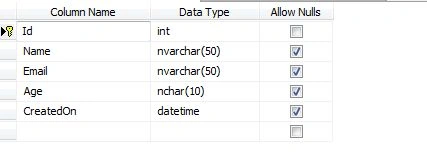
This article explains how to save data into a database using jQuery and JSON in ASP.NET. The query above will create a new table in your database like this:
<%@ Page Language="C#" AutoEventWireup="true" CodeFile="Default.aspx.cs" Inherits="_Default" %>
<!DOCTYPE html PUBLIC "-//W3C//DTD XHTML 1.0 Transitional//EN" "http://www.w3.org/TR/xhtml1/DTD/xhtml1-transitional.dtd">
<html xmlns="http://www.w3.org/1999/xhtml">
<head runat="server">
<title></title>
<script type="text/javascript" src="http://code.jquery.com/jquery-1.10.2.min.js"></script>
<style type="text/css">
<style type="text/css">
body
{
font-family: Verdana;
font-size: 11px;
}
.errMsg
{
width: 200px;
text-align: left;
color: yellow;
font: 12px arial;
background: red;
padding: 5px;
display: none;
}
.tblResult
{
border-collapse: collapse;
}
.tblResult td
{
padding: 5px;
border: 1px solid red;
}
.tblResult th
{
padding: 5px;
border: 1px solid red;
}
img
{
cursor: pointer;
}
</style>
</style>
</head>
<body>
<form id="form1" runat="server">
<div>
<table cellspacing="0" cellpadding="0">
<tr>
<td colspan="2">
<%--//=== Here we will show error and confirmation messages.--%>
<div class="errMsg">
</div>
</td>
</tr>
<tr>
<td>
<b>Name</b>
</td>
<td>
<asp:TextBox runat="server" ID="txtName" />
</td>
</tr>
<tr>
<td>
<b>Email</b>
</td>
<td>
<asp:TextBox runat="server" ID="txtEmail" />
</td>
</tr>
<tr>
<td>
<b>Age</b>
</td>
<td>
<asp:TextBox runat="server" ID="txtAge" />
</td>
</tr>
<tr>
<td colspan="2">
<input type="button" onclick="saveData()" id="btnSave" value="Save" title="Save" />
</td>
</tr>
<tr>
<td colspan="2">
<%--//==== We will show our data in this div--%>
<div id="divData">
</div>
</td>
</tr>
</table>
</div>
<script type="text/javascript">
function clear() {
$("#txtName").val("");
$("#txtEmail").val("");
$("#txtAge").val("");
}
function bindData() {
$.ajax({
type: "POST",
url: "Default.aspx/getData",
data: "{}",
contentType: "application/json; charset=utf-8",
datatype: "jsondata",
async: "true",
success: function (response) {
if ($('#tblResult').length != 0) // remove table if it exists
{ $("#tblResult").remove(); }
var table = "<table class='tblResult' id=tblResult><thead> <tr><th>Name</th><th>Email</th><th>Age</th></thead> <tbody>";
for (var i = 0; i <= response.d.length - 1; i++) {
var row = "<tr>";
row += '<td>' + response.d[i].Name + '</td>';
row += '<td>' + response.d[i].Email + '</td>';
row += '<td>' + response.d[i].Age + '</td>';
row += '</tr>';
table += row;
}
table += '</tbody></table>';
$('#divData').html(table);
$("#divData").slideDown("slow");
},
error: function (response) {
alert(response.status + ' chandan ' + response.statusText);
}
});
}
function saveData() {
var txtName = $("#txtName").val();
var txtEmail = $("#txtEmail").val();
var txtAge = $("#txtAge").val();
$.ajax({
type: "POST",
url: "Default.aspx/saveData",
data: "{name:'" + txtName + "',email:'" + txtEmail + "',age:'" + txtAge + "'}",
contentType: "application/json; charset=utf-8",
datatype: "jsondata",
async: "true",
success: function (response) {
$(".errMsg ul").remove();
var myObject = eval('(' + response.d + ')');
if (myObject > 0) {
bindData();
$(".errMsg").append("<ul><li>Data saved successfully</li></ul>");
}
else {
$(".errMsg").append("<ul><li>Opppps something went wrong.</li></ul>");
}
$(".errMsg").show("slow");
clear();
},
error: function (response) {
alert(response.status + ' ' + response.statusText);
}
});
}
</script>
</form>
</body>
</html>
The Output will be like this:
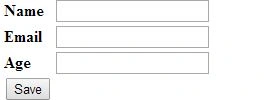
Step 1: Add this code between the head tags of your page.
Let's create our save function in the Default.aspx.cs page. To call your method from jQuery you need to be create a method of type [WebMethod].
Step 2: Add Name space: using System.Web.Services;
Step 3: Save Method:
[WebMethod]
public static int saveData(string name, string email, string age)
{
try
{
int status = 1;
string Query = string.Empty;
SqlConnection cn = new SqlConnection("Data Source=sqlexpress; Initial Catalog=Json;Integrated Security=True");
Query = "INSERT INTO Student (Name,Email,Age,CreatedOn) VALUES ('" + name + "','" + email + "'," + age + ",GETDATE())";
SqlCommand cmd = new SqlCommand(Query, cn);
cn.Open();
cmd.ExecuteNonQuery();
cn.Close();
return status;
}
catch
{
return -1;
}
}
2. bindData() method. This method will create a dynamic HTML table and insert into the page to show the records we have entered.
[WebMethod]
public static Student[] getData()
{
string data = string.Empty;
data = "dhdhdhddh";
StudentCollection sc = new StudentCollection();
try
{
SqlConnection con = new SqlConnection("Data Source=sqlexpress; Initial Catalog=Json;Integrated Security=True");
if (con.State == ConnectionState.Closed)
{
con.Open();
}
SqlDataReader dr;
SqlCommand cmd;
string FetchData = "Select * From Student";
cmd = new SqlCommand(FetchData, con);
dr = cmd.ExecuteReader();
if (dr.Read())
{
while (dr.Read())
{
Student s = new Student();
s.Name = dr[0].ToString();
s.Email = dr[1].ToString();
s.Age = dr[2].ToString();
sc.Add(s);
}
}
return sc.ToArray();
}
catch
{
return sc.ToArray();
}
}
}
public class Student
{
public string Name { get; set; }
public string Email { get; set; }
public string Age { get; set; }
}
public class StudentCollection : List<Student>
{
public void Add(Student st)
{
base.Add(st);
}
}
Output
If you have followed all the steps carefully then you will see the output like this:

Hubert GarciaPosted Jul 8, 2019, 4:21 PM
Thank you very much for sharing your code, you would be kind enough to explain how it can be done by having an html table with several input, how can it be saved in a SQL SERVER database? thank you.
Krishna ReddyPosted Apr 4, 2016, 8:05 AM
Please Explain Why we are using JSON in Asp.net and How to use JSON?
PUNIT RAIPosted May 8, 2015, 1:10 AM
plz priti can u tell me how to update and delete record with jason plz provide me any link or code plz... [email protected]
PUNIT RAIPosted May 8, 2015, 1:10 AM
plz priti can u tell me how to update and delete record with jason plz provide me any link or code plz