

Interface in TypeScript
- interface InterfaceName{
- firstname:string; // variable declaration
- MyFunction(value: number): void; // method declaration;
- }
The following examples tell you, how to use interfaces in TypeScript, do the following steps to create a program using an interface.
Step 1
Open Visual Studio 2012 and click on "File" menu -> "New" -> "Project...". After that, a window is opened; enter the name of your application like "InterfaceExample", then click on the Ok button.
Step 2
After Step 1 your project has been created. The Solution Explorer, which is at the right side of your project, contains the js file, ts file, css file and html file.
Step 3
The code of interface programs:
InterfaceExample.ts
program1 code:
- interface MyInterface {
- firstname: string;
- lastname: string;
- country: string;
- }
- class MyClass {
- fulldata: string;
- constructor(public firstname, public lastname, public country) {
- this.fulldata = firstname + " " + lastname + " " + country;
- }
- }
- function data(mcn: MyInterface) {
- return "Welcome in " + mcn.firstname + " " + mcn.lastname + " " + mcn.country;
- }
- window.onload = () => {
- var name = new MyClass("Mcn", "solution", " at India");
- document.body.innerHTML = data(name);
- }
app.js
- var MyClass = (function() {
- function MyClass(firstname, lastname, country) {
- this.firstname = firstname;
- this.lastname = lastname;
- this.country = country;
- this.fulldata = firstname + " " + lastname + " " + country;
- }
- return MyClass;
- })();
- function data(mcn) {
- return "Welcome in " + mcn.firstname + " " + mcn.lastname + " " + mcn.country;
- }
- window.onload = function() {
- var name = new MyClass("Mcn", "solution", " at India");
- document.body.innerHTML = data(name);
- };
default.html
- <!DOCTYPEhtml>
- <htmllang="en"
- xmlns="http://www.w3.org/1999/xhtml">
- <head>
- <metacharset="utf-8"/>
- <title>TypeScript HTML App</title>
- <linkrel="stylesheet"href="app.css"type="text/css"/>
- <scriptsrc="app.js">
- </script>
- </head>
- <body>
- <h1>TypeScript HTML App</h1>
- <divid="content"/>
- </body>
- </html>
Output:
 InterfaceEx.ts
program2 code:
- interface MyInterface {}
- class Mcn implements MyInterface {}
- class Mcn1 extends Mcn {}
- var John = new Mcn1();
- if (John instanceof Mcn1)
- alert("John is an employee of Mcn Solution");
app.js
- var __extends = this.__extends || function(d, b) {
- function __() {
- this.constructor = d;
- }
- __.prototype = b.prototype;
- d.prototype = new __();
- }
- var Mcn = (function() {
- function Mcn() {}
- return Mcn;
- })();
- var Mcn1 = (function(_super) {
- __extends(Mcn1, _super);
- function Mcn1() {
- _super.apply(this, arguments);
- }
- return Mcn1;
- })(Mcn);
- var McnFinal = (function(_super) {
- __extends(McnFinal, _super);
- function McnFinal() {
- _super.apply(this, arguments);
- }
- return McnFinal;
- })(Mcn1);
- var John = new Mcn1();
- if (John instanceof Mcn1) {
- alert("John is an employee of Mcn Solution");
- }
- if (John instanceof Mcn) {
- alert("John is an employee of Mcn Solution");
- }
default.html
- <!DOCTYPEhtml>
- <htmllang="en"
- xmlns="http://www.w3.org/1999/xhtml">
- <head>
- <metacharset="utf-8"/>
- <title>TypeScript HTML App</title>
- <linkrel="stylesheet"href="app.css"type="text/css"/>
- <scriptsrc="app.js">
- </script>
- </head>
- <body>
- <h1>TypeScript HTML App</h1>
- <divid="content"/>
- </body>
- </html>
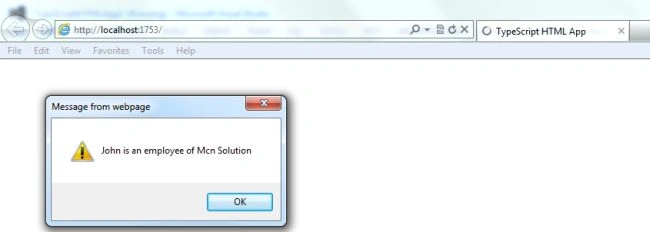
Output:
Join the conversation! Your thoughts help the community grow.