

iPhone Memory Leaks
I have used Instruments and NSZombie for tracking application memory leaks. In this article, I will use Instruments for the tracking. Instruments have the following features.
- Memory allocation (virtual memory and real memory allocation)
- Leaks in memory
- Activity Monitor
- System Trace
- Core animation
- Blank
What are memory leaks and the causes of memory leaks?
A memory leak is when your program loses track of a piece of memory that was allocated. The consequence is that the "leaked" memory will never be freed by the program. This usually happens when a piece of code does a "new" or a "malloc" (or an "alloc" in Objective-C) but never does a corresponding "delete", "free" or "release", respectively.
When you new, malloc, or alloc, what the OS is doing is giving your program a chunk of memory on the heap. It expects you to hold a reference to that memory address (usually in the form of a pointer) and it relies on you to tell the OS when you're done with it (by calling free, delete, or release).
Memory leaks happen when you throw away your pointer to that memory. If your program no longer knows where in the heap your memory is allocated, how can you ever free it?
In simpler language, memory leaks mean you already freed the pointer and now the OS doesn't have a reference of that pointer.
Example
I am creating an example application that leaks memory in two places.
Blank
And there's a LeakedObject class.
Instruments
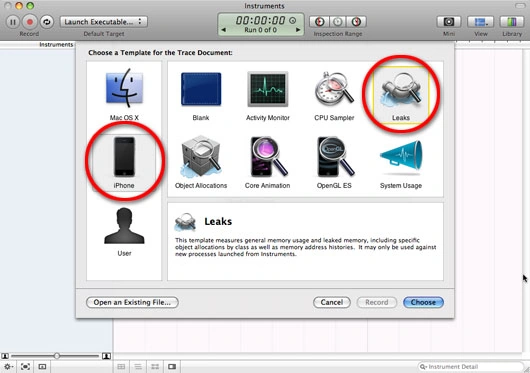
Launch Instruments. Here you will see many tools in Instruments for various tasks. On the left-hand side, choose iPhone. On the right-hand menu, double-click the "Leaks" tool:
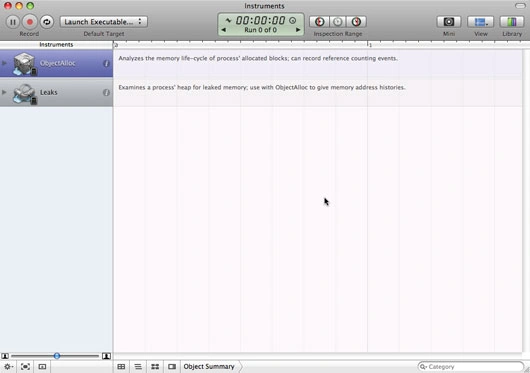
Once you've clicked that, you should see the following screen.
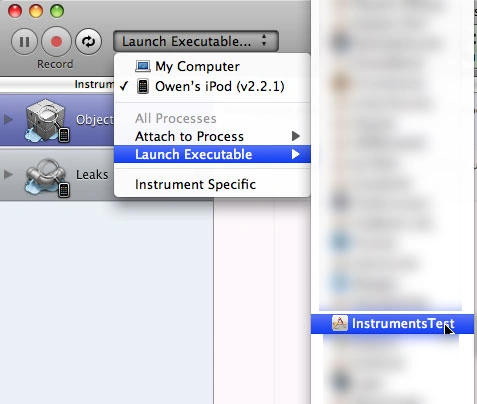
Please connect the device to the system. In the top-left corner of the window, you'll see a drop-down menu that says "Launch Executable". Click on that and ensure that your iPhone (not your computer) is selected as the active device. Then scroll down to "Launch Executable" and you should see a list of all the apps that are installed on your iPhone. Find your app and select it.
After the app/game has run for a few seconds, the auto leak check will run, and lo and behold, it will find 2 memory leaks.
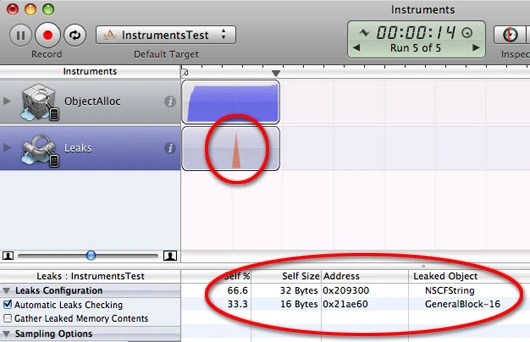
Click on one memory leak. The Detail View will show you a complete stack trace to the point where your leaked memory was allocated. In our example above, clicking on the first leak reveals that a leak occurred inside [NSString initWithUTF8String]. If you look one step higher in the stack trace, you'll see the last call inside my app was to [InstrumentsTestViewController viewDidLoad].
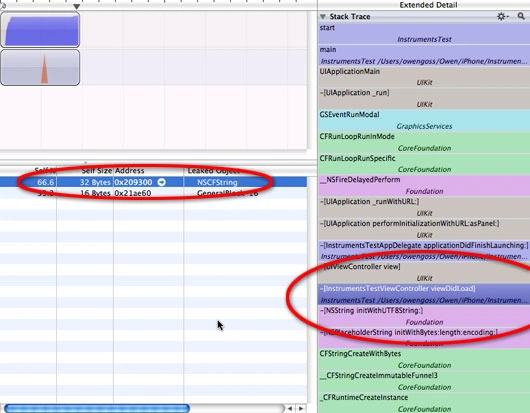
Double-click on that line in the selected Detail View and it opens an XCode window right to the culprit!
Sonu ChaudharyPosted Mar 18, 2016, 3:04 PM
good
Sr KarthigaPosted Feb 19, 2016, 5:46 AM
good one
Sr KarthigaPosted Feb 19, 2016, 5:46 AM
Nice Explanation
Monish BansalPosted Feb 19, 2013, 6:07 AM
Yes we check memory leaks in every app. Initial load time is default and we cant change it. And in some cases app can crash due to high memory use. an example if you check Image album in facebook app and change image frequently then app will crash because it saves images in cache and app will crash. This is the limitation of smart phone devices.
Mahesh ChandPosted Feb 15, 2013, 12:46 PM
Great informative article. Now question is, can you build app smart enough not to crash and know there are memory leaks and close the leaks or that function. As a user, there are two things you do not want. Wait for app to load (initial load, or any screen or any data) and second crash. I am aware that iOS will close your app if it does not respond within certain time (seconds, not sure actual time).
Sachin BhardwajPosted Feb 15, 2013, 7:01 AM
Nice article it is really helpful for beginner in ios technology... Thanks Monish sir!!
Monish BansalPosted Feb 14, 2013, 10:29 PM
In This condition app will not have free memory and it will show memory warning. and sometime app can be crash or app performance will very low.
Sam HobbsPosted Feb 14, 2013, 5:23 PM
There are actually many possible causes of memory leaks. The most common probably is when the programmer simply forgets to do the delete/free. Sometimes it is conditional in the sense that a function might be returned from prior to the end of the function and the memory is not freed whereas it is freed at the end of the function.