

Introduction : This is a simple application for beginners to understand what the role of models, views and controllers are in an ASP.NET MVC application. MVC is often seen in web applications where the view is HTML or XHTML generated by the application. Applications developed using the MVC architecture provide immense flexibility to the programmer in regards to design, development, testing and maintenance as each component can be handled separately. This is a the simple application that is used to define the condition and display person records using properties. MVC stands for models,views,controllers; every fields plays a different role in the integrated application. Their roles are given below :
- Models : In this we define
the business logic of the application.
- Views : It provides the GUI
interface that is used to display the records.
- Controllers : In a MVC application, the controller play the most important role; handling all of the requests,
Step 1: Open Visual Studio 2010.
- Go to file -> New->Projects.
- Create an ASP.NET MVC 2 Empty Web Application.
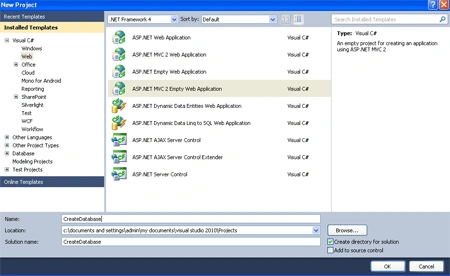
Step 2:
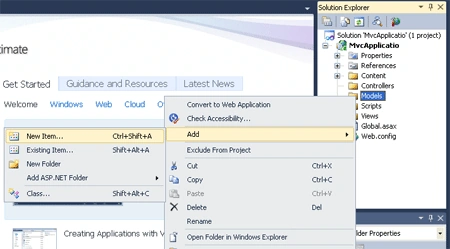
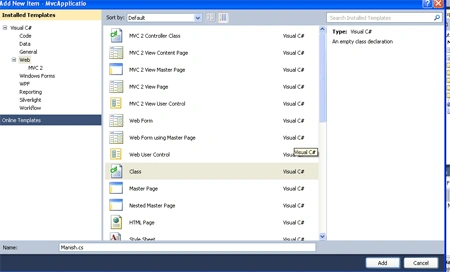
- Right click on the Model folder ->add new
items->add class.
- Name of Class is "Manish".
- In a class define the properties.
Code:
using
System;
using
System.Collections.Generic;
using
System.Linq;
using
System.Web;
namespace
Texboxdisplay.Models
{
public class
Manish
{
private string
fname;
private string
Lname;
private int
eid;
private int
esalary;
private string
eaddress;
public string
Fname
{
set
{
fname = value;
}
get
{
return fname;
}
}
public string
lname
{
set
{
Lname = value;
}
get
{
return Lname;
}
}
public int
id
{
set
{
eid = value;
}
get
{
return eid;
}
}
public string
address
{
set
{
eaddress =
value;
}
get
{
return eaddress;
}
}
public int
salary
{
set
{
esalary = value;
}
get
{
return esalary;
}
}
}
}
Step 3:
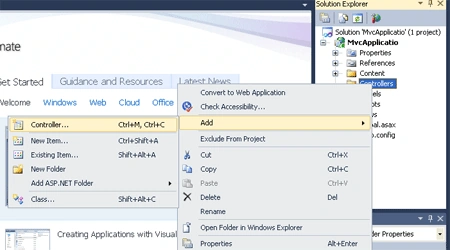
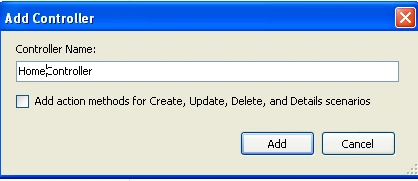
- Right click on the Controllers folder
->add->Controllers.
- Name of Controllers is "HomeController".
- In a controller, define the request.
Code:
using
System;
using
System.Collections.Generic;
using
System.Linq;
using
System.Web;
using
System.Web.Mvc;
using
Texboxdisplay.Models;
namespace
Texboxdisplay.Controllers
{
public class
HomeController :
Controller
{
//
// GET: /Home/
public
ActionResult Index()
{
Manish mn =
new Manish();
mn.Fname = "manish singh";
mn.lname = "sandeep singh";
mn.id = 10001;
mn.salary = 100000;
mn.address = "varanasi";
return View(mn);
}
}
}
Step 4:
-
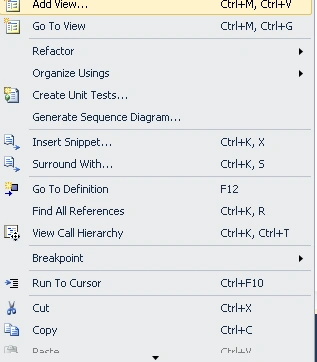
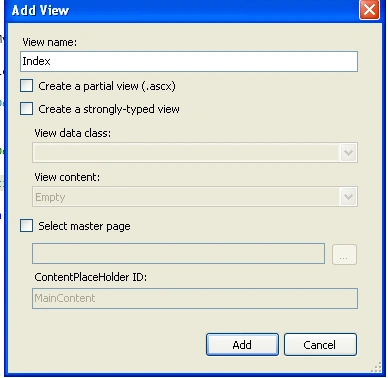
Right click on the Index Method -> Add View.
-
View name same as "Index".
-
Create a Strong type View.
-
When you create the Strong type view automatically take the namespace and class name.
Code:
<%@
Page Language="C#"
Inherits="System.Web.Mvc.ViewPage<Texboxdisplay.Models.Manish>"
%>
<!DOCTYPE
html PUBLIC
"-//W3C//DTD XHTML 1.0 Transitional//EN"
"http://www.w3.org/TR/xhtml1/DTD/xhtml1-transitional.dtd">
<html
xmlns="http://www.w3.org/1999/xhtml"
>
<head
runat="server">
<title>Index</title>
</head>
<body
bgcolor="#cc99ff">
<div
style="background-color:
#00FFFF">
The customer
Fname is <% =
Model.Fname %><br
/>
The customer Lname
is <% =
Model.lname %><br
/>
The customer
Id is <% =
Model.id %><br
/>
The customer Salary
is <% =
Model.salary %><br
/>
The customer Address
is <% =
Model.address %><br
/>
<%
if (Model.salary > 1000){%>
This is a Rich man
<%
} else{ %>
work hard and get a mony
<%}
%>
</div>
</body>
</html>
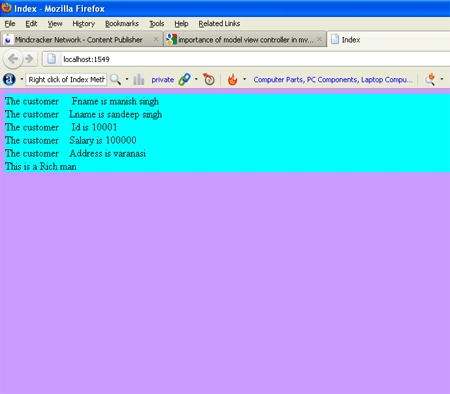
Stap 5: Press crtl+f5 and run the program.
OUTPUT:
Mukesh KumarPosted Oct 25, 2015, 2:56 PM
Nice One