

Introduction
Using ASP.NET MVC tools we have created a simple login form application. In this application we have created three fields: name, password, email. The Microsoft ASP.NET MVC framework is Microsoft's newest framework for building web applications. The ASP.NET MVC framework was designed from the ground up to make it easier to build good software. The ASP.NET MVC framework was created to support pattern-based software development. In other words the framework was designed to make it easier to implement software design principles and patterns when building web applications. MVC model contains all of an application's logic that is not contained in a View or Controller. MVC view contains HTML markup and view logic. MVC controller contains control-flow logic. An MVC controller interacts with MVC Models and Views to control the flow of application execution.
Step 1: Open Visual Studio 2010.
- Go to file -> New->Projects.
- Create an ASP.NET MVC 2 Empty Web Application.
- Name is "loginform"

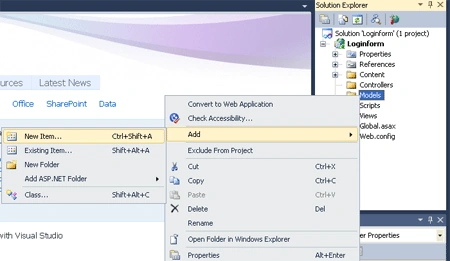
Step 2: Add a class in model folder.
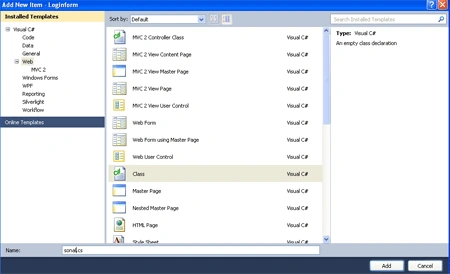
- Right click on the Model folder ->add new items->add class.
- Name of Class is "sonal".
- In a class define the properties.
- using System;
- using System.Collections.Generic;
- using System.Linq;
- using System.Web;
- namespace Loginform.Models
- {
- public class sonal
- {
- public string Name { get; set; }
- public int Passward { get; set; }
- public string Email { get; set; }
- }
- }
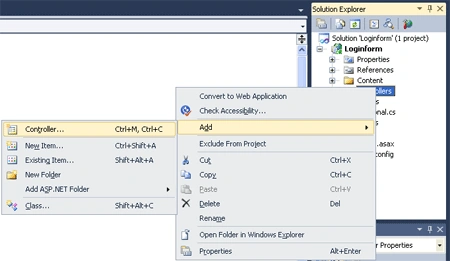
- Right click on the Controllers folder ->add->Controllers.
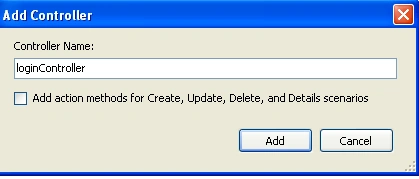
- Name of Controllers is "Login".
- In a controller, define the request.
- using System;
- using System.Collections.Generic;
- using System.Linq;
- using System.Web;
- using System.Web.Mvc;
- using Loginform.Models;
- namespace Loginform.Controllers
- {
- public class loginController : Controller
- {
- //
- // GET: /login/
- static List<sonal> sun = new List<sonal>();
- public ActionResult Index()
- {
- return View(sun);
- }
- public ActionResult Record(sonal sun)
- {
- return View(sun);
- }
- public ActionResult Login()
- {
- return View();
- }
- [AcceptVerbs(HttpVerbs.Post)]
- public ActionResult Login(sonal sonu)
- {
- if (!ModelState.IsValid)
- {
- return View("Login", sonu);
- }
- sun.Add(sonu);
- return RedirectToAction("Index");
- }
- }
- }
- Name of first view is "Index".
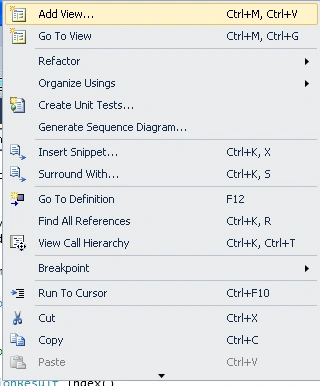
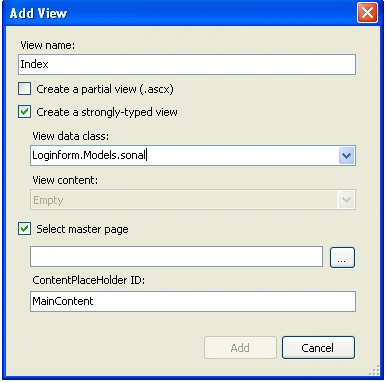

- <%@ Page Language="C#" Inherits="System.Web.Mvc.ViewPage<IEnumerable<Loginform.Models.sonal>>" %>
- <!DOCTYPE html PUBLIC "-//W3C//DTD XHTML 1.0 Transitional//EN" "http://www.w3.org/TR/xhtml1/DTD/xhtml1-transitional.dtd">
- <html xmlns="http://www.w3.org/1999/xhtml" >
- <head runat="server">
- <title>Index</title>
- </head>
- <body bgcolor="#66ffcc">
- <div>
- <table>
- <tr>
- <th></th>
- <th>
- Nmae
- </th>
- <th>
- </th>
- </tr>
- <% foreach (var sonal in Model) { %>
- <tr>
- <td>
- <%= Html.ActionLink("Record", "Record",sonal )%>
- </td>
- <td>
- <%= Html.Encode(sonal.Name) %>
- </td>
- <td>
- <%= Html.Encode(sonal.Email) %>
- </td>
- </tr>
- <% } %>
- </table>
- <p>
- <%= Html.ActionLink("Login Now", "Login") %>
- </p>
- </div>
- </body>
- </html>
- Name of view is "Login view"

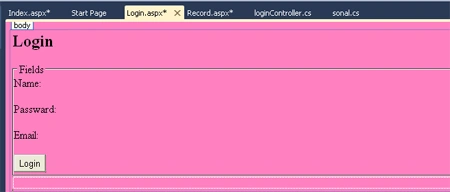
- <%@ Page Language="C#" Inherits="System.Web.Mvc.ViewPage<Loginform.Models.sonal>" %>
- <!DOCTYPE html PUBLIC "-//W3C//DTD XHTML 1.0 Transitional//EN" "http://www.w3.org/TR/xhtml1/DTD/xhtml1-transitional.dtd">
- <html xmlns="http://www.w3.org/1999/xhtml" >
- <head runat="server">
- <title>Login</title>
- </head>
- <body bgcolor="#ff80c0">
- <div>
- <h2 >Login</h2>
- <%= Html.ValidationSummary("Create was unsuccessful. Please correct the errors and try again.") %>
- <% using (Html.BeginForm()) {%>
- <fieldset>
- <legend>Fields</legend>
- <p>
- <label for="Name">Name:</label>
- <%= Html.TextBox("Nmae") %>
- <%= Html.ValidationMessage("Id", "*") %>
- </p>
- <p>
- <label for="Passward">Passward:</label>
- <%=Html.Password("*") %>
- <%= Html.ValidationMessage("Passward", "*") %>
- </p>
- <p>
- <label for="Email">Email:</label>
- <%= Html.TextBox("Email") %>
- <%= Html.ValidationMessage("Email", "*") %>
- </p>
- <p>
- <input type="submit" value="Login" />
- </p>
- </fieldset>
- <% } %>
- <div>
- <%=Html.ActionLink("Back to List", "Index") %>
- </div>
- </div>
- </body>
- </html>
- Name of the view is "recordview"
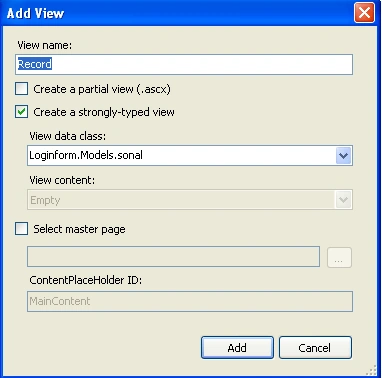

- <%@ Page Language="C#" Inherits="System.Web.Mvc.ViewPage<Loginform.Models.sonal>" %>
- <!DOCTYPE html PUBLIC "-//W3C//DTD XHTML 1.0 Transitional//EN" "http://www.w3.org/TR/xhtml1/DTD/xhtml1-transitional.dtd">
- <html xmlns="http://www.w3.org/1999/xhtml" >
- <head runat="server">
- <title>Record</title>
- </head>
- <body bgcolor="#ff80ff">
- <div>
- <h2>Details</h2>
- <fieldset>
- <legend>Display Fields</legend>
- <p>
- Nmae:
- <%= Html.Encode(Model.Name) %>
- </p>
- <p>
- Passward:
- <%= Html.Encode(Model.Passward) %>
- </p>
- <p>
- Email:
- <%= Html.Encode(Model.Email) %>
- </p>
- </fieldset>
- <p>
- <%=Html.ActionLink("Back to List", "Index") %>
- </p>
- </div>
- </body>
- </html>


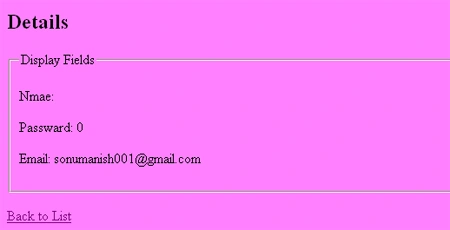
Maulik TankPosted Feb 19, 2020, 1:34 AM
Why you are use [AcceptVerbs(HttpVerbs.Post)] it is use full or not
Ranjana GoelPosted Sep 5, 2017, 6:58 AM
Exception Details: System.InvalidOperationException: The view 'Record' or its master was not found. The following locations were searched:~/Views/Login/Record.aspx~/Views/Login/Record.ascx ~/Views/Shared/Record.aspx ~/Views/Shared/Record.ascx
Manav PandyaPosted Jan 22, 2017, 1:25 PM
Do you have same functionality for asp.net mvc ???
Manav PandyaPosted Jan 22, 2017, 1:24 PM
Thanks for sharing this one
Venkat LakshmananPosted Jan 21, 2016, 11:53 PM
I have error in HTTP 404.The resource cannot be found.
SrinivasPosted Sep 14, 2015, 4:44 AM
Good Article
Ujjval ShuklaPosted Sep 10, 2015, 7:24 AM
Manish,I want download of above article.
Surya VenkatesanPosted Apr 22, 2015, 7:50 AM
i tried this coding.. but output is not displayed and no errors in the program
gayathri rPosted Feb 25, 2015, 1:35 PM
Add those 3 views(Login ,Record, Index) under views by creating a folder Login.
ambrish kumarPosted Feb 21, 2015, 7:43 AM
Hi all add following code in global file this will be ok. add the controller and start page in action. routes.MapRoute( "Default", // Route name "{controller}/{action}/{id}", // URL with parameters new { controller = "Login", action = "Record", id = UrlParameter.Optional } // Parameter defaults );
Bhavik PatelPosted Jul 18, 2014, 2:58 AM
Good article but one suggestion while writing code use proper name of class and method so it helps to understand better way
chetan palPosted Apr 14, 2014, 6:06 AM
I made the Project as you define but can any one tell me how i will run it..
Jiten LadPosted Apr 8, 2014, 7:55 AM
can u give example with database connect in it and showing in grid....
Jiten LadPosted Apr 8, 2014, 7:54 AM
now i understood mvc...
Suma BPosted Jul 30, 2013, 7:55 AM
Hi,I tried all steps given in this article but my solution create an error:" Access is denied".Plz give me solution ASAP
Suman KumarPosted May 15, 2013, 2:45 AM
Nice ...
Asha RajuPosted Oct 30, 2012, 7:26 AM
Hi, I have created the project as show above but i am getting an error "The resource cannot be found.Description: HTTP 404. The resource you are looking for (or one of its dependencies) could have been removed, had its name changed, or is temporarily unavailable. Please review the following URL and make sure that it is spelled correctly. Can you please suggest what i need to do .
RanjanPosted Oct 26, 2012, 4:58 AM
Hi,I tried all steps given in this article but my solution create an error:" The resource cannot be found".Plz give me solution ASAP
Former memberPosted Oct 2, 2012, 2:40 AM
Hi....This is really nice article. http://dotnetpools.com/Article/ArticleDetiail/?articleId=24&title=Ajax%20Login%20Example%20Using%20Jquery%20%20In%20Asp.net
Pooja DoshiPosted Mar 30, 2012, 1:13 AM
Hey..i m getting an error hile creating dis in my application like "The model item passed into the dictionary is of type 'System.Collections.Generic.List`1[Final_MLM.Login]', but this dictionary requires a model item of type 'Final_MLM.Models.Login'."... plz help to solve dis error..
Neeraj RaiPosted Dec 7, 2011, 12:55 PM
This is a good one to understand the MVC