

Step 1 : Open Expression Blend
- Select new project--> WPF application
- Name the application and select the language.
- Add one Listbox, select this Listbox
- Go to property window
- Name this Listbox as "listdetail"
- First button : Name this button as "All Employee info" and this button is to show the list of employees in the listbox.
- Second button : Name this button as "Add Employee Details" and this button is to add the detaiil of employees into the database.
- Third button : Name this button as "submit" and this button is used to submit the employee details to the database.
- Listbox : Name this listbox as "listdetail" and this listbox is used to display the Employee detail.
- Textbox to accept:
- Employee Name
- Experience
- Designation
- Annual Income
- Address
- TextBlock to Display:
- Employee Name
- Experience
- Designation
- Annual Income
- Address
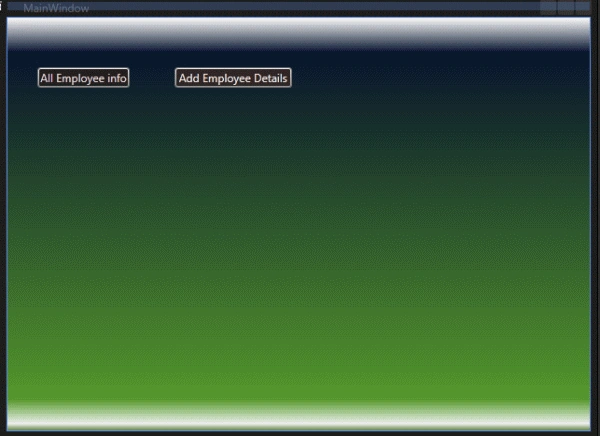
Step 5 : Now select button first.
- Go to property window
- Click on the event button
- On the click event give name to this event as "employeeinfo"
- Press enter.
private void employeeinfo(object sender, System.Windows.RoutedEventArgs e)
{
listdetail.Visibility = System.Windows.Visibility.Visible;
enametb.Visibility = System.Windows.Visibility.Hidden;
enametxt.Visibility = System.Windows.Visibility.Hidden;
extb.Visibility = System.Windows.Visibility.Hidden;
extxt.Visibility = System.Windows.Visibility.Hidden;
desgtb.Visibility = System.Windows.Visibility.Hidden;
desgtxt.Visibility = System.Windows.Visibility.Hidden;
aitb.Visibility = System.Windows.Visibility.Hidden;
aitxt.Visibility = System.Windows.Visibility.Hidden;
addtb.Visibility = System.Windows.Visibility.Hidden;
addtxt.Visibility = System.Windows.Visibility.Hidden;
}
In this code I have set all the control's visibility to "hidden" except listbox.
Step 7 : Now select second button.
-
Go to property window
-
Click on the event button
-
On the click event give name to this event as "add_emp"
-
press enter.
private void add_emp(object sender, System.Windows.RoutedEventArgs e)
{
enametb.Visibility = System.Windows.Visibility.Visible;
enametxt.Visibility = System.Windows.Visibility.Visible;
extb.Visibility = System.Windows.Visibility.Visible;
extxt.Visibility = System.Windows.Visibility.Visible;
desgtb.Visibility = System.Windows.Visibility.Visible;
desgtxt.Visibility = System.Windows.Visibility.Visible;
aitb.Visibility = System.Windows.Visibility.Visible;
aitxt.Visibility = System.Windows.Visibility.Visible;
addtb.Visibility = System.Windows.Visibility.Visible;
addtxt.Visibility = System.Windows.Visibility.Visible;
submit.Visibility = System.Windows.Visibility.Visible;
enametxt.Text ="";
extxt.Text="";
desgtxt.Text= "";
aitxt.Text= "";
addtxt.Text ="";
}
In this code all the textboxes and textblocks are set visible and these texboxes contain no text so that a fresh data is inserted into the record.
Step 9 : Now we have to insert the employee record into the database, for this do the following.
- Go to Project window
- Right click on the Application name
- Select Edit in VIsual Studio.
- Go to solution Explorer
- Right click on the application name
- Add new folder
- Name this folder as "App_Data"
- Now right click on the folder
- Add new item
- Select local database
- Create new database, here I have added database named " emprecord"
- Add new table and set the fields same as that have been asigned in the textblocks
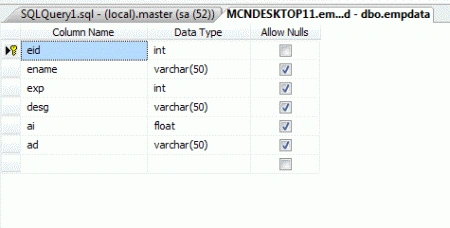
- Name the table as "empdata"
- Here I have set the employee id as primary key
- Check the IsIdentity property to true
- Set identity seed to any value

Step 13 : Now open the server explorer in visual studio. For this:
- Go to View--> Server Explorer
- In this a database file is added. Now right click on this database icon
- Add connection. select the database same as created above. Fill the necessary details of adding new connection.
- After successful establishing the connection a new database file is added
private void sub(object sender, System.Windows.RoutedEventArgs e)
{
SqlCommand cmd = new SqlCommand("insert into empdata values('"+enametxt.Text+"',"+extxt.Text+",'"+desgtxt.Text+"',"+ aitxt.Text+",'"+addtxt.Text +"')", scon);
cmd.Connection.Open();
cmd.ExecuteNonQuery();
cmd.Connection.Close();
submit.Visibility = System.Windows.Visibility.Hidden;
listdetail.Items.Refresh();
}
Step 15 : Open the Expression Blend and this will prompt you to allow the changes to be done in the project as it has been modified externally. Select Yes and open the coding part.
Step 16 : Now we have to write the database into the xml file for this write the following line of code in the "employeeinfo" method.
private void employeeinfo(object sender, System.Windows.RoutedEventArgs e)
{
listdetail.Visibility = System.Windows.Visibility.Visible;
enametb.Visibility = System.Windows.Visibility.Hidden;
enametxt.Visibility = System.Windows.Visibility.Hidden;
extb.Visibility = System.Windows.Visibility.Hidden;
extxt.Visibility = System.Windows.Visibility.Hidden;
desgtb.Visibility = System.Windows.Visibility.Hidden;
desgtxt.Visibility = System.Windows.Visibility.Hidden;
aitb.Visibility = System.Windows.Visibility.Hidden;
aitxt.Visibility = System.Windows.Visibility.Hidden;
addtb.Visibility = System.Windows.Visibility.Hidden;
addtxt.Visibility = System.Windows.Visibility.Hidden;
string queryString = "SELECT * FROM empdata";
SqlDataAdapter adapter = new SqlDataAdapter(queryString, scon);
System.Data.DataSet ds = new System.Data.DataSet();
adapter.Fill(ds);
// Write to XML here
ds.WriteXml(@"\\MCNSERVER2\UserProfiles\mspanwar\My Documents\Expression\Blend 4\Projects\WpfApplication4\WpfApplication4\App_Data\output.xml");
listdetail.Items.Refresh();
}
Step 17 : Now it is clear from the above code that the xml file so created is saved in the App_Data folder with the name "output.xml". Now next job is to bind the listbox items to the xml file. For this select Listbox.
- Go to the property panel
- Select the Data tab
- Select the Datasource --> Create Xml data source
- Now the window opens up asking the xml file path, browse and select the XML file and press OK
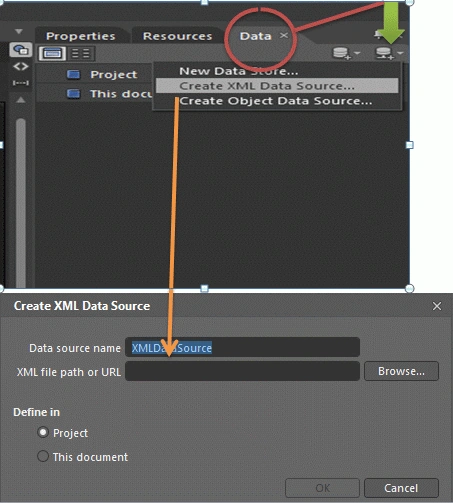
Step 18 : You'll see that the XML file is attached in the Data panel and it shows all the tags/ contents of the XML file.
- Now again select the Listbox
- Go to the property window
- Go to Common Properties--> Itemsource
- In the ItemSource property select the small yellow square button( advanced option button)
- It opens a window, in this window select--> Databinding

Step 19 : Selecting databinding option a window opens up, in this window.
- Select Data field tab
- In the Datafield tab select the XML file on the left side and drop down item of the file appears on the right panel
- Before proceeding select "All properties" instead of "Matching Types only"
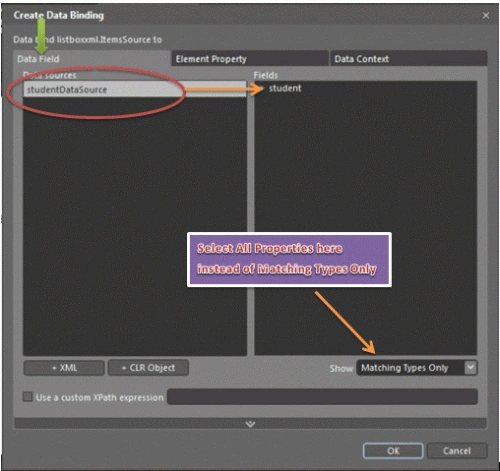
Step 20 : Now the you can drop the XML file contents list and select the property you would like to bind into the Listbox.
- select the name property and press OK and exit
- The listbox shows the list of names present in the XML file
- The names of all the table data is shown on the listbox
using System;
using System.Collections.Generic;
using System.Text;
using System.Windows;
using System.Windows.Controls;
using System.Windows.Data;
using System.Windows.Documents;
using System.Windows.Input;
using System.Windows.Media;
using System.Windows.Media.Imaging;
using System.Windows.Shapes;
using System.Data.SqlClient;
namespace WpfApplication4
{
/// <summary>
/// Interaction logic for MainWindow.xaml
/// </summary>
public partial class MainWindow : Window
{
string[] str = new string[7];
SqlConnection scon = new SqlConnection(@"Data Source=.;Initial Catalog=emprecord;Persist Security Info=True;User ID=sa;Password=wintellect");
public MainWindow()
{
}
private void employeeinfo(object sender, System.Windows.RoutedEventArgs e)
{
listdetail.Visibility = System.Windows.Visibility.Visible;
enametb.Visibility = System.Windows.Visibility.Hidden;
enametxt.Visibility = System.Windows.Visibility.Hidden;
extb.Visibility = System.Windows.Visibility.Hidden;
extxt.Visibility = System.Windows.Visibility.Hidden;
desgtb.Visibility = System.Windows.Visibility.Hidden;
desgtxt.Visibility = System.Windows.Visibility.Hidden;
aitb.Visibility = System.Windows.Visibility.Hidden;
aitxt.Visibility = System.Windows.Visibility.Hidden;
addtb.Visibility = System.Windows.Visibility.Hidden;
addtxt.Visibility = System.Windows.Visibility.Hidden;
string queryString = "SELECT * FROM empdata";
SqlDataAdapter adapter = new SqlDataAdapter(queryString, scon);
System.Data.DataSet ds = new System.Data.DataSet();
adapter.Fill(ds);
// Write to XML here
ds.WriteXml(@"\\MCNSERVER2\UserProfiles\mspanwar\My Documents\Expression\Blend 4\Projects\WpfApplication4\WpfApplication4\App_Data\output.xml");
listdetail.Items.Refresh();
}
private void add_emp(object sender, System.Windows.RoutedEventArgs e)
{
enametb.Visibility = System.Windows.Visibility.Visible;
enametxt.Visibility = System.Windows.Visibility.Visible;
extb.Visibility = System.Windows.Visibility.Visible;
extxt.Visibility = System.Windows.Visibility.Visible;
desgtb.Visibility = System.Windows.Visibility.Visible;
desgtxt.Visibility = System.Windows.Visibility.Visible;
aitb.Visibility = System.Windows.Visibility.Visible;
aitxt.Visibility = System.Windows.Visibility.Visible;
addtb.Visibility = System.Windows.Visibility.Visible;
addtxt.Visibility = System.Windows.Visibility.Visible;
submit.Visibility = System.Windows.Visibility.Visible;
enametxt.Text ="";
extxt.Text="";
desgtxt.Text= "";
aitxt.Text= "";
addtxt.Text ="";
}
private void sub(object sender, System.Windows.RoutedEventArgs e)
{
SqlCommand cmd = new SqlCommand("insert into empdata values('"+enametxt.Text+"',"+extxt.Text+",'"+desgtxt.Text+"',"+ aitxt.Text+",'"+addtxt.Text +"')", scon);
cmd.Connection.Open();
cmd.ExecuteNonQuery();
cmd.Connection.Close();
submit.Visibility = System.Windows.Visibility.Hidden;
listdetail.Items.Refresh();
}
}
}
Step 22 : Xaml coding of the application is as follows.
<Window
xmlns="http://schemas.microsoft.com/winfx/2006/xaml/presentation"
xmlns:x="http://schemas.microsoft.com/winfx/2006/xaml"
x:Class="WpfApplication4.MainWindow"
x:Name="Window"
Title="MainWindow"
Width="640" Height="480">
<Grid x:Name="LayoutRoot" DataContext="{Binding Source={StaticResource outputDataSource}}">
<Grid.ColumnDefinitions>
<ColumnDefinition/>
</Grid.ColumnDefinitions>
<Grid.Background>
<LinearGradientBrush EndPoint="0.5,1" StartPoint="0.5,0">
<GradientStop Color="#FFFBFBFB" Offset="0"/>
<GradientStop Color="#FF608543" Offset="1"/>
<GradientStop Color="#FF2B16C4" Offset="1"/>
<GradientStop Color="#FF06132D" Offset="0.084"/>
<GradientStop Color="#FFEDEFEC" Offset="0.984"/>
<GradientStop Color="#FF549728" Offset="0.924"/>
</LinearGradientBrush>
</Grid.Background>
<ListBox x:Name="listdetail" Margin="21,101,0,41" Background="#FF161313" BorderThickness="5,25,5,45" FontSize="13.333" Foreground="#FFF3EBEB" ItemBindingGroup="{Binding}" ItemContainerStyle="{Binding ElementName=enametxt}" HorizontalAlignment="Left" Width="246.768" ItemsSource="{Binding Source={StaticResource outputDataSource3}, XPath=/NewDataSet/Table/ename}">
<ListBox.BorderBrush>
<LinearGradientBrush EndPoint="0.5,1" StartPoint="0.5,0">
<GradientStop Color="Black" Offset="0"/>
<GradientStop Color="#FFCE0F0F" Offset="1"/>
<GradientStop Color="#FF4DB122" Offset="0.205"/>
<GradientStop Color="#FFDA9218" Offset="0.594"/>
<GradientStop Color="#FF0CC876" Offset="0.924"/>
<GradientStop Color="#FFF73AA2" Offset="0.815"/>
<GradientStop Color="#FFC59619" Offset="0.141"/>
</LinearGradientBrush>
</ListBox.BorderBrush>
</ListBox>
<Button x:Name="empinfo" Content="All Employee info" Height="22" Margin="32,53,0,0" VerticalAlignment="Top" HorizontalAlignment="Left" Width="99" Foreground="#FFE9DFDF" Background="#FF231E1E" Click="employeeinfo"/>
<Button x:Name="addempdetails" Content="Add Employee Details" Height="22" Margin="178.768,53,0,0" VerticalAlignment="Top" HorizontalAlignment="Left" Width="126" Background="#FF2F2525" Foreground="#FFF7EEEE" Click="add_emp"/>
<Button x:Name="submit" Content="Submit" Height="21" Margin="0,0,206.232,65" VerticalAlignment="Bottom" HorizontalAlignment="Right" Width="62" Click="sub" ClickMode="Press" />
<TextBox x:Name="enametxt" Height="27" Margin="0,141,17,0" TextWrapping="Wrap" Text="Employee Name" VerticalAlignment="Top" HorizontalAlignment="Right" Width="167.232"/>
<TextBox x:Name="extxt" Height="27" Margin="0,182,17,0" TextWrapping="Wrap" Text="Experience" VerticalAlignment="Top" HorizontalAlignment="Right" Width="167.232"/>
<TextBox x:Name="desgtxt" Margin="0,0,17,191" TextWrapping="Wrap" Text="Designation" Height="27" VerticalAlignment="Bottom" HorizontalAlignment="Right" Width="167.232"/>
<TextBox x:Name="aitxt" Margin="0,0,17,148" TextWrapping="Wrap" Text="Annual income" Height="27" VerticalAlignment="Bottom" HorizontalAlignment="Right" Width="167.232"/>
<TextBox x:Name="addtxt" Margin="0,0,17,106" TextWrapping="Wrap" Text="Address" Height="27" VerticalAlignment="Bottom" HorizontalAlignment="Right" Width="167.232"/>
<TextBlock x:Name="enametb" Height="23" Margin="287.768,141,239.232,0" TextWrapping="Wrap" Text="Employee Name" VerticalAlignment="Top" Background="#FF4E4444" Foreground="#FFF5B914"/>
<TextBlock x:Name="extb" Height="23" Margin="287.768,182,239.232,0" TextWrapping="Wrap" Text="Experience" VerticalAlignment="Top" Background="#FF4E4444" Foreground="#FFF5B914"/>
<TextBlock x:Name="desgtb" Height="23" Margin="287.768,0,239.232,191" TextWrapping="Wrap" Text="Designation" VerticalAlignment="Bottom" Background="#FF4E4444" Foreground="#FFF5B914"/>
<TextBlock x:Name="aitb" Height="23" Margin="287.768,0,239.232,148" TextWrapping="Wrap" Text="Annual income" VerticalAlignment="Bottom" Background="#FF4E4444" Foreground="#FFF5B914"/>
<TextBlock x:Name="addtb" Height="23" Margin="287.768,0,239.232,106" TextWrapping="Wrap" Text="Address" VerticalAlignment="Bottom" Background="#FF4E4444" Foreground="#FFF5B914"/>
</Grid>
</Window>
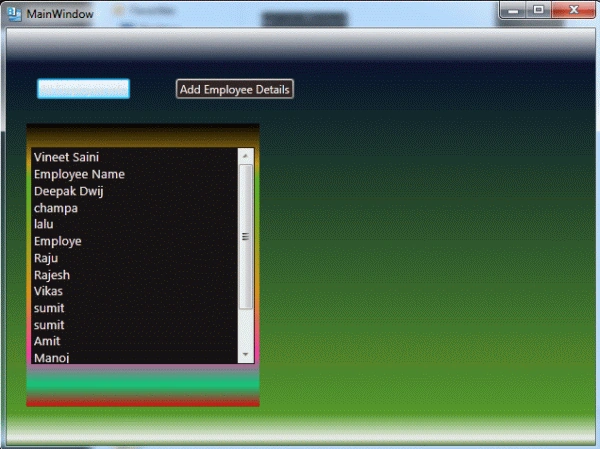
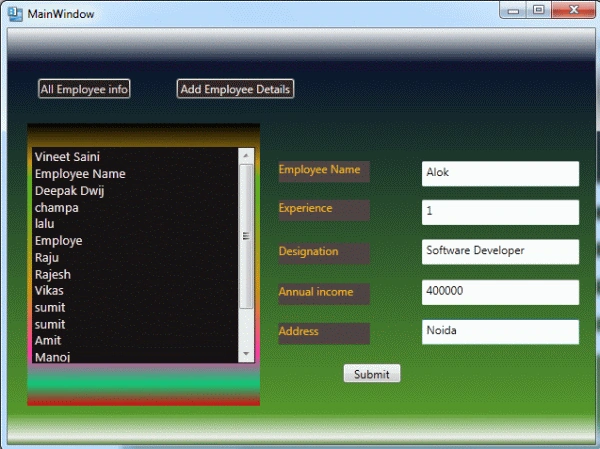
Step 23 : Now press F5 and see the output as below :
Clicking the All Employee info button.
Clicking the Add Employee Details. 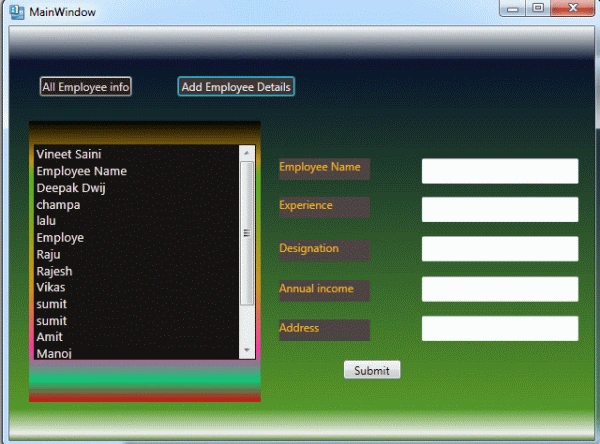
Entering data and pressing the Submit button.
Now again clicking the add employee detail clears the fields.
Hope this article was helpful to you. feel free to post your comment and feedback to improve better.
Join the conversation! Your thoughts help the community grow.