

Definition
A way of notifying a change to a number of dependent classes.
The Observer pattern defines a one to many relationship between objects so that when one changes its state, all the others are notified accordingly.
Encapsulate the core components in a Subject abstraction, and the variable components in an Observer hierarchy.
Design
The Observer pattern is composed of two classes. The Subject/Target is a class whose objects change their state at an independent rate. Observers may indicate that they wish to be informed of these changes and the Subject/Target will send them notifications.
UML Diagram
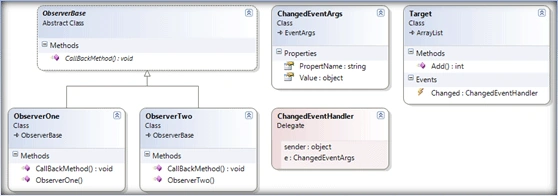
Code
//Notifier
public delegate void ChangedEventHandler(object sender, ChangedEventArgs e);
//Subject
public class Target: ArrayList
{
public event ChangedEventHandler Changed;
public override int Add(object value)
{
if (Changed != null)
{
Changed(this, new ChangedEventArgs() { PropertName = "Add", Value = value });
}
return base.Add(value);
}
}
//Custom Event args
public class ChangedEventArgs : EventArgs
{
public string PropertName { get; set; }
public object Value { get; set; }
}
public class ObserverOne
{
public ObserverOne(Target target)
{
target.Changed += new ChangedEventHandler(A);
}
public void A(object sender, ChangedEventArgs e)
{
Console.WriteLine("Tagret added with " + e.Value.ToString());
}
}
public class ObserverTwo
{
public ObserverTwo(Target target)
{
target.Changed += new ChangedEventHandler(A);
}
public void A(object sender, ChangedEventArgs e)
{
Console.WriteLine("Tagret added with " + e.Value.ToString());
}
}
//Client
static void Main(string[] args)
{
Target target = new Target();
ObserverOne observer1 = new ObserverOne(target);
ObserverTwo observer2 = new ObserverTwo(target);
target.Add("Chinna");
}
Priyaranjan K SPosted Oct 26, 2015, 11:52 AM
Good One
Santhakumar MunuswamyPosted Oct 18, 2015, 2:39 AM
Good one
Mukesh KumarPosted Oct 16, 2015, 3:30 AM
Good One, Thanks for sharing
Humayun Kabir MamunPosted Oct 16, 2015, 1:59 AM
Nice...
Harshad PansuriyaPosted Oct 16, 2015, 1:02 AM
Nice one
Nilesh JadavPosted Oct 16, 2015, 1:00 AM
Nice work !
RakeshPosted Oct 16, 2015, 12:53 AM
Good share
Ankit BansalPosted Oct 16, 2015, 12:29 AM
thanks for sharing..