

Many factors can affect throughput of the workflows in SharePoint. Some of these factors are :
- Number of users: Will affect the frequency of triggering of workflow and hence the total number of workflow instances. This factor will affect the consumption of resources.
- Complexity of workflow: The type of user operations configured in the workflow will affect how the workflow runs. More complex workflows that perform many operations against the content database or register for more events will run slower and consume more resources than other workflows.
- Workflow hibernation stages: The number of stages that the workflow goes into hibernation waiting for some event to trigger or action to be taken. These types of workflows will run slower.
- SSL certificate requirements : If SSL Certificates are used for connections, then those needs to be valid. If the certificate validity expires, you will deal a lot of time in determining where the problem is due to the cryptic error messages received from SharePoint.
As shown below, you can view the analytic and debug logs for the workflow manager in the event viewer. This log helps in diagnosing if there is any errors and performance issues in your workflow during execution.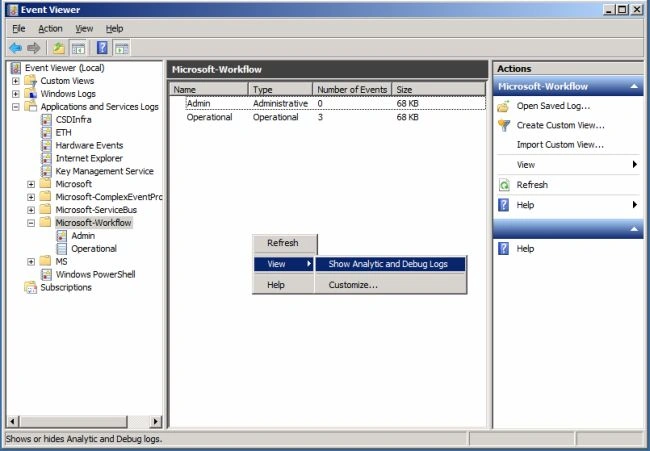
Figure : Event Viewer, Workflow Logs
If you have access to the SharePoint 2013 database then there is another place where you can directly query for errors that have occurred during workflow execution: the table "DebugTraces" in Workflow Instance Management Database as shown below. 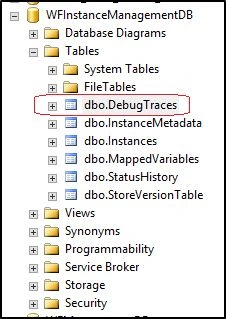
Figure : Workflow DebugTraces Table
Task history List and Workflow History List
The most common mistake made by developers is to use the Task History List and Workflow History List as an audit log. These are SharePoint lists that have their own recommendations for scaling. The number of items in the folder or root of a list should be less than 2000. When you exceed this number, as shown in following figure, performance begins to suffer.

Figure : Task history List and Workflow History List usage
Some Key Points to Consider
- For workflows you should consider creating new task and history lists for every workflow association. This helps but does not totally eliminate the problem if a workflow writes to the history list often or creates an excessive number of tasks.
- List sizes should be monitored and trimming should be done on lists where appropriate. Some of this trimming is taken care of by the AutoCleanUp job for the task list that deletes tasks and workflow instances that have been marked complete longer than the expiration specified in the workflow association but it is not complete and may not be sufficient.
- Do not consider the Workflow History list to be an audit log.
- By default, the tasks and history lists are indexed to help with scaling. As these lists grow, performance is affected. To reduce the rate of the performance decrease it is recommended to keep separate history and task lists for different workflow associations. Periodically you should change these lists in the workflow association settings as lists become large.
Join the conversation! Your thoughts help the community grow.