

Introduction
In this article we are going to see how we can add a User Control dynamically to a web page with the help of ASP.Net and C#.
Step 1: Go to File -> New ->Project

Step 2: Type the required name of the user control and click the Add button.
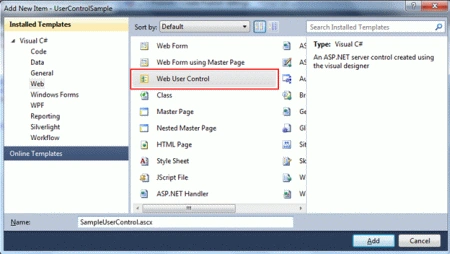
Step 3: You will get the markup for SampleUserControl.ascx as shown below:
Code
<%@ Control Language="C#"
AutoEventWireup="true"
CodeBehind="SampleUserControl.ascx.cs" Inherits="UserControlSample.SampleUserControl" %>
Step 4: You will get the code behind as follows:
Code
namespace UserControlSample
{
public partial class SampleUserControl : System.Web.UI.UserControl
{
protected void Page_Load(object sender, EventArgs e)
{
}
}
}
Step 5: Now add you controls into the User controls. Controls like TextBox and Label show a simple example. Note Controls can be placed just below the Control directive.
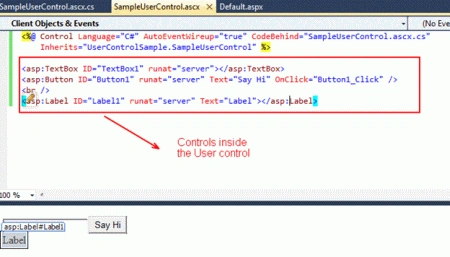
Step 6: Code Behind for dynamically loading a User Control:
using System;
namespace UserControlSample
{
public partial class _Default : System.Web.UI.Page
{
protected void Page_Load(object sender, EventArgs e)
{
}
protected void Button1_Click(object sender, EventArgs e)
{
//Populate the form.
SampleUserControl c1 =
(SampleUserControl)LoadControl("SampleUserControl.ascx");
c1.UserName = "Glenn";
//Adding user control inside the form element.
form1.Controls.Add(c1);
SampleUserControl c2 =
(SampleUserControl)LoadControl("SampleUserControl.ascx"); form1.Controls.Add(c2);
}
}
}
Step 7: Before clicking the Button shows below.
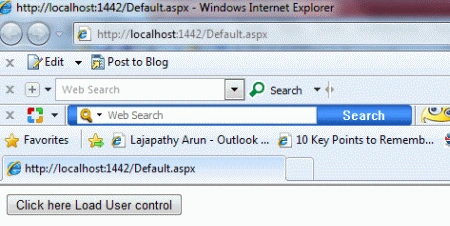
Step 8: After clicking the Button in default.aspx page, it dynamically adds the User Control twice as per the code written. Displays with Username in one control, to see the difference.
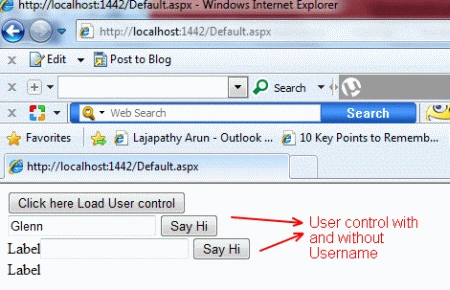
This helps to add the user control dynamically so we change the user control based on the user input.
Satyabrata MahapatraPosted Oct 11, 2022, 2:42 PM
This example does not work.
Muhammad Aqib ShehzadPosted Jan 27, 2016, 7:29 AM
good one
Damodar KarmacharyaPosted Mar 4, 2013, 6:08 PM
Hi, Thanks for the nice article. How do we handle post back from the user control? In the example how Say Hi button is not firing click event. Do you have example for that? Best Regards, Damodar
Lajapathy ArunPosted Apr 9, 2012, 12:46 AM
Have a nice day :)
Jimmy UnderwoodPosted Apr 8, 2012, 11:52 PM
Really, Thanks for this article keep it up...