

Introduction
This article shows how to access User Control data from the web page. In other words, how to pass data from a User Control page to the Default.aspx page.
Advantage of using User Control:
- The easiest way to combine several controls into a single control.
- Can simply be dragged onto a Web page without writing much code.
- Helps to reduce duplicate coding.
- Web pages can even be converted to user controls.
- User controls inherit from the UserControl class, which inherits from the Template-Control class, which inherits from the Control class.
Step 1: Go to File -> New ->Project

Step 2: Type the required name for a user control and click Add button.
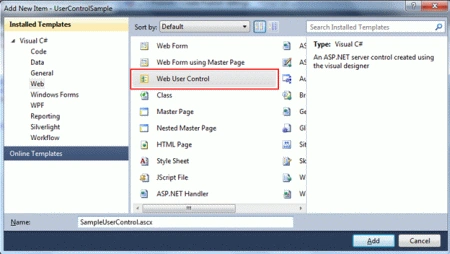
Step 3: You will get the markup for SampleUserControl.ascx shown below.
<%@ Control Language="C#"
AutoEventWireup="true"
CodeBehind="SampleUserControl.ascx.cs" Inherits="UserControlSample.SampleUserControl" %>
Step 4: You will get the code behind as follows:
namespace UserControlSample
{
public partial class SampleUserControl : System.Web.UI.UserControl
{
protected void Page_Load(object sender, EventArgs e)
{
}
}
}
Step 5: Now add you controls into the User controls. Controls like TextBox and Label show a simple example. Note Controls can be placed just below the Control directive.
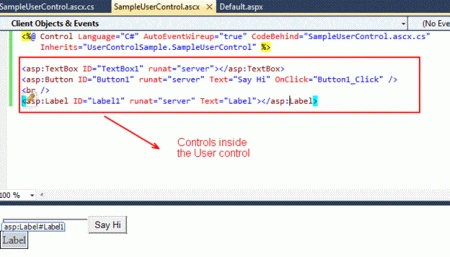
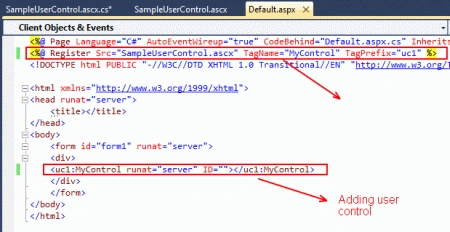
Step 6: Register the User control in the web page. Use just next to page Directive.
<%@ Register
Src="SampleUserControl.ascx"
TagName="MyControl"
TagPrefix="uc1" %>
Src -> User Control page name with extension.
TagName-> Tag name can be any name, this is user defined.
TagPrefix-> Can be any prefix, this is user defined.
Step 7: Register and add the user control to a web page and run the default.aspx page.
Step 8: Code Behind for the User Control: Use the UserCapition and UserName property to access the values from the User Control page for the Default.aspx page.
using System;
using System.Collections.Generic;
using System.Web;
using System.Web.UI;
using System.Web.UI.WebControls;
namespace UserControlSample
{
public partial class SampleUserControl : System.Web.UI.UserControl
{
protected void Page_Load(object sender, EventArgs e)
{
}
protected void Button1_Click(object sender, EventArgs e)
{
Label1.Text = "Hi" + TextBox1.Text;
}
public string UserCaption
{
get { return Label1.Text; }
set { Label1.Text = value; }
}
public string UserName
{
get { return TextBox1.Text; }
set { TextBox1.Text = value; }
}
}
}
Step 9: The Code Behind for Default.aspx to access data from the User Control.
using System;
using System.Collections.Generic;
using System.Web;
using System.Web.UI;
using System.Web.UI.WebControls;
namespace UserControlSample
{
public partial class _Default : System.Web.UI.Page
{
protected void Page_Load(object sender, EventArgs e)
{
MyControl1.UserCaption = "Enter User Name:";
}
protected void Button2_Click1(object sender, EventArgs e)
{
Label1.Text = MyControl1.UserCaption + MyControl1.UserName;
}
}
}
Step 10: The user interface of the User Control:
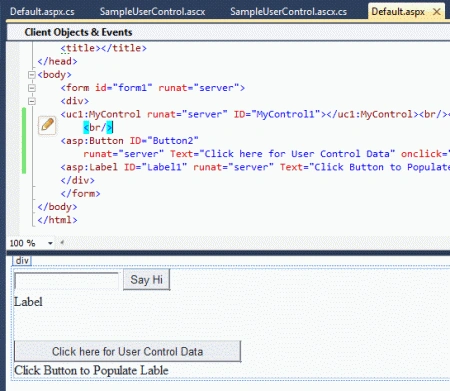
This helps to access data from a User control for a web page by its properties and helps to get data back to a web page from a User Control page.
freddy andersenPosted Dec 16, 2012, 7:33 AM
Thanks for a great article - 1. you show us to dynamic load a usercontrol into a ASP.net page 2. you show us to accessing data from a usercontrol Now PLEASE show us how do you Accessing Data From a dynamic loaded User Control in ASP.NET have a nice day and thanks in advance
Lajapathy ArunPosted Apr 9, 2012, 12:46 AM
Have a nice day:)
Arjun PanwarPosted Apr 8, 2012, 11:46 PM
Thanks, Lajapathy for sharing this article...